RD Timora Watch Face
RD Watch Face- 3 歳以上対象年齢
- カスタマイズカテゴリ
- 2026/8/8更新日
- ¥230価格
rd_timora.watchfaceのGoogle Play公式ページにリンクしています。最終確認:2026/11/19。
このアプリについて
Googleによる英語 (アメリカ合衆国)からの自動翻訳です。
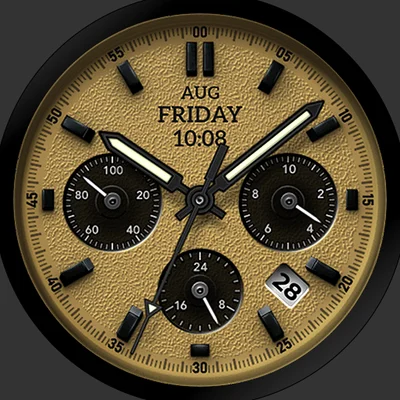
RD Timoraウォッチフェイスは、Wear OSデバイス向けにプレミアムなクロノグラフデザインを提供します。
RD Timoraウォッチフェイスは、Wear OSデバイス向けに、モダンなデザインと精緻なディテールを備えたプレミアムなクロノグラフデザインを提供します。日付と曜日表示、多機能サブダイヤル、そして見やすい時刻表示を備えたこのウォッチフェイスは、アクティブなライフスタイルにもビジネスシーンにも最適です。
互換性とインストール:
このアプリは、Wear OS 5(API 34以降)の新しいウォッチフェイスフォーマットに最適化されています。対応デバイスは以下のとおりです。
- Samsung Galaxy Watch 8、Ultra、7、6、5、4(Wear OS 5へのアップデートが必要です)
- Google Pixel Watchシリーズ
- その他のWear OS 5以降対応スマートウォッチ
(注:Wear OS 5以降を搭載したデバイスのみサポート対象です!)
インストール方法:
1. ウォッチをスマートフォンに接続してください。
2. スマートフォンのコンパニオンアプリを使用してウォッチフェイスをインストール/アップデートし、ウォッチで確認後、「インストール」または「アップデート」を選択してください。
カスタマイズオプション:
- インデックススタイル 3種類
- 背景テクスチャスタイル 3種類
- 針スタイル 3種類
- 秒針スタイル 3種類
- スモールクロノグラフ針 3種類
- クロノグラフ針スタイル 2種類
- AOD(常時表示ディスプレイ)輝度レベル 4段階
- カラーテーマ 10種類
- AODグローモード 1種類
機能:
- デジタル24時間表示
- 日付と曜日
- バッテリー残量表示(針クロノグラフスタイル)[左]
- 歩数計(針クロノグラフスタイル)[右]
- 24時間表示/午前/午後表示(針クロノグラフスタイル)[下]
- コンプリケーションスロットオプション
カラー調整とカスタマイズ:
1. 時計のディスプレイを長押しします。
2. ボタンを押して調整します。
3. 左右にスワイプして、カスタマイズ可能な項目を切り替えます。
4. 上下にスワイプして、項目のオプション/カラーを変更します。
サポートやご要望については、dekove.dev@gmail.comまでメールでお問い合わせください。
原文を表示
RD Timora Watch Face delivers a premium chronograph design with a modern look and precise detailing for Wear OS devices. Featuring day & date display, multi-function sub-dials, and clear time indicators, this watch face is perfect for both active and professional lifestyles.
Compatibility & Installation:
This app is optimized for the new Watch Face Format regarding Wear OS 5 (API 34+). Compatible devices include:
- Samsung Galaxy Watch 8, Ultra, 7, 6 , 5, 4 (Wear OS 5 update required)
- Google Pixel Watch Series
- Other Wear OS 5+ smartwatches
(Note: Only devices running Wear OS 5 or higher are supported!)
installation :
1. Keep your watch connected to your phone.
2. Instal/update watch face with companion app on your phone, and check on your watch then choose instal or update.
Customization available:
- 3 x Index Styles
- 3 x Background Texture Styles
- 3 x Hand Styles
- 3 x Second Hand Styles
- 3 x Small hand Chronos
- 2 x Chronos Styles
- 4 x AOD levels
- 10 x Color themes
- 1 x AOD glow mode
Features:
- Digital 24 H
- Day & Date
- Battery life indicator with hand chronograph style [ Left ]
- Steps Count indicator with hand chronograph style [ Right ]
- 24 H / AM/PM indicator with hand chronograph style [ Bottom ]
- Complication Slot options
Color adjustments and customization :
1. press and hold finger on the watch display.
2. press the button to adjust.
3. Swipe left or right to switch between the different customizable items.
4. Swipe up or down to change the options/color of the items.
For support and request, you can email me at dekove.dev@gmail.com
データ セーフティ
このアプリが収集・共有するデータについて、RD Watch FaceがGoogle Playで申告している内容です。
- 第三者と共有されるデータはありません詳しくは、デベロッパーが共有を申告する方法についての説明をご覧ください
- データは収集されません詳しくは、デベロッパーが収集を申告する方法についての説明をご覧ください
開発元の連絡先
- メールdekove.dev@gmail.com
- プライバシーポリシーtermsfeed.com
- 住所JL LETNAN BOYAK 005/012 LANGGINI BANGKINANG KOTA KAMPAR Riau Indonesia
情報
- 提供元
- RD Watch Face
- カテゴリ
- カスタマイズ
- 更新日
- 2026/8/8
- リリース
- 2026/5/21
- 対象年齢
- 3 歳以上
- 価格
- ¥230
- パッケージ名
- rd_timora.watchface