Roboxic HD Watch Face
DeNitE Appz広告を含む · アプリ内課金
- 3 歳以上対象年齢
- カスタマイズカテゴリ
- 2023/11/21更新日
- 無料価格
com.denite.watchface.roboxicのGoogle Play公式ページにリンクしています。最終確認:2026/11/20。
このアプリについて
Googleによる英語 (アメリカ合衆国)からの自動翻訳です。
フェイスウィジェットとライブ壁紙を見る-バッテリー、日付、天気、歩数、ハート
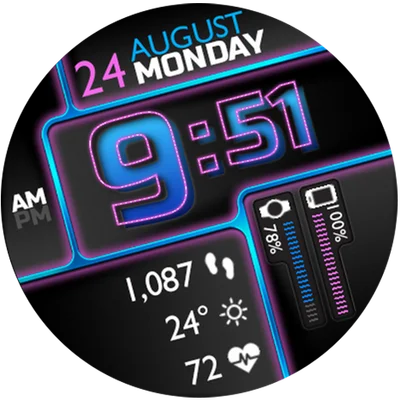
この完全にカスタマイズ可能なインタラクティブな HD Wear OS ウォッチフェイス、時計ウィジェット、ライブ壁紙は、手首とランチャーにクラシックな優雅さをもたらします。機能には、カスタム合併症、バッテリーレベル、気象条件、歩数カウンター、心拍数、カラーピッカー、日付情報が含まれます。設定アプリもモバイル デバイスにインストールされ、希望する外観に合わせて文字盤を構成できます。任意の色を選択して、自分だけの完全にカスタムな外観を作成してください。 Wear OS ウォッチをお持ちでない場合は、問題ない!ランチャーで時計ウィジェットやライブ壁紙を使用できます。
⭐ 新しい Samsung Galaxy Watch 4 & 5 シリーズを含むすべての Wear OS ウォッチと互換性があります。 ⭐
❗ 重要 ❗ - Tizen を使用する Samsung ウォッチや、Wear OS 以外のオペレーティング システムを搭載した他のスマートウォッチとは互換性がありません。
★基本機能★
✔ ランチャー時計ウィジェット (バッテリー消費のため秒針なし) (モバイルのみ)
✔ ライブ壁紙 (モバイルのみ)
✔ カスタマイズ可能なデジタル時計
✔ タイムゾーンの選択
✔ 24時間対応
✔ 焼き付き保護
✔ スクエア互換
★プレミアム機能★
✔ カスタムコンプリケーション (Wear OS)
✔ ウィジェットフレーム
✔ ライブ壁紙 (秒)
✔ 画面モード (通常、常時周囲、常時オン)
✔ インタラクティブアクション (Samsung Watch 4/5 では現在利用できません)
✔ ピークカードサイズセレクター
✔ アンビエントモードセレクター
✔ カラーピッカーで背景やテキストに好きな色を選択できます
✔ パーソナルカラーテーマを保存 (長押ししてテーマを削除)
✔ バッテリーステータスを監視
✔ 携帯電話のバッテリーステータス (Android 携帯電話に接続されている場合)
✔ 現在の日付
✔ ステップカウンター
✔ * 気象状況 (Android スマートフォン接続時)
✔ 心拍数(履歴グラフ)
★翻訳★
✔ 英語
✔ 中国語
✔ チェコ語
✔ オランダ語
✔ フランス語
✔ ドイツ語
✔ イタリア語
✔ 日本語
✔ 韓国語
✔ ロシア語
✔ スペイン語
★インストール方法★
ウォッチフェイス - Play ストアからインストールすると、スマートフォン上のアプリに権限を付与するよう求められる場合があります。必ずすべての権限を承認してください。アプリがスマートフォンにインストールされると、時計とWear OS アプリに転送されるまでに 5 ~ 10 分かかる場合があります。しばらくお待ちください。インストールしたら、ウォッチフェイスを長押しして選択メニューを表示するか、Wear OS アプリからこのウォッチフェイスを選択します。付属の設定アプリを使用して設定とオプションを構成します
ウィジェット - 使用しているランチャーに応じて、ランチャーを長押ししてウィジェットを配置するか、アプリドロワー -> ウィジェットリストからこのウィジェットを選択できます。付属のアプリを使用してウィジェット設定をカスタマイズおよび変更します。
ライブ壁紙 - 使用しているランチャーに応じて、ランチャーを長押しして壁紙を選択するか、設定アプリからライブ壁紙を選択できます。
何か問題がございましたら、否定的なレビューを残す前にメールでご連絡ください。できるだけ早く問題を解決できるよう最善を尽くします。< /b>
★トラブルシューティング★
http://deniteappz.com/watchface/troubleshooting.html
さらなるウォッチフェイスの登場にご期待ください!
* 正確な天気情報を更新するために、ユーザーの位置情報にバックグラウンドでアクセスすることができます。
原文を表示
This completely customizable interactive HD Wear OS Watch Face, Clock Widget & Live Wallpaper brings a classic elegance to your wrist and Launcher. Features include custom complications, battery levels, weather conditions, step counter, heart rate, color picker & date information. A settings app will also be installed on your mobile device to configure the watch face for any look you desire. Select any color and create a completely custom look for yourself! Don't have a Wear OS watch? No Problem! You can use the clock widget or Live Wallpaper on your launcher!
⭐ Compatible with all Wear OS watches including the new Samsung Galaxy Watch 4 & 5 Series! ⭐
❗ IMPORTANT ❗ - Not compatible with Samsung Watches that use Tizen or other smartwatches with other operating systems than Wear OS.
★Basic Features★
✔ Launcher Clock Widget (No second hand due to battery consumption) (Mobile only)
✔ Live Wallpaper (Mobile only)
✔ Customizable digital clock
✔ Time zone selection
✔ 24-Hour
✔ Burn-In protection
✔ Square Compatible
★Premium Features★
✔ Custom Complications (Wear OS)
✔ Widget Frames
✔ Live Wallpaper (Seconds)
✔ Screen Modes (Normal, Always Ambient, Always On)
✔ Interactive Actions (Currently unavailable on Samsung Watch 4/5)
✔ Peek card size selector
✔ Ambient modes selector
✔ Color picker to select any color you like for the background, text
✔ Save personal color themes (long press to delete theme)
✔ Watch battery status
✔ Phone battery status (When connected to an Android Phone)
✔ Current date
✔ Step Counter
✔ * Weather conditions (When connected to an Android Phone)
✔ Heart Rate (History Graph)
★Translations★
✔ English
✔ Chinese
✔ Czech
✔ Dutch
✔ French
✔ German
✔ Italian
✔ Japanese
✔ Korean
✔ Russian
✔ Spanish
★How to install★
Watch Face - Once you have installed from the Play store, you may be asked to grant permissions to the app on your phone - be sure to approve all permissions. Once the app has installed on your phone, it may take 5-10 minutes to transfer over to you watch and the Wear OS app. Please be patient. Once installed, simply long press on your watch face to bring up the selection menu, or select this watch face from the Wear OS app. Use the accompanying settings app to configure the settings and options
Widget - Depending on what launcher you are using, you can either long press on your launcher to place a widget, or select this widget from the App Drawer -> Widgets list. Customize and change the widget settings with the accompanying App.
Live Wallpaper - Depending on what launcher you are using, you can either long press on your launcher to select your Wallpaper, or you can select the Live Wallpaper from the Settings App
If you have any problems at all, please send me an email before leaving a negative review - I will do my best to fix the issue as soon as possible.
★Trouble Shooting★
http://deniteappz.com/watchface/troubleshooting.html
Stay tuned for more watch faces to come!
* User Location may be accessed in the background for accurate weather updates.
データ セーフティ
このアプリが収集・共有するデータについて、DeNitE AppzがGoogle Playで申告している内容です。
- 第三者と共有されるデータはありません詳しくは、デベロッパーが共有を申告する方法についての説明をご覧ください
- このアプリは以下の種類のデータを収集することがあります位置情報、個人情報、アプリの情報、パフォーマンス
- データは暗号化されません
- データを削除するようリクエストできます
新機能
バージョン 6.2.2 · 2023/11/21
★6.2.2★
✔ Bug fixes...
開発元の連絡先
- ウェブサイトdeniteappz.com
- メールdeniteappz@gmail.com
- プライバシーポリシーdeniteappz.com
- 住所21 Carlton St. #1303 Toronto, ON M5B 1L3 Canada
情報
- 提供元
- DeNitE Appz
- カテゴリ
- カスタマイズ
- バージョン
- 6.2.2
- 更新日
- 2023/11/21
- リリース
- 2020/8/24
- 必要条件
- Android 6.0以降
- 対象年齢
- 3 歳以上
- 価格
- 無料
- アプリ内課金
- ¥100~¥1,620/アイテム
- パッケージ名
- com.denite.watchface.roboxic