SMZ Knights Pro E2
SMZ™- 3 歳以上対象年齢
- カスタマイズカテゴリ
- 2025/11/1更新日
- ¥170価格
com.smzjdh.knightspro_e2のGoogle Play公式ページにリンクしています。最終確認:2026/11/13。
このアプリについて
Googleによる英語 (アメリカ合衆国)からの自動翻訳です。
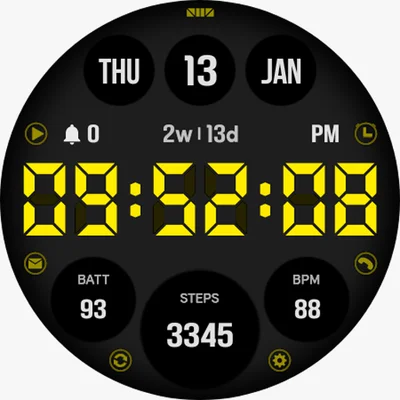
WearOS用のデジタルウォッチフェイス
!!!!!写真のように時計を飾るためにビデオを見てください!!!!!
!!!使用法についてはビデオをご覧ください!!!
これは、あなたの健康、さまざまなウォッチフェイスのテーマと色に役立つ情報を提供するデジタルウォッチフェイスです。
時計の好みや服の色、ストラップに合わせて、さまざまなテーマや色をカスタマイズできます。
[知らせ]
このアプリには、このウォッチフェイスをサポートするためのシンプルなコンパニオンアプリケーションがあります。携帯電話から削除しても、時計にインストールされているウォッチフェイスには影響しません。 [インストール]チェックボックスでこのアプリのチェックを外すことができます。ただし、時計が選択されていることを確認してください。
[時計にインストール]
時計へのアプリのインストールには時間がかかる場合があります。または、「すぐにデバイスにインストールします」というメッセージが表示され、インストールがスタンバイ状態のままになる場合があります。
この問題はアプリとは関係がなく、デベロッパーはGoogleストアのダウンロードを管理できません。
この問題を解決するためのいくつかの提案があります。
以下のURLの記事を確認してください。
*ウォッチフェイスを時計にインストールする方法-https://cafe.naver.com/smzwatch/28
【24時間形式の使い方】
時間形式を変更したい場合は、時計に接続されている携帯電話の以下のパスで設定できます。
*接続されている電話-設定-一般管理-日時-24時間形式を使用します。
チェックされている場合、時計も24時間形式になり、チェックされていない場合、時計は12時間形式になります。
[心拍数測定のメニュー]
実際のデバイスを装着して、心拍数測定ボタンをタップする必要があります。
すると心拍数測定アイコンが表示され、しばらく待つと測定された心拍数が更新されて表示されます。
実際の時計デバイスを装着していないと、心拍数の測定は機能しないことを覚えておいてください。
-心拍数を測定する操作シーケンス。
1.実際の時計デバイスを着用します。
2.心拍数ゾーンを1回タップし、測定が完了するのを待ちます。
*心拍数のショートカットは心拍数の測定アプリを開きません。
※時計デバイスが接続されている携帯電話と他のデータを同期している場合、測定がしばらく遅れる場合があります。
3.次に、心拍数測定アイコンが表示され、測定が行われます。
4.測定が完了すると、結果値が更新され、ウォッチフェイスに表示されます。
※1時間に1回自動計測します。
[許可]
このウォッチフェイスがヘルス情報をプローブで表示するには、すべてのセンスアクセス許可を許可する必要があります。
(ウォッチ-設定-アプリ-権限-このウォッチフェイス-すべての権限を許可する)
[カスタマイズ]
ウォッチフェイスをカスタマイズするには、画面を長押しして[Coustomize]ボタンをタッチします。
*これらの選択はcoustomizeフィールドで編集してください。
[修正されたショートカット]
このショートカットは、領域をタップするだけですぐに使用できます。
※これらのパーは登録写真の最後の写真を参考にしてください。
[編集可能なショートカット]
その領域をタップしてショートカットとして使用するアプリを選択するか、[カスタマイズ]フィールドでアプリを選択できます。
次に、ワンタップでショートカットを使用できます。
※これらのパーは登録写真の最後の写真を参考にしてください。
【SMZインスタグラム】
http://www.instagram.com/smz.watch.tech
[SMZ Facebook]
https://www.facebook.com/smz.watchface
【SMZホームページ】
https://www.smzwatch.com
【メールはいつでも大歓迎です】
smz.watch.tech@gmail.com
原文を表示
!!!!! Please Watch the video to decorate your watch like the photos !!!!!
!!! Please Watch the VIDEO for usage !!!
This is a Digital Watch face providing useful informations for your health, various watchface theme and colors.
You can customize various themes and colors according to your taste, clothes color and strap of the watch.
[NOTICE]
This app has a simple companion application for supporting this watchface. Deleting it from your phone has no effect on the watchface installed on your watch. You can uncheck this app in the Install checkbox. However, make sure your watch is selected.
[Install on your watch]
Installing the app on your watch may take a while or it may just have a 'Install on device soon' message and the installation will stay on standby.
This issue has nothing to do with the app and the developer has no control over Google Store downloads.
Here are some suggestions for resolving this issue.
Please check the article at the URL below.
*How to install the watchface on the watch - https://cafe.naver.com/smzwatch/28
[How to use 24-hour format]
If you want to change the time format, you can set it in the path below on the phone connected to the watch.
*The connected phone - Settings - General management - Date and time - Use 24-hour format.
If checked, the watch will also be in 24-hour format, and if unchecked, the watch will be in 12-hour format.
[MENUAL OF MEASURING HEART RATE]
You have to put on the real device and tap the heart rate measurement button.
Then the heart rate measurement icon will appear, and if you wait for a while, the measured heart rate will be updated and displayed.
Just remember that heart rate measurement won't work unless you're wearing the actual watch device.
- Operating sequence of measuring heart rate.
1. Wear the real watch device.
2. Tap the heart rate zone once and wait for the measurement to complete.
* The heart rate shortcut does not open the measuring heart rate app.
* If your watch device is syncing other data with the connected phone, the measurement may be delayed for a while.
3. Then the heart rate measurement icon appears and the measurement is taken.
4. When the measurement is completed, the result value is updated and displayed on your watch face.
* It is also automatically measured once an hour.
[PERMISSIONS]
In order for this watch face to display health informations proberly, you must allow all sense access permissions.
( Watch - Settings - Apps - Permissons - This watchface - Allow all permissions)
[CUSTOMIZE]
For customization of watchface, touch and hold the screen and touch on [Coustomize] button.
*Please edit these selections in coustomize field.
[FIXED SHORTCUT]
You can use this shortcut immediately by tapping on the area.
*Please refer to the last photo among the registered photos for these pars.
[EDITABLE SHORTCUTS]
You can select the app you want to use as a shortcut by tapping that area, or you can select the app in Customize field.
Then you can use the shortcut with one tap.
*Please refer to the last photo among the registered photos for these pars.
[SMZ Instagram]
http://www.instagram.com/smz.watch.tech
[SMZ Facebook]
https://www.facebook.com/smz.watchface
[SMZ Homepage]
https://www.smzwatch.com
[E-mail is always welcome]
smz.watch.tech@gmail.com
データ セーフティ
このアプリが収集・共有するデータについて、SMZ™がGoogle Playで申告している内容です。
- 第三者と共有されるデータはありません詳しくは、デベロッパーが共有を申告する方法についての説明をご覧ください
- データは収集されません詳しくは、デベロッパーが収集を申告する方法についての説明をご覧ください
開発元の連絡先
- ウェブサイトinstagram.com
- メールsmz.watch.tech@gmail.com
- プライバシーポリシーsmzwatch.com
- 住所거제대로 275 거제미소지움더퍼스트, 102동 1101호 연제구, 부산광역시 47512 South Korea
情報
- 提供元
- SMZ™
- カテゴリ
- カスタマイズ
- 更新日
- 2025/11/1
- リリース
- 2022/1/18
- 対象年齢
- 3 歳以上
- 価格
- ¥170
- パッケージ名
- com.smzjdh.knightspro_e2