SMZ Z-CODE
SMZ™- 3 歳以上対象年齢
- カスタマイズカテゴリ
- 2025/11/9更新日
- ¥220価格
com.smzjdh.z_codeのGoogle Play公式ページにリンクしています。最終確認:2026/11/13。
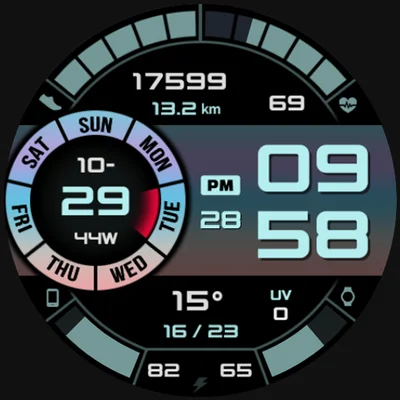
このアプリについて
Googleによる英語 (アメリカ合衆国)からの自動翻訳です。
Wear OS 用 SMZ デジタル ウォッチフェイス
写真のようにあなたの時計を飾るビデオをご覧ください。
使用方法についてはビデオをご覧ください。
【24時間制の使い方】
時間形式を変更したい場合は、時計に接続されている携帯電話の以下のパスで設定できます。
*接続された電話 - 設定 - 一般管理 - 日付と時刻 - 24 時間形式を使用します。
チェックを入れると時計も 24 時間形式になり、チェックを外すと時計は 12 時間形式になります。
[カスタマイズ]
ウォッチフェイスをカスタマイズするには、画面を長押しして[カスタマイズ]ボタンをタッチします。
【AOD画面の暗さ】
カスタマイズセクションの「AOD Dim」は、すべての AOD 画面の暗さを調整します。
[携帯電話のバッテリー残量]
amoledwatchfaces™ の携帯電話バッテリー コンプリケーション アプリ
開発者のリンク - https://play.google.com/store/apps/dev?id=5591589606735981545
この機能を使用するには、「Phone Battery Complication」アプリが携帯電話と時計にインストールされている必要があります。
ダウンロードパス:
https://play.google.com/store/apps/details?id=com.weartools.phonebattcomp
※設定方法はこちら。 - https://cafe.naver.com/smzwatch/22
【SMZインスタグラム】
http://www.instagram.com/smz.watch.tech
[SMZフェイスブック]
https://www.facebook.com/smz.watchface
【SMZホームページ】
https://www.smzwatch.com
【メールはいつでも大歓迎です】
smz.watch.tech@gmail.com
原文を表示
Please Watch the video to decorate your watch like the photos.
Please Watch the VIDEO for usage.
[How to use 24-hour format]
If you want to change the time format, you can set it in the path below on the phone connected to the watch.
*The connected phone - Settings - General management - Date and time - Use 24-hour format.
If checked, the watch will also be in 24-hour format, and if unchecked, the watch will be in 12-hour format.
[CUSTOMIZE]
For customization of watchface, touch and hold the screen and touch on [Coustomize] button.
[The DARKNESS of the AOD screen]
In the Customize section, 'AOD Dim' adjusts the darkness of all the AOD screen.
[Phone Battery Level]
Phone Battery Complications app from amoledwatchfaces™
Dev's link - https://play.google.com/store/apps/dev?id=5591589606735981545
To use this function, the 'Phone Battery Complication' app must be installed on your phone and watch.
Download path :
https://play.google.com/store/apps/details?id=com.weartools.phonebattcomp
*How to set. - https://cafe.naver.com/smzwatch/22
[SMZ Instagram]
http://www.instagram.com/smz.watch.tech
[SMZ Facebook]
https://www.facebook.com/smz.watchface
[SMZ Homepage]
https://www.smzwatch.com
[E-mail is always welcome]
smz.watch.tech@gmail.com
データ セーフティ
このアプリが収集・共有するデータについて、SMZ™がGoogle Playで申告している内容です。
- 第三者と共有されるデータはありません詳しくは、デベロッパーが共有を申告する方法についての説明をご覧ください
- データは収集されません詳しくは、デベロッパーが収集を申告する方法についての説明をご覧ください
開発元の連絡先
- ウェブサイトsmzwatch.com
- メールsmz.watch.tech@gmail.com
- プライバシーポリシーblog.naver.com
- 住所거제대로 275 거제미소지움더퍼스트, 102동 1101호 연제구, 부산광역시 47512 South Korea
情報
- 提供元
- SMZ™
- カテゴリ
- カスタマイズ
- 更新日
- 2025/11/9
- リリース
- 2024/11/5
- 対象年齢
- 3 歳以上
- 価格
- ¥220
- パッケージ名
- com.smzjdh.z_code