SO1K94
Saint On- 3 歳以上対象年齢
- カスタマイズカテゴリ
- 2026/8/24更新日
- ¥210価格
com.watchfacestudio.so1k94のGoogle Play公式ページにリンクしています。最終確認:2026/11/16。
このアプリについて
Googleによる英語 (アメリカ合衆国)からの自動翻訳です。
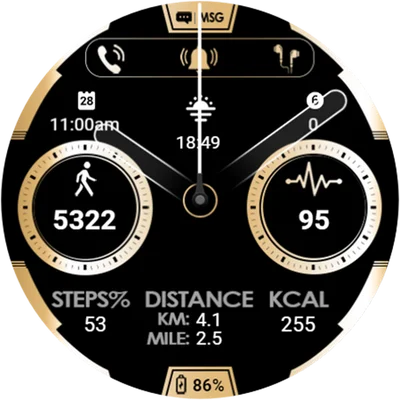
SO1K94 スポーツ ウォッチフェイス
SO1K94 Wear OS 向けに設計
[ Wear OS デバイスのみ - API 28+ ]
SO1K94 クオリティ ハイブリッド ウォッチフェイス。
サポートされている 10 の目立つ背景色オプション。
シンプルで素晴らしい。
3つのコンパイルをサポート。
注: 自動 10 分間隔の心拍数測定がウォッチフェイスに実装されています。心拍数の測定は現在、他のアプリからの測定とは無関係です。手動測定が可能です - 心拍数をタップします。測定時には時計を手首に装着する必要があります。
*** Oppo と正方形の時計モデルは現在サポートされていません!
インストールに関する注意事項:
1 - 時計が電話に正しく接続されていることを確認し、電話で電話アプリを開き、[時計にダウンロード] をタップして、時計の指示に従います。
ウォッチから設定ボタンをタップして数分後、ウォッチフェイスがインストールされます。搭載されているウォッチフェイスを選択できます。
電話アプリはプレースホルダーとして機能するだけで、Wear OS ウォッチのウォッチフェイスを簡単にセットアップして見つけることができます
注: 支払いサイクルに行き詰まった場合は、心配しないでください。2 回目の支払いを求められた場合でも、支払いは 1 回だけ行われます。 5 分間待つか、時計を再起動してもう一度お試しください。
デバイスと Google サーバー間の同期に問題がある可能性があります。
また
2 - または、PC の Web ブラウザからウォッチフェイスをインストールしてみてください。
こちら側の問題は開発者に依存しないことに注意してください。開発者は、こちらから Play ストアを制御することはできません。ありがとう。
スポーツで健康を維持し、トラッキングで成功し、生活をコントロールしましょう!
特徴
● ステップ - 心拍数 (手首から) - 3 つの特別なコンプリケーション。
● 画面上で常にサポート
●心拍数をタップして手動測定
● 距離 - (km とマイル)
すべての機能を利用するには、手動でセンサーとコンプリケーションのデータ取得権限を有効にしてください。
インターネット
https://www.saintonwf.com
インスタグラム
https://www.instagram.com/Saint_0n
フェイスブック
https://www.facebook.com/saintonwf
原文を表示
SO1K94 Designed for Wear OS
[ For Wear OS devices only - API 28+ ]
SO1K94 Quality Hybrid watch face.
Supported 10 bemarkable background colours options.
Simple and Remarkable.
Supported 3 Complation.
NOTE: Automatic 10-minute interval heart rate measurement has been implemented on the watch face. Heart rate measurement is currently independent of measurements from other apps. Manual measurement is possible - tap heart rate, the watch must be on the wrist when measuring.
*** Oppo and square watch models are currently not supported!
INSTALLATION NOTES:
1 - Make sure the watch is properly connected to the phone, open the Phone App on the phone and tap "DOWNLOAD TO WATCH" and follow the instructions on the watch.
A few minutes after tapping the set from watch button, the watch face will be installed. You can choose the installed watch face.
The Phone app just acts as a placeholder to make it easy to set up and find the watch face on your Wear OS watch
Note: If you get stuck in the payment cycle, DON'T Worry, only one payment will be made even if you are asked to pay a second time. Wait 5 minutes or restart your watch and try again.
There may be a synchronization issue between your device and Google servers.
or
2 - Alternatively, try to install the watch face from the web browser on your PC.
Please note that issues on this side are NOT developer dependent. The developer has no control over the Play Store from this side. thanks.
Stay healthy with sports, succeed with tracking, keep your life under control!
FEATURES
● Steps - Heart rate (From Wrist) - 3 special complication.
● Always supported on screen
● Manual measurement by tapping heart rate
● Distance - (km and mile)
For full functionality, please manually enable Sensors and Complication data retrieval permissions!
Internet
https://www.saintonwf.com
INSTAGRAM
https://www.instagram.com/Saint_0n
FACEBOOK
https://www.facebook.com/saintonwf
データ セーフティ
このアプリが収集・共有するデータについて、Saint OnがGoogle Playで申告している内容です。
- 第三者と共有されるデータはありません詳しくは、デベロッパーが共有を申告する方法についての説明をご覧ください
- データは収集されません詳しくは、デベロッパーが収集を申告する方法についての説明をご覧ください
開発元の連絡先
- ウェブサイトsaintonwf.com
- メールismailermistr@gmail.com
- プライバシーポリシーsaintonwf.com
- 住所ABDULLAHPASA MAHALLESI 288. SOKAK NO:23-F D:19 23-F 23270 MERKEZ/Elazığ Türkiye
情報
- 提供元
- Saint On
- カテゴリ
- カスタマイズ
- 更新日
- 2026/8/24
- リリース
- 2023/3/6
- 対象年齢
- 3 歳以上
- 価格
- ¥210
- パッケージ名
- com.watchfacestudio.so1k94