Space Earth Watch Face
RADU GHEORGHE TURCU- 3 歳以上対象年齢
- カスタマイズカテゴリ
- 2024/11/28更新日
- ¥190価格
com.turcuradu.spaceearthwatchfaceのGoogle Play公式ページにリンクしています。最終確認:2026/11/24。
このアプリについて
Googleによる英語 (アメリカ合衆国)からの自動翻訳です。
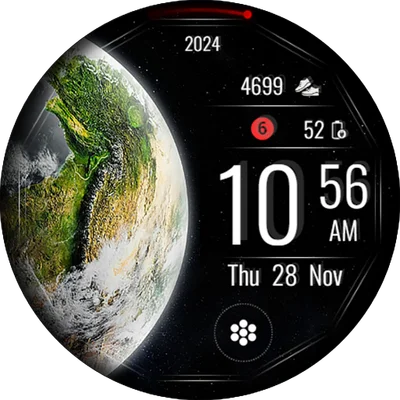
4 つの異なる画像を 1 つにまとめます。
🌍 スタイルと機能性を兼ね備えた素晴らしいウォッチフェイスを体験してください! 🌟
惑星をイメージした美しくデザインされた文字盤で、スマートウォッチのエクスペリエンスを向上させましょう。カスタマイズ可能な機能と鮮やかなカラーが満載のこの時計は、単なる文字盤ではなく、あなたの究極の毎日の相棒です。 🕰️✨
🌟 特徴:
✅ AM/PM形式の大きなデジタル時計 - 一目で読みやすい。
✅ 完全な日付表示 - 重要な日を見逃すことはありません! 📅
✅ バッテリーインジケーター – 一日中電源が入った状態を保ちます。 🔋
✅ ステップカウンター - フィットネスの経過を簡単に追跡します。 👟
✅ 通知カウンター – メッセージとアラートを常に受信します。 🔔
✅ カスタム ウィジェット – お気に入りの機能を使用して文字盤をカスタマイズします。
🎨 複数のテキストの色とデザイン
💫 4 つのユニークな表示スタイル – 気分に合わせて切り替えましょう!
🌌 地球にインスピレーションを得た息をのむようなテーマ – 美しさと実用性の融合。
🔧 この文字盤を選んだ理由?
✔️ カスタマイズ可能なウィジェット – 最も重要な機能を追加します。 (天気、カレンダー、またはショートカット 🚀)。
✔️ フィットネス愛好家ですか?リアルタイムの歩数追跡でモチベーションを維持。
✔️ 通知表示をきれいに – 物事をきちんと整理して保ちます。
✔️ 忙しいスケジュールやカジュアルな日常使いに最適です。
📥 今すぐダウンロードして、あなたのスマートウォッチをスタイルと生産性が完璧に融合したものに変身させましょう! 💪
-------------------------------------------------- -------------
スマートウォッチでのウォッチフェイスのインストールに関する注意事項:
電話アプリは、Wear OS ウォッチに文字盤を簡単にインストールして見つけられるようにするためのプレースホルダーとしてのみ機能します。インストールドロップダウンメニューからウォッチデバイスを選択する必要があります。
電話機でヘルパーを直接ダウンロードする場合は、アプリケーションを開いてディスプレイまたはダウンロード ボタンをタッチする必要があります。 -> 時計へのインストールが開始されます。
Wear OS ウォッチを接続する必要があります。
この方法で動作しない場合は、そのリンクを携帯電話の Chrome ブラウザにコピーし、右から下矢印をクリックして、インストールするウォッチフェイスを選択します。
問題がある場合は、raduturcu03@gmail.com までご連絡ください。
私のGoogleプロフィールで他のデザインを見てみてください。
原文を表示
🌍 Experience a Stunning Watch Face That Combines Style and Functionality! 🌟
Elevate your smartwatch experience with this beautifully designed planet-inspired watch face. Packed with customizable features and vibrant colors, it's more than just a watch face – it’s your ultimate daily companion! 🕰️✨
🌟 Features:
✅ Large Digital Clock with AM/PM format – easy to read at a glance.
✅ Full Date Display – never miss an important day! 📅
✅ Battery Indicator – stay powered all day. 🔋
✅ Step Counter – track your fitness journey effortlessly. 👟
✅ Notification Counter – keep up with messages & alerts. 🔔
✅ Custom Widgets – personalize your watch face with your favorite functionalities.
🎨 Multiple Text Colors & Designs
💫 4 Unique Display Styles – switch it up to match your mood!
🌌 Breathtaking Earth-inspired theme – blend of beauty & practicality.
🔧 Why Choose This Watch Face?
✔️ Customizable Widgets – Add the features you care about most! (Weather, calendar, or shortcuts 🚀).
✔️ Fitness Enthusiast? Real-time steps tracking to stay motivated.
✔️ Clean Notifications Display – keep things tidy and organized.
✔️ Ideal for busy schedules or casual everyday use!
📥 Download Now to transform your smartwatch into the perfect blend of style and productivity! 💪
---------------------------------------------------------------
Watch face installation notes on smart watch:
Phone app serves only as a placeholder to make it easier to install & find the watch face on your Wear OS watch. You have to select your watch device from the install dropdown menu.
If you download the helper directly with the phone , you need to open application and touch on the display or the download button. -> will start to install on the watch.
A wear os watch need to be connected.
If not working in that way , you can copy that link into your phone chrome browser and click on arrow down from right , and you choose the watchface to install.
If you have problems , please contact me on raduturcu03@gmail.com
Try to see others designs in my google profile.
データ セーフティ
このアプリが収集・共有するデータについて、RADU GHEORGHE TURCUがGoogle Playで申告している内容です。
- 第三者と共有されるデータはありません詳しくは、デベロッパーが共有を申告する方法についての説明をご覧ください
- データは収集されません詳しくは、デベロッパーが収集を申告する方法についての説明をご覧ください
開発元の連絡先
- ウェブサイトfacebook.com
- メールraduturcu03@gmail.com
- プライバシーポリシーe-droid.net
- 住所Str. Eduard Albert Bielz, Nr. 89d, Bl. b1, Sc. f, et.1, Ap. 60 550031 Sibiu Romania
情報
- 提供元
- RADU GHEORGHE TURCU
- カテゴリ
- カスタマイズ
- 更新日
- 2024/11/28
- リリース
- 2024/11/27
- 対象年齢
- 3 歳以上
- 価格
- ¥190
- パッケージ名
- com.turcuradu.spaceearthwatchface