Spooktime - Digital Watch Face
Interactive Awesome Apps- 3 歳以上対象年齢
- カスタマイズカテゴリ
- 2026/10/18更新日
- ¥120価格
com.watchfacestudio.spooktimeのGoogle Play公式ページにリンクしています。最終確認:2026/11/13。
このアプリについて
Googleによる英語 (アメリカ合衆国)からの自動翻訳です。
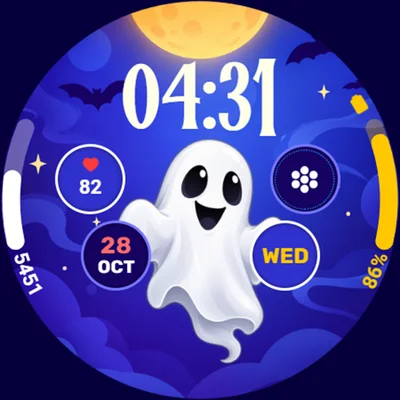
ハロウィンスペシャル - デジタルウェアOSウォッチフェイス(ハロウィン特別版)
Interactive Awesome Appsは、新たなデジタルウォッチフェイス「Spooktime」を発表します!
Spooktimeの機能:
- デジタル表示
- バッテリー残量表示(パーセント表示+アイコン)
- 歩数計
- 心拍数計(アイコン表示+アイコン)
- 曜日
- 日付
- 月
- 常時表示(AOD)で全てのインジケーターを表示、アクティブピクセルの平均使用率は9.5%未満
注:このアプリは、Wear OS 5以降(API 33以上)を搭載したデバイス専用です。
これらの機能をすぐに利用するには、ウォッチをWear OS 5にアップデートしてください。
「インストール」ドロップダウンメニューから、お使いのウォッチデバイスを選択してください。
または、付属のコンパニオンアプリを使用して、ウォッチフェイスをウォッチに直接インストールすることもできます。
Galaxy Watch 4/5/6/7/8/9/Ultra/Ultra 2をお使いの方:スマートフォンのGalaxy Wearableアプリの「ダウンロード」カテゴリからウォッチフェイスを探して適用してください。
注:
利用可能な全ての機能とアプリのショートカットの詳細については、付属の画像をご覧ください。
このウォッチフェイスはWear OS 5以降のデバイスに対応していますが、最新のWear OSソフトウェアバージョンを搭載した新しいデバイスで最もスムーズに動作することをご留意ください。
当社のウォッチフェイスはすべてSamsung Galaxy Watch 4および7でテスト済みで、問題なく動作することが確認されています。
すべてのインジケーターの機能を最大限に活用するには、インストール後にすべてのセンサー権限を有効にしてください。ありがとうございます。
お問い合わせ:
qasimghumang@gmail.com
ご質問、問題、ご意見などございましたら、お気軽にメールでお問い合わせください。喜んで対応させていただきます。
お客様のご満足を最優先に考え、すべてのコメント、ご提案、苦情を真摯に受け止め、24時間以内にご返信いたします。
Interactive Awesome Appsのその他のアプリはこちら:
https://play.google.com/store/apps/dev?id=8552910097760453185
YouTubeチャンネルはこちら:
https://www.youtube.com/@interactive-apps
ウェブサイトはこちら:
https://hayattech.com
Pinterestはこちら:
https://pin.it/5b5DJQBNU
ウォッチフェイスをご利用いただきありがとうございます。素敵な一日をお過ごしください!
原文を表示
Interactive Awesome Apps is proud to present another digital watch face, Spooktime!
Spooktime features:
- Digital
- Battery % + Icon
- Steps Counter
- Heart Rate Counter + ICON
- Day
- Date
- Month
- AOD showing all indicators, averaging less then 9.5% active pixels
NOTE - This app is made only for Wear OS 5 or above with API 33+ devices.
Update your watch to Wear OS 5 to use these features instantly.
Select only your watch device from the "INSTALL" drop-down menu.
Alternatively, use our provided phone companion app to help you install the watch face directly on your watch.
Galaxy Watch 4/5/6/7/8/9/Ultra/Ultra 2 users: Find and apply the watch face from the "Downloads" category in the Galaxy Wearable app on your phone.
NOTE:
Please see the provided visuals for detailed info on all available features and app shortcuts!
This watch face is compatible with Wear OS 5 or above devices, but keep in mind that it will run best and smoothest on newer devices with latest Wear OS software versions.
All our watch faces are tested on Samsung Galaxy Watch 4 and 7, where they are confirmed to work without any issues.
For full functionality of all indicators enable all Sensors permissions after installation, thank you!
CONTACT:
qasimghumang@gmail.com
E-mail us for any questions, issues or general feedback - we're here for you!
Customer satisfaction is our main priority, and we take every comment, suggestion and complaint very seriously, making sure to respond to each e-mail within 24 hours.
More from Interactive Awesome Apps:
https://play.google.com/store/apps/dev?id=8552910097760453185
Visit our Youtube channel:
https://www.youtube.com/@interactive-apps
Visit our Website:
https://hayattech.com
Pinterest:
https://pin.it/5b5DJQBNU
Thank you for using our watch faces, have a great day!
データ セーフティ
このアプリが収集・共有するデータについて、Interactive Awesome AppsがGoogle Playで申告している内容です。
- 第三者と共有されるデータはありません詳しくは、デベロッパーが共有を申告する方法についての説明をご覧ください
- データは収集されません詳しくは、デベロッパーが収集を申告する方法についての説明をご覧ください
新機能
バージョン 1.0.0 · 2026/10/18
Spooktime - Digital Wear OS Watch Face Halloween Special
開発元の連絡先
- メールqasimghumang@gmail.com
- プライバシーポリシーprojects.hayattech.com
- 住所House 39, Liaqat Avenue Jinnah Gardens, Phase 1 Islamabad, 44000 Pakistan
情報
- 提供元
- Interactive Awesome Apps
- カテゴリ
- カスタマイズ
- バージョン
- 1.0.0
- 更新日
- 2026/10/18
- リリース
- 2026/10/18
- 対象年齢
- 3 歳以上
- 価格
- ¥120
- パッケージ名
- com.watchfacestudio.spooktime