SPORTIK
Eugeniy Radzivill- 3 歳以上対象年齢
- カスタマイズカテゴリ
- 2025/8/25更新日
- ¥220価格
com.watchfacestudio.sportikのGoogle Play公式ページにリンクしています。最終確認:2026/11/27。
このアプリについて
Googleによる英語 (アメリカ合衆国)からの自動翻訳です。
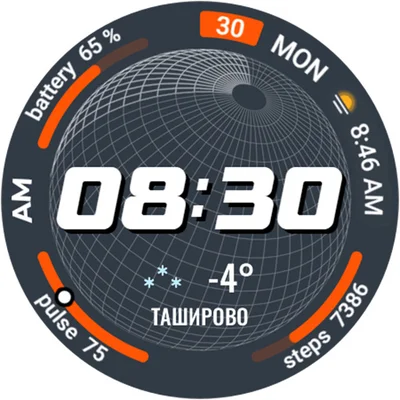
Wear OS プラットフォーム上のスマートウォッチのウォッチフェイス
Wear OS プラットフォーム上のスマート ウォッチのウォッチフェイスは、次の機能をサポートしています。
- 12/24時間モードの自動切り替え。時計の表示モードはスマートフォンの設定モードと同期します
- 曜日の多言語表示。言語はスマートフォンの設定と同期されます
- データ型の二か国語表示: ロシア語と英語。英語が優先され、スマートフォンのインターフェース言語がロシア語ではない場合に表示されます。
- バッテリー残量の表示
- 歩数の表示
- 現在の心拍数の表示
カスタマイズ:
ウォッチフェイス設定メニューで配色の 1 つを選択できます。
ウォッチフェイスには、ウォッチにインストールされているアプリケーションからのデータを表示するための 2 つの情報ゾーンがあります。 (スクリーンショットのように) 天気情報と日の出/日の入り時刻を設定することをお勧めします。もちろん、他のアプリのデータを設定することもできますが、それらのアプリはそのような情報を表示するように最適化されていない可能性があり、データの代わりに空のフィールドや不完全またはフォーマットされていないテキストが表示される可能性があります。
重要!私が保証できるのは、Samsung ウォッチの情報ゾーンの正しい動作のみです。申し訳ございませんが、他メーカーの時計での動作保証は致しかねます。ウォッチフェイスを購入する際は、この点にご注意ください。
Samsung Galaxy Watch Ultra の天気表示にも 1 つの特殊な点があります。12/07/24 の時点で、ソフトウェアが原因でこの時計では天気データ (Samsung の標準アプリ) が正しく表示されません。サードパーティ製アプリの気象データを使用できます。
バッテリー寿命を節約するために、設定メニューから黒い文字盤の背景を選択できます。
このウォッチフェイス用にオリジナルのAODモードを作成しました。これを表示するには、ウォッチのメニューで有効にする必要があります。この場合、AOD モードは 2 つのモードで動作します。
- エコノミー(メニューの値を「AOD Dark」に設定)
- Bright (メニューの値を「AOD Bright」に設定します)。ご注意ください!このモードではバッテリーの消費量が多くなります
コメントや提案については、電子メールでご連絡ください:eradzivill@mail.ru
ソーシャルネットワークに参加しましょう
https://vk.com/eradzivill
https://radzivill.com
https://t.me/eradzivill
https://www.facebook.com/groups/radzivill
心から、
ユージェニー・ラジヴィル
原文を表示
Watch face for smart watches on the Wear OS platform supports the following functionality:
- Automatic switching of 12/24 hour modes. The watch display mode is synchronized with the set mode on your smartphone
- Multilingual display of the day of the week. The language is synchronized with the settings of your smartphone
- Bilingual display of data types: in Russian and English. English is a priority and is displayed in cases where the interface language on the smartphone is not Russian
- Display of battery charge
- Display of the number of steps taken
- Display of the current heart rate
CUSTOMIZATION:
You can choose one of the color schemes in the watch face settings menu
The watch face has two information zones for displaying data from applications installed on your watch. I recommend setting up Weather information and sunrise/sunset times (as in the screenshots). Of course, you can set up data from any other apps, but they may not be optimized to display such information, and you may have empty fields or incomplete/not formatted text instead of data.
IMPORTANT! I can only guarantee the correct operation of the information zones on Samsung watches. Unfortunately, I cannot guarantee operation on watches from other manufacturers. Please keep this in mind when purchasing a watch face.
There is also one peculiarity in displaying the weather on the Samsung Galaxy Watch Ultra - as of 12/07/24, weather data (stock Samsung app) is displayed incorrectly in this watch due to software. You can use weather data from third-party apps.
You can select a black watch face background through the settings menu to save battery life.
I made an original AOD mode for this watch face. To display it, you need to activate it in the menu of your watch. In this case, the AOD mode can work in two modes
- Economy (set the value in the menu to "AOD Dark")
- Bright (set the value in the menu to "AOD Bright"). Please note! In this mode, battery consumption will be higher
For comments and suggestions, please write to e-mail: eradzivill@mail.ru
Join us on social networks
https://vk.com/eradzivill
https://radzivill.com
https://t.me/eradzivill
https://www.facebook.com/groups/radzivill
Sincerely,
Eugeniy Radzivill
データ セーフティ
このアプリが収集・共有するデータについて、Eugeniy RadzivillがGoogle Playで申告している内容です。
- 第三者と共有されるデータはありません詳しくは、デベロッパーが共有を申告する方法についての説明をご覧ください
- データは収集されません詳しくは、デベロッパーが収集を申告する方法についての説明をご覧ください
開発元の連絡先
- ウェブサイトradzivill.com
- メールeradzivill@mail.ru
- プライバシーポリシーeradzivill.wixsite.com
- 住所дер. Терновка, ул. Песочная, д. 4 Наро-Фоминск Московская область Россия 143300
情報
- 提供元
- Eugeniy Radzivill
- カテゴリ
- カスタマイズ
- 更新日
- 2025/8/25
- リリース
- 2024/12/7
- 対象年齢
- 3 歳以上
- 価格
- ¥220
- パッケージ名
- com.watchfacestudio.sportik