Squared Graph Paper Watch Face
BasilBase- 3 歳以上対象年齢
- カスタマイズカテゴリ
- 2026/8/19更新日
- ¥260価格
com.basilbase.squaredのGoogle Play公式ページにリンクしています。最終確認:2026/11/13。
このアプリについて
Googleによる英語 (アメリカ合衆国)からの自動翻訳です。
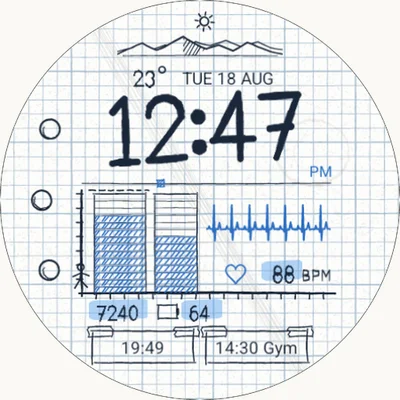
手描きのノートスケッチ。グリッド上でのあなたの一日。明るいものから暗いものまで、960種類のルック。
手首に装着する方眼紙。あなたの1日を、紙に描かれたグリッド上に記録します。
⚠️ 天気情報には、一度だけ許可が必要です
Wear OSはデフォルトではウォッチフェイスに位置情報へのアクセスを許可しないため、
気温は許可するまで表示されます。
設定 › セキュリティとプライバシー › 権限マネージャー › 位置情報 ›
ウォッチフェイス › アプリ使用中は許可
その他の機能はインストール後すぐに利用できます。時刻、日付、歩数、心拍数
バッテリー残量、2枚のSDカードは、設定や専用アプリなしで使用できます。
まるで実験ノートの手書きページのように、1日の出来事が記録されていきます。
測定値は時計の横には表示されず、
紙に描かれたグリッド上に、描かれた軸からマス目ごとに上昇するようにプロットされます。数字は活字ではなく手書きです。10個の数字が描かれ、各行にわずかな揺れがあり、7には横棒が入っています。
📊 用紙独自のグリッド上にプロット
● 毎日の目標に対する歩数 ― バーの上部にある点線の旗は
固定の10,000ではなく、あなた自身の目標値です。
● 同じグラフの2列目にバッテリー残量が表示されます。
● 脈拍のリズムストリップ:脈拍が速いときはスパイクが密集し、
遅いときは間隔が広がります。
● 位置情報が上部に表示されると、ヘッダーに今日の気温が表示されます。
● 架空の数値はありません ― 時計で測定できない数値は空白になります。
🌄 1ページに1日分
● 上部の余白には山々が描かれ、その上空を太陽が横切ります。
そして夜には月が描かれます。
● 位置情報が上部に表示されると、あなたの日の出と日の入りに合わせて、どの山が昇っているかが表示されます。
弧上の位置が時刻を示します ― 日時計であって、暦ではありません
🎨 960通りの組み合わせ、うち3種類はダークモード
● 用紙10種類 ― ブライトホワイト、クリーム、アイボリー、ミント、ローズ、クラフト、セピアに加え、
ダーク用紙3種類 ― ブループリント、カーボン、黒板
● 罫線6種類 ― 方眼、ミリメートル、線、ドット、アイソメトリック、無地
● インク16種類 ― グラファイトから蛍光ペンまで
● 10 × 6 × 16 = 960通りの組み合わせ、すべて判読可能
用紙、罫線、インクはそれぞれ独立した設定で、組み合わせが固定されることはありません。
方眼クラフト、ドットブループリント、無地。
🌙 常時表示、フリーズなし
アンビエント表示は、紙を取り除いたシンプルなデザインです。輪郭線で描かれた数字、日付、軸、バッテリー残量表示。秒表示がないのは意図的なものです。画面が暗くなると1分ごとに再描画されるため、秒は静止したままになります。
秒を刻むのではなく、表示しないのが正解です。
📎 自分で設定できる2枚のカード
画面下部には2枚のカードがあります。これは、自分で設定できるコンプリケーションスロットです。
ウォッチフェイスを長押しして「カスタマイズ」を開き、好きな情報を入力しましょう。
例えば、今日の日の入り時刻、第2時間帯、次の会議、ショートカットなど。
オプションリストは、お客様のウォッチ固有のものであり、弊社のものではありません。そのため、インストールするアプリごとにリストが増えていきます。
初期設定では、次のカレンダーイベントと今日の日の入り時刻が表示されるので、すぐに使い始めることができます。
このページはタップ操作も可能で、カード料金はかかりません。歩数と心拍数をタップするとヘルスケアアプリが開きます。バッテリーをタップするとバッテリー残量が表示され、日付をタップするとカレンダーが開きます。
⚙️ あなたにぴったりのデザイン
● レイアウト — フル表示またはサイレント表示:シート、時刻、ヘッダーのみを表示。
より落ち着いた表示がお好みの方に。
● 時刻表示形式 — 自動、12時間表示、24時間表示から選択可能。
● 秒目盛りの表示/非表示 — 通常使用時は、目盛り線に沿ってドットが移動します。
● 広告なし、トラッキングなし、サブスクリプションなし、専用アプリ不要
● 一度購入すれば永久に利用可能
📱 互換性
Wear OS 5以降(API 34+):Galaxy Watch 4~8、Pixel Watch、その他のWear OS 5搭載デバイス。Galaxy Watch 6で動作確認済み。
📌 インストール方法
1. スマートウォッチをスマートフォンに接続した状態で、こちらからご購入ください。
2. WatchでPlayストアを開き、ライブラリからインストールしてください。または、
スマートフォンで「その他のデバイスにインストール」をタップし、ウォッチを選択してください。
3. ウォッチフェイスを長押しし、「スクエア」を選択します。もう一度長押しして、
「カスタマイズ」をタップし、用紙を選択してください。
スマートフォンの画面でアプリを探すことができます。ウォッチフェイスはウォッチ上で動作します。
支払い画面が2回表示されても、料金は1回分しか請求されません。
✉️ サポート
何か問題が発生したり、追加してほしい用紙の音色がある場合は、
contact@basilbase.comまでご連絡ください。担当者が丁寧に対応いたします。
原文を表示
Graph paper for your wrist. Your day, plotted on the paper's own grid.
⚠️ WEATHER NEEDS ONE PERMISSION, ONCE
Wear OS does not give watch faces location access by default, so the
temperature shows -- until you allow it:
Settings › Security and privacy › Permission manager › Location ›
Watch faces › Allow while using the app
Everything else works the moment you install it — time, date, steps, heart
rate, battery and the two cards need no setup and no companion app.
A hand-drawn page from a lab notebook, filling itself in as the day goes on.
The readings are not printed beside the clock — they are plotted on the
paper's own grid, rising from a drawn axis square by square. The numerals are
hand-lettered rather than typeset: ten drawn digits, a wobble in every line,
and a crossbar on the 7.
📊 PLOTTED ON THE PAPER'S OWN GRID
● Steps against YOUR daily goal — the dashed flag across the top of the bar
is your own number, not a fixed 10,000
● Battery as the second column of the same chart
● A real rhythm strip for your pulse: the spikes crowd when it is fast and
spread out when it is slow
● Today's temperature in the header, once location is allowed above
● No invented numbers — a reading your watch does not have is left blank
🌄 A WHOLE DAY ON ONE PAGE
● Mountains sketched in the top margin, with the sun crossing the sky above
them — and then the moon, for the night
● Which one is up follows your own sunrise and sunset once location is
allowed; where it sits on the arc is the hour — a sundial, not an almanac
🎨 960 COMBINATIONS, THREE OF THEM DARK MODE
● 10 papers — Bright white, Cream, Ivory, Mint, Rose, Kraft, Sepia, plus
three dark sheets: Blueprint, Carbon and Blackboard
● 6 rulings — Squares, Millimetre, Lines, Dots, Isometric, Plain
● 16 inks, from Graphite to Highlighter
● 10 × 6 × 16 = 960 combinations, every one legible
Paper, ruling and ink are three separate settings, never locked pairs:
squared kraft, dotted blueprint, an unruled sheet.
🌙 ALWAYS-ON, WITH NOTHING TO FREEZE
Ambient is the same drawing with the paper taken away: outline digits, the
date, the axes and the battery bar. There is no seconds field, on purpose —
a dimmed screen redraws once a minute, so drawn seconds can only sit still.
The fix is not to make it tick. The fix is not to draw it.
📎 TWO CARDS YOU FILL YOURSELF
The bottom of the page has two cards — complication slots you fill yourself.
Press and hold the watch face, open Customize, and put whatever you like in
them: today's sunset, a second time zone, your next meeting, a shortcut.
The list of options is your watch's, not ours, so it grows with every app you
install. Out of the box the cards show your next calendar event and today's
sunset, so there is nothing to set up before you start.
The page is tappable too, at no card cost: steps and pulse open your health
app, the battery opens battery status, the date opens your calendar.
⚙️ MADE TO FIT YOU
● Layout — Full, or Quiet: just the sheet, the time and the header, when
you want a calmer dial
● Hour format — Auto, 12 or 24, chosen on the watch
● Seconds mark on or off — a dot walking one ruled line, in normal use
● No ads, no tracking, no subscription, no companion phone app
● One purchase, yours forever
📱 COMPATIBILITY
Wear OS 5 and above (API 34+): Galaxy Watch 4-8, Pixel Watch and other Wear
OS 5 devices. Tested on Galaxy Watch6.
📌 HOW TO INSTALL
1. With your watch connected to your phone, buy here.
2. Open the Play Store on your WATCH and install from your library — or on
the phone, tap "Install on more devices" and pick your watch.
3. Long-press your watch face, pick Squared, then long-press again and tap
Customize to choose your paper.
The phone entry helps you find it; the face runs on the watch. A payment
prompt shown twice still charges once.
✉️ SUPPORT
Something not working, or a paper tone you want added? Write to
contact@basilbase.com and you will get a real reply.
データ セーフティ
このアプリが収集・共有するデータについて、BasilBaseがGoogle Playで申告している内容です。
- 第三者と共有されるデータはありません詳しくは、デベロッパーが共有を申告する方法についての説明をご覧ください
- データは収集されません詳しくは、デベロッパーが収集を申告する方法についての説明をご覧ください
新機能
バージョン 1.0 · 2026/8/19
First release.
• Hand-drawn numerals on hand-drawn paper, nothing typeset
• Steps and battery plotted on the grid, against YOUR step goal
• A heart trace whose spike spacing is your actual pulse
• 10 papers × 6 rulings × 16 inks = 960 looks, three of them dark
• Sun or moon over the mountains, following your real sunrise
• Always-on with no seconds field, so nothing can look frozen
• Two cards you fill yourself, plus five tap targets
No ads, no tracking, no subscription, no companion app.
開発元の連絡先
- メールcontact@basilbase.com
- プライバシーポリシーbasilbase.com
- 住所UMUTKENT MAH. ADA 4 SK. NO: 17 IC KAPI NO: 9 MERKEZ 14300 Bolu Türkiye
情報
- 提供元
- BasilBase
- カテゴリ
- カスタマイズ
- バージョン
- 1.0
- 更新日
- 2026/8/19
- リリース
- 2026/8/19
- 対象年齢
- 3 歳以上
- 価格
- ¥260
- パッケージ名
- com.basilbase.squared