Tacho Watch Face
VG Faces- 3 歳以上対象年齢
- カスタマイズカテゴリ
- 2026/8/17更新日
- ¥210価格
com.watchfacestudio.VGTachoのGoogle Play公式ページにリンクしています。最終確認:2026/11/21。
このアプリについて
Googleによる英語 (アメリカ合衆国)からの自動翻訳です。
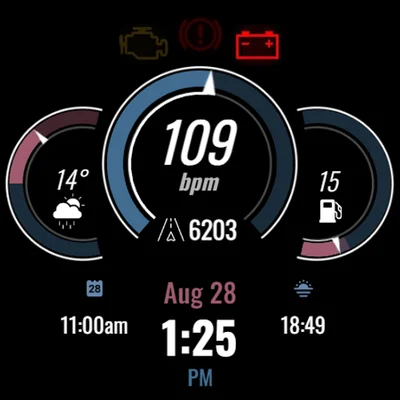
自動車向けWear OSデジタルフェイス:ダッシュボードアラート、2つのコンプリケーション、2つのAODモード
Wear OS 用 Tacho ウォッチ フェイス
Wear OS 用 Tacho ウォッチ フェイスでスマートウォッチをパワーアップしましょう。高性能自動車のダッシュボードからインスピレーションを得たこのデジタル フェイスは、画面をダイナミックな計器クラスターに変え、自動車愛好家の美学とスマートな機能性を完璧に融合させます。
主な機能:
• ダッシュボード警告灯: 車のダッシュボードのインジケーターを模倣した独自の警告システム。バッテリー残量低下 (20% 未満)、未読メッセージ、心拍数上昇 (140 bpm 以上)、極端な気象条件 (-15 ℃ 未満または +28 ℃ 以上) を視覚的に即座に警告します。
• 自動車レイアウト: 目立つスピードメータースタイルの中央ゲージで心拍数を読み、その両脇にはバッテリーの状態と天気を示す直感的な燃料計スタイルのインジケーターが配置されています。
• カスタマイズ可能な 2 つのコンプリケーション: 最も重視する情報専用の 2 つのスロットでディスプレイをパーソナライズできます。
• 毎日の必須データ: 日付と毎日の歩数カウンターを一目で確認できます。
• カラーテーマ: さまざまな鮮やかなカラーテーマから選択して、ライドやスタイルに簡単に合わせることができます。
• 常時表示モード 2 つ: ダッシュボードのレイアウトを維持する情報表示の暗いモードと、デジタル時刻のみを表示する最小限のモードという 2 つの異なる AOD オプションでバッテリー寿命を管理できます。
スマートショートカット システム:
直感的なタップ ゾーンでスマートウォッチを簡単に操作できます。
• 時刻をタップ: アラームにすばやくアクセスできます。
• 日付をタップ: カレンダーを開きます。
• バッテリーをタップ: バッテリーの状態を開きます。
インストール:
1. 時計がBluetoothで接続されていることを確認します。
2. Google Playストアからダウンロードします。
3. 時計の画面を長押しし、一番下までスクロールして、適用するウォッチフェイスを選択します。
互換性:
以下のデバイスを含むWear OS 5+専用に設計されています。
• Samsung Galaxy Watch 9 & Ultra • Google Pixel Watch 5 • その他、Wear OS 5以降を搭載した新しいデバイス
原文を表示
Tacho Watch Face for Wear OS
Rev up your smartwatch with the Tacho Watch Face for Wear OS. Inspired by high-performance automotive dashboards, this digital face transforms your screen into a dynamic instrument cluster, offering a perfect blend of car enthusiast aesthetics and smart functionality.
Key Features:
• Dashboard Warning Lights: A unique alert system that mimics car dashboard indicators! Get instant visual alerts for low battery (below 20%), unread messages, high heart rate (above 140 bpm), and extreme weather conditions (below -15°C or above +28°C).
• Automotive Layout: Read your Heart rate on a prominent, speedometer-style central gauge, flanked by intuitive fuel-gauge style indicators for Battery status and Weather.
• 2 Customizable Complications: Personalize your display with two dedicated slots for the information you value most.
• Essential Daily Data: Keep track of the Date and your daily Step counter at a glance.
• Color Themes: Match your ride or your style effortlessly by choosing from a variety of vibrant color themes.
• 2 Always On Display Modes: Manage your battery life with two distinct AOD options: an informative dimmed mode that retains your dashboard layout, and a minimal mode displaying only the digital time.
Smart Shortcut System:
Navigate your smartwatch effortlessly with intuitive tap zones:
• Tap Time: Quick access to Alarm.
• Tap Date: Opens your Calendar.
• Tap Battery: Opens Battery status.
Installation:
1. Ensure your watch is connected via Bluetooth.
2. Download from the Google Play Store.
3. Long-press your watch screen, scroll to the end, and select the watch face to apply.
Compatibility:
Designed exclusively for Wear OS 5+ devices, including:
• Samsung Galaxy Watch 9 & Ultra
• Google Pixel Watch 5
• And other newer devices running Wear OS 5 or higher.
データ セーフティ
このアプリが収集・共有するデータについて、VG FacesがGoogle Playで申告している内容です。
- 第三者と共有されるデータはありません詳しくは、デベロッパーが共有を申告する方法についての説明をご覧ください
- データは収集されません詳しくは、デベロッパーが収集を申告する方法についての説明をご覧ください
- Play ファミリー ポリシーの遵守に努めています
新機能
2026/8/17
開発元の連絡先
- メールvolder83@gmail.com
- プライバシーポリシーsites.google.com
- 住所W.-I.-Lenin-Straße 51 19370 Parchim Germany
情報
- 提供元
- VG Faces
- カテゴリ
- カスタマイズ
- 更新日
- 2026/8/17
- リリース
- 2025/2/17
- 対象年齢
- 3 歳以上
- 価格
- ¥210
- パッケージ名
- com.watchfacestudio.VGTacho