The Weather Window
BarefootDials- 3 歳以上対象年齢
- カスタマイズカテゴリ
- 2026/8/25更新日
- ¥290価格
com.barefootdials.the_weather_windowのGoogle Play公式ページにリンクしています。最終確認:2026/11/21。
このアプリについて
Googleによる英語 (アメリカ合衆国)からの自動翻訳です。
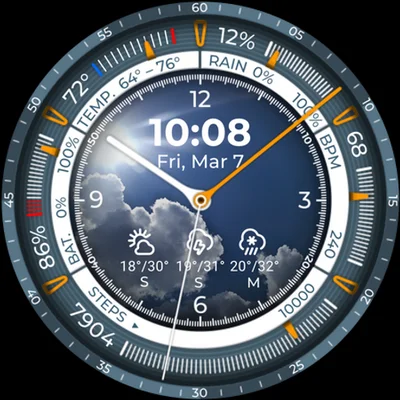
情報豊富な、天気とスポーツに焦点を当てたデジタルとアナログのハイブリッド デザイン
Weather Window ウォッチフェイスを発見してください: 手首の天気と情報ハブ
Weather Window のウォッチフェイスは、スタイルと情報を巧みに組み合わせています。
ハイブリッド ディスプレイ: 両方の長所をお楽しみください – クラシックなアナログ針 (時、分、秒) と、時間と日付の鮮明なデジタル表示が融合します。
一目でわかる包括的なデータ: 以下の情報を常に入手できます。
• 時間 (アナログおよびデジタル)
• 日付
• 現在の気温とその日の気温範囲
• 降水確率 (%)
• バッテリー残量
• 講じられた措置
• 心拍数 (BPM)
• 温度範囲を含む天気予報アイコン
視覚的な天気表現: 目玉は、現在の気象条件に一致する写真を表示する中央のデジタル ディスプレイです。これにより、天気を視覚的にすばやく把握できます。 (知っておくべきこと: これらの天気画像は文字盤に直接組み込まれており、インターネットからライブでダウンロードされるものではありません。)
あなただけのスタイル: あなただけのスタイルにしましょう! 20 色のテーマと 5 つの針スタイルから選択して、好みに合わせて文字盤をカスタマイズできます。
重要な注意事項: このウォッチフェイスは現在、ユーザーがカスタマイズ可能な合併症をサポートしていません。
ご注意ください:
• 時計のプロセッサ速度とメモリによっては、気象データ、特に気象画像のロードに時間がかかる場合があります。場合によっては、別の文字盤に短時間切り替えたり、元の文字盤に戻したりすると、処理速度が向上する場合があります。
• 一部のウォッチ (Samsung Galaxy Watch など) では、携帯電話のコンパニオン アプリまたはウォッチ設定で直接、気象データまたは位置情報の許可を有効にする必要がある場合があります。
• このウォッチフェイスには少なくとも Wear OS 5.0 が必要です。
電話アプリの機能:
スマートフォン用のコンパニオン アプリは、時計への文字盤のインストールを支援するためだけに使用されます。インストールが正常に完了すると、アプリは不要になり、安全にアンインストールできます。
原文を表示
Discover the Weather Window Watch Face: Your Weather and Info Hub on Your Wrist
The Weather Window watch face cleverly combines style and information:
Hybrid Display: Enjoy the best of both worlds – classic analog hands (hour, minute, second) meet a clear digital display for time and date.
Comprehensive Data at a Glance: Stay fully informed with:
• Time (Analog & Digital)
• Date
• Current Temperature & Day's Temperature Range
• Chance of Rain (%)
• Battery Level
• Steps Taken
• Heart Rate (BPM)
• Weather Forecast Icons with Temperature Ranges
Visual Weather Representation: The centerpiece is the central digital display featuring a photo that matches the current weather conditions. This gives you a quick visual grasp of the weather. (Good to know: These weather images are built directly into the watch face and are not downloaded live from the internet.)
Your Personal Style: Make it yours! Choose from 20 color themes and 5 hand styles to customize the watch face to your taste.
Important Note: This watch face does not currently support user-customizable complications.
Please Note:
• Loading weather data, especially the weather images, might take a moment depending on your watch's processor speed and memory. Sometimes, briefly switching to another watch face and back can help speed things up.
• Some watches (e.g., Samsung Galaxy Watch) may require you to enable permissions for weather data or location in the phone's companion app or directly in the watch settings.
• This watch face requires at least Wear OS 5.0.
Phone App Functionality:
The companion app for your smartphone is solely for assisting with the installation of the watch face onto your watch. Once the installation is successfully completed, the app is no longer needed and can be safely uninstalled.
データ セーフティ
このアプリが収集・共有するデータについて、BarefootDialsがGoogle Playで申告している内容です。
- 第三者と共有されるデータはありません詳しくは、デベロッパーが共有を申告する方法についての説明をご覧ください
- データは収集されません詳しくは、デベロッパーが収集を申告する方法についての説明をご覧ください
- Play ファミリー ポリシーの遵守に努めています
新機能
2026/8/25
Version 1.0.2: Companion app maintenance update. No action is needed if your watch face is already installed.
開発元の連絡先
- メールinfo@barefootdials.com
- プライバシーポリシーbarefootdials.com
- 住所C/ Vall, 132 07620 Llucmajor España
情報
- 提供元
- BarefootDials
- カテゴリ
- カスタマイズ
- 更新日
- 2026/8/25
- リリース
- 2025/4/2
- 対象年齢
- 3 歳以上
- 価格
- ¥290
- パッケージ名
- com.barefootdials.the_weather_window