TORQUE
watchface ninja™- 3 歳以上対象年齢
- カスタマイズカテゴリ
- 2026/11/1更新日
- 無料価格
ninja.watchface.torqueのGoogle Play公式ページにリンクしています。最終確認:2026/11/19。
このアプリについて
Googleによる英語 (アメリカ合衆国)からの自動翻訳です。
ウォッチフェイス忍者 |トルク | 2023 年 6 月 15 日。
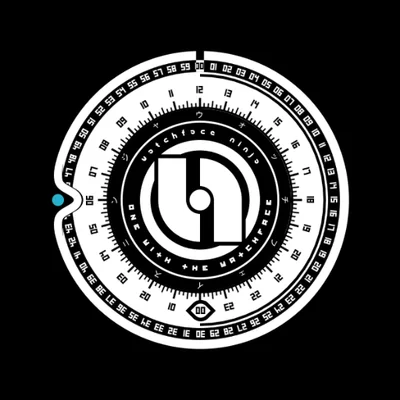
TORQUE は、1 つのロードされたアナログ ジャンプ 24 時間ウォッチフェイスです。 Watchface には、分と秒の 24 時間表示、心拍数、目標歩数、パワー、マスコット、日、月の種類、月の位置、通知、カスタム ショートカット、色の反転など、必要なものがすべて揃っており、永久に無料です。
楽しむ
- 時間 [分と秒を含む 24 時間のジャンプ時間]
- 歩数目標 0 ~ 100%
- 20 ~ 180 bpm の心拍数モニター
- バッテリーステータス 1 ~ 100%
- 心拍数メーターをタップすると心拍数を測定
- マスコット [牛または衛門を使用して月をカバーしたり、ウォッチフェイスの忍者ロゴを使用して追加データをカバーしたりできますが、ロゴのウォッチフェイスにあるウォッチフェイスの名前はオプションです]
- 曜日 [星を数えます、水曜日は 3 で、土曜日は 6 です]
- AOD [ウォッチフェイス忍者ロゴ]
- 深いディープカバー下のムーンフェイズタイプ
- 月の位置 [NM 新月 - EC イブニング クレセント - FQ 第 1 クォーター - WG 上弦ギブス - FM フールムーン - WG 下弦ギブス - LQ 下弦 - MG 朝クレセント]
- 通知 0 ~ 60 [時計のデフォルト通知インジケーターの固有のスポットを含む]
- 通知インジケーターの色 [デフォルトではオレンジですが、青に変更できます。時計のデフォルトのインジケーターを使用している場合は、それを無効にする必要があります]
- 色を反転する
- Ninja Vision [数値用X線ビジョン]
- 永久無料
注記:
通知インジケーターにカスタムの忍者カラーを使用するには、まずデフォルトの時計の通知インジケーターを無効にする必要があります (通知インジケーターが装備されている場合、またはすべての設定が完了していない場合)。時計の歯車アイコンまたは設定に移動し、通知をタップし、詳細設定で通知インジケーターを削除します。その後、忍者オレンジまたは忍者ブルーのいずれかの色を使用できるようになります。
ウォッチがデフォルトでオレンジ色の通知インジケーターを使用していない場合、またはオレンジ色の通知インジケーターを備えていない場合でも、今後はオレンジ色の通知インジケーターが使用されるようになります。
こんにちは。
こんにちは
ウォッチフェイス忍者
ウォッチフェイスニンジャ
https://watchface.ninja
@watchfaceninja
watchface ninja によって ♥ で作成されました
OSを着る | API 28+
©ウォッチフェイス忍者
原文を表示
TORQUE is one loaded analog jump 24h watchface. Watchface features everything you need, time 24h with minutes and seconds, heart rate, steps goal, power, mascots, days, moon type, moon position, notifications, custom shortcuts,reverse colors and it's free forever.
Enjoy
- Time [jump hour 24h with minutes and seconds]
- Steps goal 0-100%
- Heart rate monitor from 20 to 180 bpm
- Battery status 1-100%
- Heart rate measure when you tap on heart rate meter
- Mascots [you can use Ox or Emon to cover moon or watchface ninja logo to cover extra data, while the name of the watchface free in logo's watchface is optional]
- Day of the week [count the stars, Wednesday is 3 and Saturday is 6]
- AOD [watchface ninja logo]
- Moon Phase Type under deep deep cover
- Moon position [NM New Moon - EC Evening Cresent - FQ First Quarter - WG Waxing Gibbous - FM Fool Moon - WG Waning Gibbous - LQ Last Quarter - MG Morning Cresent]
- Notifications 0-60 [includes unique spot for watch's default notification Indicator]
- Notifications indicator color [it's orange by default but can be changed to blue, must disable the watch's default indicator if it's using one]
- Reverse colors
- Ninja Vision [X-ray vision for numerals]
- Free forever
Note:
To use custom ninja color for your notifications indicator you must first disable default watch's [if equipped with one, if not you are all set] notifications indicator. Go to gear icon or settings on your watch, tap on notifications and under advanced settings remove notifications indicator. After that you will be able to use either ninja orange or ninja blue colors.
If your watch is not using orange notifications indicator by default or does not have one, now it will.
Konnichiwa
こんにちは
watchface ninja
ウォッチフェイス ニンジャ
https://watchface.ninja
@watchfaceninja
Created with ♥ by watchface ninja
Wear OS | API 28+
© watchface ninja
データ セーフティ
このアプリが収集・共有するデータについて、watchface ninja™がGoogle Playで申告している内容です。
- 第三者と共有されるデータはありません詳しくは、デベロッパーが共有を申告する方法についての説明をご覧ください
- データは収集されません詳しくは、デベロッパーが収集を申告する方法についての説明をご覧ください
- Play ファミリー ポリシーの遵守に努めています
開発元の連絡先
- ウェブサイトwatchface.ninja
- メールtorque@watchface.ninja
- プライバシーポリシーsites.google.com
- 住所8514 Grand Ave Apt 2N River Grove, IL 60171 United States
情報
- 提供元
- watchface ninja™
- カテゴリ
- カスタマイズ
- バージョン
- 5.0.0
- 更新日
- 2026/11/1
- リリース
- 2023/7/2
- 対象年齢
- 3 歳以上
- 価格
- 無料
- パッケージ名
- ninja.watchface.torque