UsA Sequence Zero - USA161
USA Design Watch Face- 3 歳以上対象年齢
- カスタマイズカテゴリ
- 2026/11/1更新日
- ¥120価格
com.usadesign.usasequenceのGoogle Play公式ページにリンクしています。最終確認:2026/11/21。
このアプリについて
Googleによる英語 (アメリカ合衆国)からの自動翻訳です。
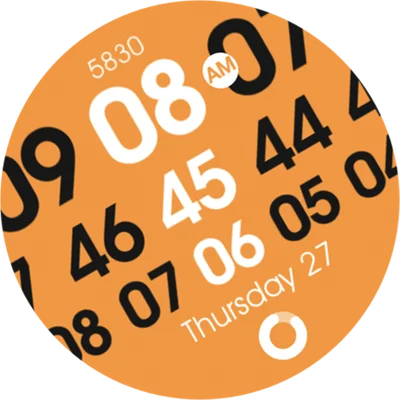
WearOS 用の一意のシーケンス番号ウォッチフェイス
Wear OS向けの、シーケンスナンバースタイルのユニークなウォッチフェイス。スタイルとコンプリケーションをカスタマイズできます。
このウォッチフェイスはWear OS API 33以上(Wear OS 4以降)が必要です。Galaxy Watch 4/5/6/7/8シリーズ以降、Pixel Watchシリーズ、およびWear OS 4以降のウォッチフェイスと互換性があります。
ご購入の際は、ウォッチに登録されているGoogleアカウントと同じアカウントをご使用ください。しばらくすると、ウォッチ上でインストールが自動的に開始されます。
特徴:
- 際立つユニークなデジタルシーケンスデザイン
- スマートフォンの設定と同期する12/24時間表示
- 選べるマルチカラーコンビネーション
- カスタム情報1つとアプリショートカット2つ
ウォッチへのインストールが完了したら、以下の手順に従ってウォッチフェイスを開いてください。
1. ウォッチのウォッチフェイスリストを開きます(現在のウォッチフェイスを長押しします)。
2. 右にスクロールして「ウォッチフェイスを追加」をタップします。
3. 下にスクロールし、「ダウンロード済み」セクションで新しくインストールしたウォッチフェイスを見つけます。
WearOS 5以降をお使いの場合は、コンパニオンアプリで「設定/インストール」をタップし、ウォッチで「設定」をタップすることもできます。
ウォッチフェイスを長押しして「カスタマイズ」メニュー(またはウォッチフェイスの下の設定アイコン)に移動し、スタイルを変更したり、カスタムコンプリケーションを管理したりできます。
12時間表示と24時間表示を切り替えるには、スマートフォンの日付と時刻の設定で、24時間表示と12時間表示のどちらかを選択できます。しばらくすると、時計は新しい設定で同期されます。
ライブサポートとディスカッションのために、Telegramグループにご参加ください。
https://t.me/usadesignwatchface
原文を表示
A unique watch face with sequence number style for Wear OS with customizable styles and complications.
This watch face requires Wear OS API 33+ (Wear OS 4 or newer). Compatible with Galaxy Watch 4/5/6/7/8 Series and newer, Pixel Watch series and other watch face with Wear OS 4 or newer.
Make sure you are purchasing using the same Google account registered on your watch. The installation should begin automatically on the watch after a few moments.
Features :
- Standout unique digital sequence design
- 12/24 hour digital sync with your phone settings
- Multi-color combination to choose
- 1 custom information and 2 app shortcuts
After the installation is completed on your watch, do these steps to open the watch face on your watch :
1. Open the watch face list on your watch (tap and hold the current watch face)
2. Scroll to the right and tap "add watch face"
3. Scroll down and find new installed watch face in the "downloaded" section
For WearOS 5 or newer, you can also simply tap "set/install" on the companion app, then tap set on the watch.
Tap and hold the watch face and go to the "customize" menu (or settings icon under the watch face) to change the styles and also manage the custom complication.
To change between 12 or 24-hour mode, go to your phone date and time settings and there is an option to use 24-hour mode or 12-hour mode. The watch will sync with your new settings after a few moments.
Join our Telegram group for live support and discussion
https://t.me/usadesignwatchface
データ セーフティ
このアプリが収集・共有するデータについて、USA Design Watch FaceがGoogle Playで申告している内容です。
- 第三者と共有されるデータはありません詳しくは、デベロッパーが共有を申告する方法についての説明をご覧ください
- データは収集されません詳しくは、デベロッパーが収集を申告する方法についての説明をご覧ください
開発元の連絡先
- メールusawatchface@gmail.com
- プライバシーポリシーusawatchface.com
- 住所JL. Bango 9 RT/RW 002/04 BUNULREJO, BLIMBING Malang Jawa Timur 65123 Indonesia
情報
- 提供元
- USA Design Watch Face
- カテゴリ
- カスタマイズ
- 更新日
- 2026/11/1
- リリース
- 2024/6/21
- 対象年齢
- 3 歳以上
- 価格
- ¥120
- パッケージ名
- com.usadesign.usasequence