VFT01 Tactical Digital
VeselkaFace DESIGN- 3 歳以上対象年齢
- カスタマイズカテゴリ
- 2026/8/25更新日
- ¥280価格
com.watchfacestudio.vft01tacticaldigitalのGoogle Play公式ページにリンクしています。最終確認:2026/11/22。
このアプリについて
Googleによる英語 (アメリカ合衆国)からの自動翻訳です。
Wear OS向けのスマートなカスタマイズ機能を備えたタクティカルデジタルウォッチフェイス。
VFT01 タクティカルデジタルウォッチフェイス – Wear OS対応タクティカルデジタルウォッチフェイス
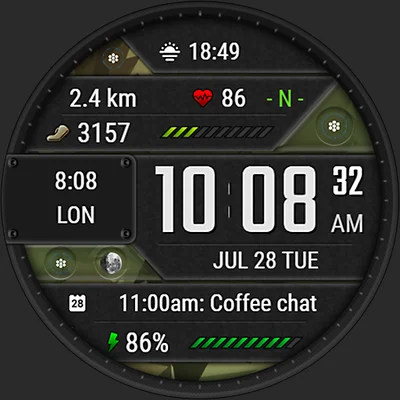
VFT01 タクティカルデジタルウォッチフェイスは、Wear OS向けのモダンなタクティカルデジタルウォッチフェイスです。堅牢なミリタリーデザイン、API 34+対応、そして豊富なカスタマイズオプションを兼ね備えています。
仕事中、アウトドア、移動中など、どんな場面でも、VFT01なら必要な情報を一目で確認できます。
日常使いを想定して設計されたこのウォッチフェイスは、大きく見やすいデジタル時計、日々の重要な情報、アクティビティトラッキング、そしてお気に入りのアプリへのクイックアクセスを提供します。すべての要素は、重要な情報が常に明確かつ瞬時に確認できるよう、綿密に配置されています。
17種類のカラーテーマ、カスタマイズ可能なコンプリケーション、アプリショートカット、2種類の常時表示スタイル、そしてスマートアクティビティインジケーターを備えたVFT01 タクティカルデジタルウォッチフェイスは、優れた視認性と利便性を維持しながら、あなたのスタイルに合わせてカスタマイズできます。
🔹 機能
基本情報
✅ 大きなデジタル表示の時刻と日付
✅ スマートなセグメントカラーインジケーター付きバッテリー残量表示
✅ 歩数と推定距離(キロメートル/マイル)
✅ 心拍数と動的ステータスインジケーター(低心拍数/正常心拍数/高心拍数)
✅ 月相表示
✅ 12時間表示の先頭ゼロを非表示にするオプション
🎨 カスタマイズ
• 17種類のカラーテーマ
• 2種類の常時表示(AOD)スタイル
• 3種類のカスタマイズ可能なコンプリケーション
• 4種類のカスタマイズ可能なアプリショートカット(うち1つは非表示)
• 12時間表示の先頭ゼロを非表示にするオプション
アクティビティ機能
✅ 10セグメントのデイリー歩数進捗インジケーターで、アクティビティレベルを一目で確認できます。
✅ 歩数、推定距離(キロメートル/マイル)
✅ 心拍数ステータスを色分け表示
✅ スマートバッテリーカラーインジケーター
🔗 隠しショートカット
• バッテリー残量 — バッテリーエリアをタップ
• 歩数 — アクティビティエリアをタップ
• 心拍数 — 心拍数エリアをタップ
• アラーム — 分をタップ
• カレンダー — 日付をタップ
• カスタムショートカット — 時をタップ
🚶♀ 距離(キロメートル/マイル)
距離は歩数から推定されます。
• 1 km ≈ 1312歩
• 1 マイル ≈ 2100歩
ウォッチフェイスの設定でキロメートルまたはマイルを選択してください。
🕒 時刻表示形式
12時間表示と24時間表示は、スマートフォンの設定と自動的に同期されます。
12時間表示の先頭ゼロはデフォルトで有効になっていますが、ウォッチフェイスの設定で無効にできます。
🔧 カスタマイズと設定
このウォッチフェイスは、コンプリケーション、アプリショートカット、スタイルを使用して完全にカスタマイズできます。
カスタマイズ方法:
• ウォッチフェイスを長押しします
• 「カスタマイズ」をタップします
• 設定項目を左右にスワイプします
• アプリや情報を割り当てるコンプリケーションエリアを選択します
コンプリケーションエリア
利用可能なコンプリケーションエリアは、「タップゾーンとアクティビティ」の図に表示されます。
割り当て可能な項目:
• アプリ
• 天気
• フィットネスデータ
• カレンダーイベント
• その他互換性のあるコンプリケーション
重要
• コンプリケーションの表示は、デバイスやインストールされているアプリによって異なる場合があります
• データが割り当てられていない場合、一部のエリアが空白になることがあります
• 利用可能な機能は、Samsung Galaxy Watch、Pixel Watch、その他のWear OSデバイスによって異なる場合があります。
📥 インストールに関する注意事項
ウォッチがスマートフォンに接続され、両方のデバイスが同じGoogleアカウントでログインしていることを確認してください。
インストール後、ウォッチフェイスが表示されるまで数分かかる場合があります。
インストール済みのウォッチフェイスを見つけるには:
• 現在使用しているウォッチフェイスを長押しします
• 右にスワイプして「ウォッチフェイスを追加」をタップします
• 「ダウンロード済み」セクションを開きます
Samsungユーザーは、以下のリンクからもウォッチフェイスをカスタマイズできます:
Galaxy Wearable → ウォッチフェイス → ダウンロード済み
私のウォッチフェイスにはすべて、インストールを簡単にするための「ウォッチで開く」ボタン付きのコンパニオンアプリが付属しています。
⚠ Wear OS、API 34以降が必要です
🚫 長方形のウォッチには対応していません
🙏 私のウォッチフェイスをお選びいただきありがとうございます!
✉ ご質問がありましたら、veselka.face@gmail.comまでご連絡ください。喜んでお手伝いいたします!
➡ 最新情報や新リリース情報をお見逃しなく!フォローしてください!
• Facebook - https://www.facebook.com/veselka.watchface/
• Telegram - https://t.me/VeselkaFace
• YouTube - https://www.youtube.com/@VeselkaFace
原文を表示
VFT01 Tactical Digital Watch Face – tactical digital watch face for Wear OS
VFT01 Tactical Digital Watch Face is a modern tactical digital watch face for Wear OS that combines a rugged military-inspired design, API 34+ support, and extensive customization options.
Whether you're at work, outdoors, or on the move, VFT01 keeps the information you need just a glance away.
Designed for everyday use, it provides a large easy-to-read digital clock, essential daily information, activity tracking, and quick access to your favorite apps. Every element is carefully arranged to keep important information clear and instantly accessible throughout the day.
With 17 color themes, customizable complications, app shortcuts, two Always-On Display styles, and smart activity indicators, VFT01 Tactical Digital Watch Face adapts to your personal style while maintaining excellent readability and convenience in any situation.
🔹 Features
Essential Information
✅ Large digital time and date
✅ Battery level with smart segmented color indicator
✅ Steps and estimated distance (KM/MI)
✅ Heart rate with dynamic status indicator (Low / Normal / High)
✅ Moon phase
✅ Option to hide the leading zero in 12-hour format
🎨 Personalization
• 17 color themes
• 2 Always-On Display (AOD) styles
• 3 customizable complications
• 4 customizable app shortcuts (including 1 hidden shortcut)
• Optional leading zero in 12-hour format
Activity Features
✅ 10-segment daily step progress indicator helps you monitor your activity level at a glance.
✅ Steps, estimated distance (KM/MI)
✅ Dynamic heart rate status colors
✅ Smart battery color indicator
🔗 Hidden Shortcuts
• Battery status — tap the battery area
• Steps — tap the activity area
• Heart rate — tap the heart rate area
• Alarm — tap the minute digits
• Calendar — tap the date
• Custom shortcut — tap the hour digits
🚶♀ Distance (KM/MI)
Distance is estimated from your step count:
• 1 km ≈ 1312 steps
• 1 mile ≈ 2100 steps
Choose KM or MI in the watch face settings.
🕒 Time format
12/24-hour mode is synchronized automatically with your phone settings.
Leading zero in 12-hour mode is enabled by default and can be disabled in watch face settings
🔧 Customization & Setup
This watch face supports full customization using complications, app shortcuts, and styles.
How to customize:
• Touch and hold the watch face
• Tap Customize
• Swipe left/right between settings
• Select a complication area to assign apps or information
Complication Areas
Available complication areas are shown in the Tap Zones & Activities diagram.
You can assign:
• apps
• weather
• fitness data
• calendar events
• and other compatible complicationss
Important
• Complication appearance may vary depending on device and installed apps
• Some areas may appear empty if no data is assigned
• Available features may vary between Samsung Galaxy Watch, Pixel Watch, and other Wear OS devices.
📥 Installation Notes
Please make sure your watch is connected to your phone and both devices are signed in with the same Google account.
The watch face may take a few minutes to appear after installation.
To find the installed watch face:
• Touch and hold the current watch face
• Swipe right and tap “Add watch face”
• Open the Downloaded section
Samsung users can also customize the watch face from:
Galaxy Wearable → Watch faces → Downloaded
All my watch faces include a companion app with an Open on watch button to help simplify installation.
⚠ Requires Wear OS, API 34+
🚫 Not compatible with rectangular watches
🙏 Thank you for choosing my watch face!
✉ Have questions? Contact me at veselka.face@gmail.com — I’ll be happy to help!
➡ Follow me for exclusive updates and new releases!
• Facebook - https://www.facebook.com/veselka.watchface/
• Telegram - https://t.me/VeselkaFace
• YouTube - https://www.youtube.com/@VeselkaFace
データ セーフティ
このアプリが収集・共有するデータについて、VeselkaFace DESIGNがGoogle Playで申告している内容です。
- 第三者と共有されるデータはありません詳しくは、デベロッパーが共有を申告する方法についての説明をご覧ください
- データは収集されません詳しくは、デベロッパーが収集を申告する方法についての説明をご覧ください
開発元の連絡先
- ウェブサイトveselkaface.com
- メールveselka.face@gmail.com
- プライバシーポリシーveselkaface.com
- 住所31 kv. 89 vul. Zaporizkoho kozatstva Zaporizhzhia Ukraine 69076
情報
- 提供元
- VeselkaFace DESIGN
- カテゴリ
- カスタマイズ
- バージョン
- 1.0.0
- 更新日
- 2026/8/25
- リリース
- 2026/7/22
- 対象年齢
- 3 歳以上
- 価格
- ¥280
- パッケージ名
- com.watchfacestudio.vft01tacticaldigital