Watch Face Digital JSON D1
Devration- 3 歳以上対象年齢
- カスタマイズカテゴリ
- 2024/8/17更新日
- ¥350価格
com.watchfacestudio.jsonD1のGoogle Play公式ページにリンクしています。最終確認:2026/11/24。
このアプリについて
Googleによる英語 (イギリス)からの自動翻訳です。
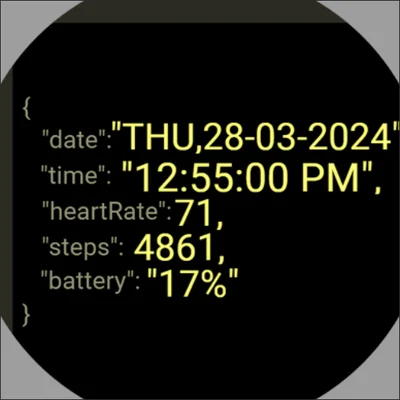
{ "text": "WearOS 用のスタイリッシュなウォッチフェイスで時間を JSON 形式で表示します"}
このウォッチフェイスは、Web 開発で使用される一般的なデータ交換言語である JSON 形式で現在の時刻を表示します。文字盤は黒を基調としたシンプルなデザインです。時刻は、時、分、秒のキーと数値の値を持つ JSON オブジェクトとして表示されます。
これは正確な JSON ではありませんが、実用的なものにするために自由に創造性を発揮しました。日常使いに。正確な ISO JSON ではありませんが、そのインスピレーションを受けています。
この文字盤は、プログラマー、Web 開発者、または JSON のシンプルさと優雅さを好む人にとって理想的です。
Samsung ウェアラブル アプリを使用して、テーマを簡単にカスタマイズし、利用可能な 8 つのコンプリケーションを設定します。
-OLED保護機能が内蔵されています。
-画面の焼き付きを最小限に抑えるために、常に表示される自動ジャグル機能が組み込まれており、毎分時間を移動します。
AOD モードは意図的に中心からずれています。これはバグではなく、焼き付き保護機能です。
-お好みに応じて、12時間モードと24時間モードを切り替えることもできます。
-AOD用の内蔵バッテリーセーバーモード
ウォッチフェイスをカスタマイズするには、画面の中央を長押ししてカスタマイズ設定を開きます。そこでは、色、合併症、アプリのショートカットを変更できます。時計の設定で常時表示モードを有効または無効にすることもできます。これは、時計がアイドル状態のときに、よりシンプルなバージョンの文字盤を表示します。
注意すべき点の 1 つは、このアプリは Tizen OS で実行されるため、Samsung Gear S2 または Gear S3 デバイスと互換性がないことです。このアプリは、Samsung Galaxy Watch 4、Galaxy Watch 5、Galaxy Watch 6、Pixel Watch など、API レベル 30 以上の Wear OS デバイス専用です。
この Minimal Digital Watch Face JSON D1 に関して問題や質問がある場合は、遠慮なく電子メール (app.devting@gmail.com) でご連絡ください。喜んでお手伝いさせていただき、より良い体験を提供させていただきます。このアプリが気に入ったら、Play ストアに肯定的な評価とレビューを残してください。本当に助かります!
さらに多くのカラー スタイルやカスタム機能が必要な場合は、メールをお送りください。新しいリリースに追加できるよう最善を尽くします。
残忍な正直なフィードバックを共有してください。何かもっと良い方法があると思われる場合は、app.devting@gmail.com にメールをお送りください。
モバイル アプリは、サポートに簡単に連絡できるヘルパー ツールとして機能します。
Wear OS デバイスに Minimal Digital Watch Face JSON D1 をお選びいただきありがとうございます。皆さんも私と同じように楽しんでいただければ幸いです! 😊
原文を表示
This watch face displays the current time in JSON format, a popular data-interchange language used in web development. The watch face has a minimalist design with a black background. The time is shown as a JSON object with keys for hours, minutes, and seconds, and values as numbers.
It's not exact JSON, I have taken creative liberty to make it practical. for day-to-day use. not exact iso JSON, its inspired.
This watch face is ideal for programmers, web developers, or anyone who appreciates the simplicity and elegance of JSON.
Use Samsung wearable app to easily customize theme and set your available 8 complications.
-It comes with Built in OLED protection.
-To minimize screen burn-in it comes with built in auto Juggle feature for always on display, it moves times every minute.
AOD mode is off centered intentionally, its not a bug its a burn in protection feature.
-You can also switch between 12- and 24-hour modes, depending on your preference.
-Built in battery saver mode for AOD
To customize your watch face, just long press the middle spot of the screen and open the customization settings. There, you can change the colour, the complications, and the app shortcuts. You can also enable or disable the always on display mode in watch settings, which shows a simpler version of the watch face when your watch is idle.
One thing to note is that this app is not compatible with Samsung Gear S2 or Gear S3 devices, as they run on Tizen OS. This app is only for Wear OS devices with API level 30or higher, such as Samsung Galaxy Watch 4, Galaxy Watch 5,Galaxy Watch 6, Pixel Watch, and others.
If you have any issues or questions about this Minimal Digital Watch Face JSON D1, don't hesitate to contact me by email at app.devting@gmail.com. I'll be happy to help you out and make your experience better. And if you like this app, please leave a positive rating and review on the Play Store. It really helps me out!
If you want more color styles or custom features drop an email, I will try my best to add them in new release.
Please share Brutal Honest feedback, if you feel something can be done better drop an email to app.devting@gmail.com.
Mobile app acts as a helper tool which enables you to easily contact for support.
Thanks for choosing Minimal Digital Watch Face JSON D1 for your Wear OS device. I hope you enjoy it as much as I do! 😊
データ セーフティ
このアプリが収集・共有するデータについて、DevrationがGoogle Playで申告している内容です。
- 第三者と共有されるデータはありません詳しくは、デベロッパーが共有を申告する方法についての説明をご覧ください
- データは収集されません詳しくは、デベロッパーが収集を申告する方法についての説明をご覧ください
新機能
2024/8/17
release
開発元の連絡先
- メールApp.devting@gmail.com
- プライバシーポリシーdocs.google.com
- 住所kewal vihar, Sahastradhara road, Dehradun Dehradun, Uttarakhand 248001 India
情報
- 提供元
- Devration
- カテゴリ
- カスタマイズ
- 更新日
- 2024/8/17
- リリース
- 2024/3/23
- 対象年齢
- 3 歳以上
- 価格
- ¥350
- パッケージ名
- com.watchfacestudio.jsonD1