Watch face M10
VG Faces- 3 歳以上対象年齢
- カスタマイズカテゴリ
- 2026/11/21更新日
- ¥32価格
com.watchfacestudio.m10のGoogle Play公式ページにリンクしています。最終確認:2026/11/26。
このアプリについて
Googleによる英語 (アメリカ合衆国)からの自動翻訳です。
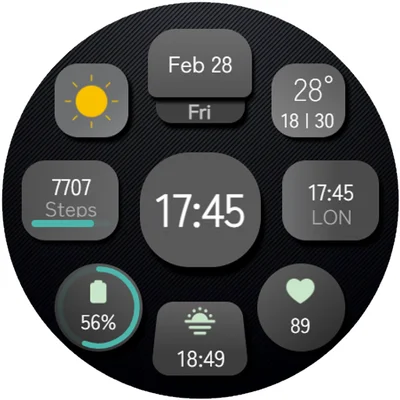
5つのカスタムウィジェット、天気予報、2つのAODモードを備えた、モダンなデジタルWear OSウォッチフェイス。
M10は、Wear OSスマートウォッチ専用に設計された、モダンで洗練された、情報量豊富なデジタルウォッチフェイスです。スタイリッシュなモジュラーカードレイアウト、滑らかなソフト3D効果、そして真のAMOLEDダークカラーを採用したM10は、日々の重要な統計情報、天気、世界時刻を視覚的な煩雑さを排除し、一目で確認できます。
最新のウォッチフェイスフォーマット(WFF)を採用したM10は、バッテリー効率を最大限に高め、スムーズな動作を実現し、Samsung Galaxy WatchやGoogle Pixel Watchを含む最新のWear OSデバイスとの完全な互換性を保証します。
主な機能と表示データ
• 鮮明なデジタル時刻表示:12時間表示と24時間表示の両方に対応した大型の中央時計(スマートフォンの設定と自動的に同期)。オプションで先頭のゼロ表示を切り替えることも可能です。
• アラームショートカット:中央の時刻表示をタップするだけで、アラームにすぐにアクセスできます。
• 日付と曜日表示:上部のモジュールに、現在の月、日、曜日が表示されます。
• リアルタイム天気と気温:現在の気温と日中の最高/最低気温予報を表示する専用天気アイコン。
豊富なカスタマイズ機能
M10を自分だけのオリジナルウォッチにカスタマイズ:ウォッチ本体または専用アプリから直接設定できます。
• 5つのカスタマイズ可能なコンプリケーション:天気、歩数、心拍数、世界時計、日の出/日の入り時刻、カレンダーイベントなど、最も気になるデータを表示するモジュール式ウィジェットをパーソナライズできます。
• 複数のカラースキーム:鮮やかなアクセントカラーと落ち着いたモノクロトーンを切り替えて、服装やウォッチストラップに合わせてカスタマイズできます。
• 3種類の背景:バッテリー消費を最小限に抑える深みのあるAMOLEDの漆黒の背景、または繊細な質感のダークな背景から選択できます。
• 先頭ゼロ表示オプション:時表示の先頭ゼロを簡単に表示/非表示できます。
バッテリーに優しい常時表示ディスプレイ(AOD)
M10は、視認性と消費電力のバランスを最適化するために特別に設計された2種類の常時表示ディスプレイ(AOD)スタイルを搭載しています。
• 情報表示AOD:手首を下ろした状態でも、暗めのモジュラーレイアウトと重要な指標が表示されます。
• バッテリー節約AOD:デジタル時刻のみを表示する超ミニマルな純黒画面で、バッテリー駆動時間を最大限に延ばします。
互換性
Wear OS 5.0以降(API 34+)を搭載したすべてのスマートウォッチに対応しています。対応機種:
• Samsung Galaxy Watch
• Google Pixel Watch
• OnePlus Watch
• TicWatch Proおよびその他のWear OS 5 / Wear OS 6デバイス
インストールとセットアップ
スマートウォッチがBluetoothでスマートフォンに接続されていることを確認してください。
Google Playからウォッチフェイスをインストールしてください(ブラウザまたはスマートフォンからインストールする場合は、ドロップダウンメニューからお使いのスマートウォッチを選択してください)。
現在表示されているウォッチ画面を長押しし、スワイプして「M10」を探し、「カスタマイズ」をタップして、色、背景、AODモード、コンプリケーションを設定してください。
注:歩数や心拍数などのセンサーデータは、ウォッチのシステムヘルスプロバイダーから直接取得されます。正確なトラッキングのために、ウォッチで必要なセンサー権限が付与されていることを確認してください。
原文を表示
M10 is a modern, clean, and highly informative digital watch face designed exclusively for Wear OS smartwatches. Featuring a sleek modular card layout, smooth soft-3D depth, and true AMOLED dark aesthetics, M10 puts your essential daily stats, weather, and world time right at a glance without visual clutter.
Built using the latest Watch Face Format (WFF), M10 ensures maximum battery efficiency, smooth performance, and full compatibility with modern Wear OS devices, including Samsung Galaxy Watch and Google Pixel Watch.
KEY FEATURES & DISPLAY DATA
• Crisp Digital Time: Large central clock supporting both 12-hour and 24-hour formats (syncs automatically with your phone settings) with an optional leading zero toggle.
• Quick Alarm Shortcut: Tap directly on the central time display for instant access to your alarms.
• Date & Day Display: Clear top module showing the current month, date, and day of the week.
• Live Weather & Temperature: Dedicated weather icon paired with current temperature and daily high/low forecast.
EXTENSIVE CUSTOMIZATION
Make M10 truly yours directly from your watch or the companion app:
• 5 Customizable Complications: Personalize the modular widgets to display the data you care about most—weather, steps, heart rate, world clock, sunrise/sunset, calendar events, and more.
• Multiple Color Schemes: Switch between vibrant accent colors and clean monochrome tones to match your outfit or watch strap.
• 3 Distinct Backgrounds: Choose between deep AMOLED pitch-black for maximum battery savings or subtle textured dark surfaces.
• Leading Zero Option: Easily show or hide the leading zero in the hour display.
BATTERY-FRIENDLY ALWAYS ON DISPLAY (AOD)
M10 features 2 specially optimized Always-On Display styles to balance visibility and power consumption:
• Informative AOD: Keeps your dimmed modular layout and essential metrics visible even when your wrist is down.
• Battery Save AOD: Ultra-minimalist pure black screen showing only the digital time to extend battery life to the maximum.
COMPATIBILITY
Designed for all smartwatches running Wear OS 5.0 and above (API 34+), including:
• Samsung Galaxy Watch
• Google Pixel Watch
• OnePlus Watch
• TicWatch Pro and other Wear OS 5 / Wear OS 6 devices
INSTALLATION & SETUP
Ensure your watch is connected to your phone via Bluetooth.
Install the watch face from Google Play (select your watch device in the drop-down menu if installing from a browser or phone).
Long-press your current watch screen, swipe to find M10, and tap Customize to set up your colors, backgrounds, AOD mode, and complications.
Note: Sensor data such as steps and heart rate are sourced directly from your watch's system health providers. Ensure necessary sensor permissions are granted on your watch for accurate tracking.
データ セーフティ
このアプリが収集・共有するデータについて、VG FacesがGoogle Playで申告している内容です。
- 第三者と共有されるデータはありません詳しくは、デベロッパーが共有を申告する方法についての説明をご覧ください
- データは収集されません詳しくは、デベロッパーが収集を申告する方法についての説明をご覧ください
- Play ファミリー ポリシーの遵守に努めています
新機能
2026/11/21
Updating targetSDK
開発元の連絡先
- メールvolder83@gmail.com
- プライバシーポリシーsites.google.com
- 住所W.-I.-Lenin-Straße 51 19370 Parchim Germany
情報
- 提供元
- VG Faces
- カテゴリ
- カスタマイズ
- 更新日
- 2026/11/21
- リリース
- 2025/2/26
- 対象年齢
- 3 歳以上
- 価格
- ¥32
- パッケージ名
- com.watchfacestudio.m10