Weather 3D v2
VG Faces- 3 歳以上対象年齢
- カスタマイズカテゴリ
- 2026/8/26更新日
- ¥300価格
com.watchfacestudio.weather_3d_v2のGoogle Play公式ページにリンクしています。最終確認:2026/11/14。
このアプリについて
Googleによる英語 (アメリカ合衆国)からの自動翻訳です。
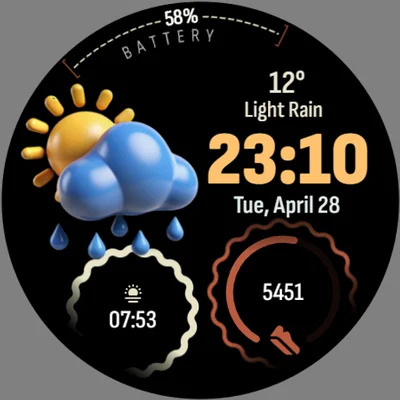
Wear OSのデジタルフェイスには、3D天気アイコン、カスタムカラー、コンプリケーションが搭載されています。
Weather 3D v2 ウォッチフェイス
Wear OS 用の Weather 3D v2 でスマートウォッチを生き生きとさせましょう。このデジタルウォッチフェイスは、美しい 3D 天気アイコン、クリアなタイポグラフィ、豊富なカスタマイズ機能を備え、手首を際立たせます。
主な機能:
• 美しい 3D 天気: 晴れ、雨、雷雨、雪などの現在の状況を表す、美しく高品質な 3D アイコン。
• カスタマイズ可能な 2 つのコンプリケーション: 下部の 2 つの円形のスロットをパーソナライズして、お好みの毎日のデータを表示します。
• 色のカスタマイズ: コンプリケーションとアクセントの色を変更して、スタイルに完璧に合わせます。
• 先頭ゼロの制御: 美的好みに合わせて、時桁の先頭ゼロを表示するか非表示にするかを選択します。
• クリーンAODモード: バッテリーを節約する常時表示ディスプレイで、デジタル時刻を洗練されたミニマルなスタイルで表示します。
スマートショートカットシステム:
統合されたタップゾーンで時計を効率的に操作します。
• 時刻をタップ: アラームを開きます
• 日付をタップ: カレンダーを開きます
• バッテリーをタップ: バッテリーの状態を開きます
• 天気アイコンをタップ: カスタマイズ可能なアプリショートカット
インストール:
1. 時計がBluetoothで接続されていることを確認します。
2. Google Playストアからダウンロードします。
3. 時計の画面を長押しし、一番下までスクロールして、適用するウォッチフェイスを選択します。
互換性:
Wear OS 5+デバイス専用に設計されています。対応デバイスには以下が含まれます。
• Samsung Galaxy Watch 8 & Ultra
• Google Pixel Watch 4
• その他、Wear OS 5以降を搭載した最新デバイス。
原文を表示
Weather 3D v2 Watch Face
Bring your smartwatch to life with Weather 3D v2 for Wear OS. This digital watch face features stunning 3D weather icons, clear typography, and extensive customization to make your wrist stand out.
Key Features:
• Stunning 3D Weather: Beautiful, high-quality 3D icons that represent current conditions like sun, rain, thunderstorms, and snow.
• 2 Customizable Complications: Personalize the two circular slots at the bottom to display your preferred daily data.
• Color Customization: Change the colors of the complication and accents to perfectly match your style.
• Leading Zero Control: Choose to show or hide the leading zero on the hour digit to suit your aesthetic preferences.
• Clean AOD Mode: A battery-saving Always-On Display that keeps the digital time visible in a sleek, minimalist style.
Smart Shortcut System:
Navigate your watch efficiently with integrated tap zones:
• Tap Time: Opens Alarm
• Tap Date: Opens Calendar
• Tap Battery: Opens Battery Status
• Tap Weather Icon: Customizable App Shortcut
Installation:
1. Ensure your watch is connected via Bluetooth.
2. Download from the Google Play Store.
3. Long-press your watch screen, scroll to the end, and select the watch face to apply.
Compatibility:
Designed exclusively for Wear OS 5+ devices, including:
• Samsung Galaxy Watch 8 & Ultra
• Google Pixel Watch 4
• And other newer devices running Wear OS 5 or higher.
データ セーフティ
このアプリが収集・共有するデータについて、VG FacesがGoogle Playで申告している内容です。
- 第三者と共有されるデータはありません詳しくは、デベロッパーが共有を申告する方法についての説明をご覧ください
- データは収集されません詳しくは、デベロッパーが収集を申告する方法についての説明をご覧ください
- Play ファミリー ポリシーの遵守に努めています
新機能
2026/8/26
開発元の連絡先
- メールvolder83@gmail.com
- プライバシーポリシーsites.google.com
- 住所W.-I.-Lenin-Straße 51 19370 Parchim Germany
情報
- 提供元
- VG Faces
- カテゴリ
- カスタマイズ
- 更新日
- 2026/8/26
- リリース
- 2026/4/2
- 対象年齢
- 3 歳以上
- 価格
- ¥300
- パッケージ名
- com.watchfacestudio.weather_3d_v2