Wfore4
Speedydesign- 3 歳以上対象年齢
- カスタマイズカテゴリ
- 2026/8/13更新日
- ¥200価格
com.watchfacestudio.wfore4のGoogle Play公式ページにリンクしています。最終確認:2026/11/14。
このアプリについて
Googleによる英語 (アメリカ合衆国)からの自動翻訳です。
スポーツ アナログ時間
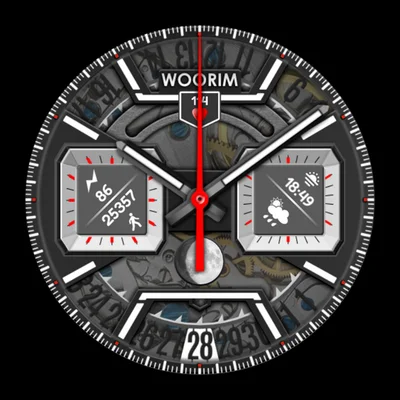
モータースポーツの世界からインスピレーションを得た、スポーティかつエレガントな文字盤。このウォッチは、月の満ち欠け、心拍数、歩数を計測します。お好みのコンプリケーションを選択し、色をカスタマイズできます。
インストールに関する注意事項:
インストールとトラブルシューティングガイドについては、こちらのリンクをご覧ください:https://speedydesign.it/installazione
このウォッチフェイスは、すべてのWear OSデバイスに対応しています。
説明:
• アナログ時刻
• 月の満ち欠け
• バッテリー残量
• 心拍数
• 歩数
• 現在の天気
• コンプリケーション
• AOD(常時表示ディスプレイ)
カスタマイズ可能:
9種類のサインカラー
1種類のコンプリケーション
文字盤のカスタマイズ:
1 - ディスプレイを長押し
2 - 「カスタマイズ」オプションをタップ
文字盤のコンプリケーション:
文字盤には、お好みのデータを表示できます。
例えば、天気、心拍数、気圧計などを選択できます。
心拍数に関する注意事項:
このウォッチフェイスは、インストール時に心拍数を自動的に計測したり、表示したりすることはありません。
文字盤に現在の心拍数データを表示するには、手動で測定する必要があります。
測定するには、心拍数表示エリアをタップしてください。
数秒お待ちください。文字盤が心拍数を測定し、現在の結果を表示します。
ウォッチフェイスをインストールする際にセンサーの使用を有効にしたことを確認してください。有効になっていない場合は、別のウォッチフェイスに切り替えてから、このウォッチフェイスに戻してセンサーを有効にしてください。
最初の手動測定後、文字盤は10分ごとに自動的に心拍数を測定します。手動測定も可能です。
(一部の機能は、一部の時計ではご利用いただけない場合があります。)
最新情報はこちら:
newsletter@speedydesign.it
SPEEDYDESIGN:
https://www.speedydesign.it
FACEBOOK:
https://www.facebook.com/Speedy-Design-117708058358665
INSTAGRAM:
https://www.instagram.com/speedydesign.ita/
ありがとうございます!
原文を表示
Sporty and elegant dial, inspired by the world of motor racing. This watch tracks the moon phases, heart rate, and steps. You can choose a complication of your choice and customize the colors.
INSTALLATION NOTES:
Please check this link for installation and troubleshooting guide: https://speedydesign.it/installazione
This watch face supports all Wear OS devices.
Description:
• Analog time
• Moon phase
• Battery Level
• Heart rate
• Steps Count
• Current weather conditions
• Complication
• AOD
Customizable:
x 09 Signs Colors
x 01 Complication
Dial customization:
1 - Touch and hold the display
2 - Tap on the Customize option
Dial Complications:
you can customize the dial with all the data you want.
For example, you can select weather, heart rate, barometer etc.
Notes on heart rate:
The watch face does not automatically measure and does not automatically display the heart rate result when installed.
To see current heart rate data on the dials, you will need to take a manual measurement.
To do this, tap the heart rate display area.
Wait a few seconds. The dial will take a measurement and display the current result.
Make sure you enabled the use of sensors when you installed the watch face, otherwise swap it with another watch face and then go back to this one to enable the sensors.
After the first manual measurement, the dial can automatically measure your heart rate every 10 minutes. Manual measurement will also be possible.
(Some features may not be available on some watches).
STAY TUNED:
newsletter@speedydesign.it
SPEEDYDESIGN:
https://www.speedydesign.it
FACEBOOK:
https://www.facebook.com/Speedy-Design-117708058358665
INSTAGRAM:
https://www.instagram.com/speedydesign.ita/
Thank you !
データ セーフティ
このアプリが収集・共有するデータについて、SpeedydesignがGoogle Playで申告している内容です。
- 第三者と共有されるデータはありません詳しくは、デベロッパーが共有を申告する方法についての説明をご覧ください
- データは収集されません詳しくは、デベロッパーが収集を申告する方法についての説明をご覧ください
新機能
バージョン 1.0.0 · 2026/8/13
- Initial release
開発元の連絡先
- ウェブサイトspeedydesign.it
- メールsupport@speedydesign.it
- プライバシーポリシーspeedydesign.it
- 住所Via dell'Alpino, 33 33047 Remanzacco Italy
情報
- 提供元
- Speedydesign
- カテゴリ
- カスタマイズ
- バージョン
- 1.0.0
- 更新日
- 2026/8/13
- リリース
- 2026/7/31
- 対象年齢
- 3 歳以上
- 価格
- ¥200
- パッケージ名
- com.watchfacestudio.wfore4