Wildflower WatchFace
Filmmotion Studio広告を含む
- 3 歳以上対象年齢
- カスタマイズカテゴリ
- 2026/8/1更新日
- 無料価格
com.watchface.wearos.wildflowerwatchfaceのGoogle Play公式ページにリンクしています。最終確認:2026/11/21。
このアプリについて
Googleによる英語 (アメリカ合衆国)からの自動翻訳です。
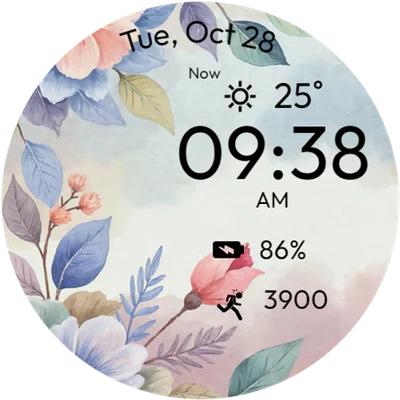
時間、歩数、バッテリーを表示する美しい野生の花のデジタル時計の文字盤。
Wildflower WatchFaceで、手首に自然の美しさを添えましょう。繊細な野花のアートとスマートなデイリー機能を融合させた、Wear OS 対応の美しいデジタルウォッチフェイスです。自然、エレガンス、スタイリッシュなスマートウォッチデザインを愛するユーザーに最適です。
🌼 最適なユーザー: 女性、女性、女の子、そして花好きの方。自然にインスパイアされたエレガントで季節感のあるウォッチフェイスをお好みの方。
🎉 あらゆるシーンに最適: 普段使い、オフィスウェア、カジュアルなお出かけ、結婚式、お祝いのシーンなど、この野花のデザインは、時代を超えた魅力でスマートウォッチを彩ります。
✨ 主な機能:
1. 柔らかくカラフルなテーマの、個性的な野花のアート。
2.デジタル表示: 時刻、日付、歩数、バッテリー残量、天気情報。
3.常時表示ディスプレイ(AOD)対応で見やすさも抜群です。
4. すべての Wear OS デバイスでスムーズなパフォーマンスを実現。
⚙️ スマートフォンアプリの機能
モバイルアプリは、Wear OS スマートウォッチへのウォッチフェイスのインストールと検索をサポートするコンパニオンツールです。
⚙️ ウォッチフェイスの機能
• 12時間/24時間デジタル時刻
• 日付と曜日表示
• バッテリー残量インジケーター
• 歩数計
• 常時表示ディスプレイ(AOD)対応
📲 インストール手順:
1. スマートフォンでコンパニオンアプリを開きます。
2. 「ウォッチにインストール」をタップします。
ウォッチの設定またはギャラリーから Wildflower ウォッチフェイス を選択します。
✅ 互換性: すべての Wear OS デバイス(API 33 以上)で動作します。
Google Pixel Watch および Samsung Galaxy Watch を含む。
❌ 長方形の時計には適していません。
このエレガントで機能的なワイルドフラワー ウォッチフェイスで、スマートウォッチに野花の魅力をプラスしましょう。美しさと実用性の完璧なバランスを実現しています。
🌸🌿
原文を表示
Bring natural beauty to your wrist with the Wildflower WatchFace—a stunning digital watch face for Wear OS that combines delicate wildflower art with smart daily features. Perfect for users who love nature, elegance, and stylish smartwatch designs.
🌼 Perfect For: Women, ladies, girls, and flower lovers who
enjoy nature-inspired, elegant, and seasonal watch faces.
🎉 Ideal for All Occasions: Whether it’s everyday use, office
wear, casual outings, weddings, or festive moments, this wildflower
design enhances your smartwatch with timeless charm.
✨ Key Features:
1. Unique wildflower artwork with soft, colorful themes.
2.Digital Display: Time, date, steps, battery %, and weather info.
3.Always-On Display (AOD) Support for easy readability.
4.Optimized for smooth performance on all Wear OS devices.
⚙️ Phone App Features
The mobile app is only a companion tool to help install and locate the
watch face on your Wear OS smartwatch.
⚙️ Watch Face Features
• 12/24h Digital Time
• Date & Day Display
• Battery Level Indicator
• Step Counter
• Always-On Display (AOD) Support
📲 Installation Instructions:
1.Open the Companion App on your phone.
2.Tap "Install on Watch."
On your watch, select Wildflower WatchFace from your settings or gallery.
✅ Compatibility: Works with all Wear OS devices (API 33+),
including Google Pixel Watch & Samsung Galaxy Watch.
❌ Not suitable for rectangular watches.
Add the charm of wildflowers to your smartwatch with this elegant and
functional Wildflower WatchFace—a perfect balance of beauty and
utility. 🌸🌿
データ セーフティ
このアプリが収集・共有するデータについて、Filmmotion StudioがGoogle Playで申告している内容です。
- 第三者と共有されるデータはありません詳しくは、デベロッパーが共有を申告する方法についての説明をご覧ください
- このアプリは以下の種類のデータを収集することがありますアプリのアクティビティ、アプリの情報、パフォーマンス、デバイスまたはその他の ID
- データは送信中に暗号化されます
- データを削除できません
開発元の連絡先
- ウェブサイトfilmmotionstudio.wordpress.com
- メールhelpfilmmotionstudio@gmail.com
- プライバシーポリシーfilmmotionstudio.wordpress.com
- 住所18 VITTHALNAGAR SOC NR BAPASITARAM CHOWK KATARGAM SURAT CITY SURAT, Gujarat 395005 India
情報
- 提供元
- Filmmotion Studio
- カテゴリ
- カスタマイズ
- 更新日
- 2026/8/1
- リリース
- 2025/10/6
- 対象年齢
- 3 歳以上
- 価格
- 無料
- パッケージ名
- com.watchface.wearos.wildflowerwatchface