Windows CMD Theme Watch Face
Open Sourcerer- 3 歳以上対象年齢
- カスタマイズカテゴリ
- 2026/10/30更新日
- ¥170価格
com.opensourcerer.watchface.premium.windowscmdのGoogle Play公式ページにリンクしています。最終確認:2026/11/21。
このアプリについて
Googleによる英語 (イギリス)からの自動翻訳です。
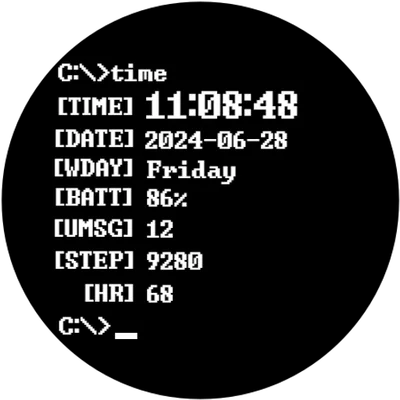
Windows コマンド プロンプトをテーマにしたデザインで時間を示すリアルな文字盤!
Windowsコマンドプロンプトをイメージしたデザインのウォッチフェイスで、個性を際立たせましょう!
特長:
- 8種類のカラフルなテーマ
- デジタル表示
- スマートフォンの時刻表示設定に準拠した12時間/24時間表示
- 充電/バッテリー残量表示
- すっきりとした見やすい常時表示ディスプレイ
- ほぼすべてのWear OSスマートウォッチに対応
表示情報:
- 時刻(12時間/24時間表示)
- 日付
- 曜日
- バッテリー残量(充電/バッテリー残量表示付き)
- 未読通知数
- 歩数
- 心拍数
Wear OS搭載スマートウォッチ向け
スマートフォンでも利用可能
このウォッチフェイスはスマートフォンアプリで確認できます。カメラや写真を使って、各スタイルを実物大で確認したり、手首に装着した状態をイメージしたりできます。ウォッチで設定を変更する前に、各設定の機能を確認したり、壁紙を設定したり、ワンタップでウォッチのPlayストアからウォッチフェイスをダウンロードしたりできます。ステップバイステップのガイドで、インストール、カスタマイズ、問題解決をサポートします。Open Sourcererの全コレクションを閲覧し、新しい顔ぶれをご覧ください。
原文を表示
Stand out from the crowd with a watch face that shows time in a Windows Command Prompt themed design!
Features:
- 8 colorful themes
- Digital time display
- 12H/24H time formats respecting smartphone time format settings
- Charging / low battery indicator
- Clean and efficient Always On Display
- Compatible with almost all Wear OS smartwatches
Displayed information:
- Time (12H/24H formats)
- Date
- Weekday
- Battery level (with additional charging and low battery indicators)
- Unread notification count
- Step count
- Heart rate
For smartwatches with Wear OS operating system.
On your phone, too
This watch face comes with a phone app. See it in every style, at its true size, and on your own wrist through the camera or a photo. Find out what each setting does before you change it on the watch, set the matching wallpapers, and open the face in your watch’s Play Store in a tap. Step-by-step guides help you install it, customise it and put things right. Browse the whole Open Sourcerer collection, and hear about new faces.
データ セーフティ
このアプリが収集・共有するデータについて、Open SourcererがGoogle Playで申告している内容です。
- 第三者と共有されるデータはありません詳しくは、デベロッパーが共有を申告する方法についての説明をご覧ください
- データは収集されません詳しくは、デベロッパーが収集を申告する方法についての説明をご覧ください
- Play ファミリー ポリシーの遵守に努めています
新機能
2026/10/30
This watch face now has a phone app. See it in every style, at its true size and on your own wrist through the camera. Find out what each setting does, set the matching wallpapers, and open the face in your watch’s Play Store in a tap. Browse the whole Open Sourcerer collection, and hear about new faces.
開発元の連絡先
- メールOpenSourcerer.help@gmail.com
- プライバシーポリシーsites.google.com
- 住所Brolių g. 10 02152 Vilnius Lithuania
情報
- 提供元
- Open Sourcerer
- カテゴリ
- カスタマイズ
- 更新日
- 2026/10/30
- リリース
- 2024/6/27
- 対象年齢
- 3 歳以上
- 価格
- ¥170
- パッケージ名
- com.opensourcerer.watchface.premium.windowscmd