Winter Ice Watch Face
Women Watch Faces- 3 歳以上対象年齢
- カスタマイズカテゴリ
- 2026/10/15更新日
- ¥200価格
com.watchfacestudio.ice.wfのGoogle Play公式ページにリンクしています。最終確認:2026/11/25。
このアプリについて
Googleによる英語 (アメリカ合衆国)からの自動翻訳です。
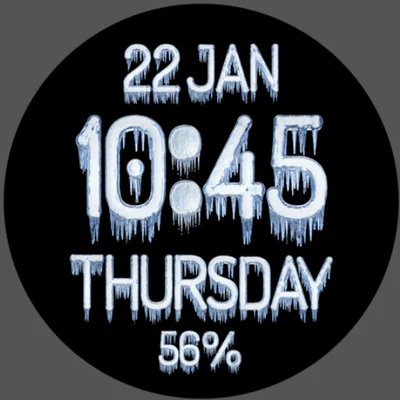
フローズンアイスドリップスタイル:日付、時刻、曜日、バッテリー、7つのテーマ、AOD
氷の滴りをイメージした大胆でドラマチックなウォッチフェイス。つららのディテールが美しい、氷の滴りを模したタイポグラフィが特徴です。クラシックなブラック、ディープネイビーブルー、ダークミッドナイトネイビー、スチールブルー、スレートブルー、クリスプホワイト、そしてクリーンなペールカラーの7色展開。クールな冬の雰囲気、氷の滴りをイメージしたフォント、氷のようなスマートウォッチデザイン、あるいはダークでムーディーなブルートーンがお好みの方にも、このクールなWear OSディスプレイは、毎日あなたの手首に力強い冬のムードをもたらします。
ユニークな氷のウォッチフェイス、クールな冬のスマートウォッチテーマ、ダークブルーのGalaxy Watchデザイン、フロスト加工のデジタルディスプレイ、あるいはSamsung Galaxy WatchやPixel Watchにエッジの効いた目を引く季節感あふれるデザインをお探しの方に最適です。大胆でドラマチック、そして決して見過ごすことのできない存在感。
このウォッチフェイスはWear OS API 33以降(Wear OS 4以降)が必要です。Samsung Galaxy Watch 4/5/6/7/Ultraシリーズ以降、Pixel Watchシリーズ、およびWear OS 4以降を搭載したその他のスマートウォッチに対応しています。
必ず、お使いのスマートウォッチに登録されているGoogleアカウントと同じアカウントでご購入ください。インストールは数分後に自動的に開始されます。
スマートウォッチへのインストールが完了したら、以下の手順でウォッチフェイスを適用してください。
1. スマートウォッチに表示されている現在のウォッチフェイスを長押しします。
2. スクロールして目的のウォッチフェイスを探します。
3. タップして適用します。
機能:
- 時刻、日付、曜日
- バッテリー残量表示
- 深みのある黒から淡い白まで、7種類のクールなカラーテーマ
- 常時表示(AOD)モードで、シンプルな黒の背景に時刻を表示します。
テーマを切り替えるには、ウォッチフェイスを長押しし、「カスタマイズ」メニューを開いて、1~7の中からお好みのスタイルを選択してください。
特別設計の常時表示アンビエントモード。スマートウォッチの設定で常時表示をオンにすると、待機時に低電力表示が表示されます。この機能はバッテリー消費量が増えることにご注意ください。
原文を表示
A bold and dramatic frozen watch face featuring stunning ice drip typography with icicle details, available in 7 unique color themes — classic black, deep navy blue, dark midnight navy, steel blue, slate blue, crisp white, and a clean pale finish. Whether you love a cool winter aesthetic, icy dripping fonts, frozen smartwatch designs or dark moody blue tones, this chilling Wear OS display brings a powerful winter vibe to your wrist every single day.
Perfect for anyone searching for a unique ice watch face, a cool winter smartwatch theme, a dark blue Galaxy Watch design, a frosted digital display, or an edgy and eye-catching seasonal look for their Samsung Galaxy Watch or Pixel Watch. Bold, dramatic and impossible to ignore.
This watch face requires Wear OS API 33+ (Wear OS 4 or newer). Compatible with Samsung Galaxy Watch 4/5/6/7/Ultra Series and newer, Pixel Watch series, and other watches with Wear OS 4 or newer.
Make sure you are purchasing using the same Google account registered on your watch. The installation should begin automatically on the watch after a few moments.
After installation is completed on your watch, do these steps to apply the watch face:
1. Tap and hold the current watch face on your watch
2. Scroll to find the watch face
3. Tap on it to apply
Features:
- Time, date, and day of the week
- Battery percentage
- 7 icy color themes from deep black to pale white
- Always-on display (AOD) mode showing time on a clean black background
To switch between themes, tap and hold the watch face, go to the Customize menu, and scroll to select your preferred style from 1 to 7.
Special designed Always On Display ambient mode. Turn on Always On Display in your watch settings to show a low power display on idle. Please be aware, this feature will use more battery.
データ セーフティ
このアプリが収集・共有するデータについて、Women Watch FacesがGoogle Playで申告している内容です。
- 第三者と共有されるデータはありません詳しくは、デベロッパーが共有を申告する方法についての説明をご覧ください
- データは収集されません詳しくは、デベロッパーが収集を申告する方法についての説明をご覧ください
新機能
2026/10/15
1 (1.0)
開発元の連絡先
- メールnastyapav3690@gmail.com
- プライバシーポリシーsites.google.com
- 住所str. Padurii 6 Bl A6, Ap 1001 077175 Stefanestii de Jos Romania
情報
- 提供元
- Women Watch Faces
- カテゴリ
- カスタマイズ
- 更新日
- 2026/10/15
- リリース
- 2026/10/15
- 対象年齢
- 3 歳以上
- 価格
- ¥200
- パッケージ名
- com.watchfacestudio.ice.wf