Zephyr Watch Face
VOKKI- 3 歳以上対象年齢
- カスタマイズカテゴリ
- 2025/11/1更新日
- ¥120価格
com.watchfacestudio.zephyrのGoogle Play公式ページにリンクしています。最終確認:2026/11/13。
このアプリについて
Googleによる英語 (アメリカ合衆国)からの自動翻訳です。
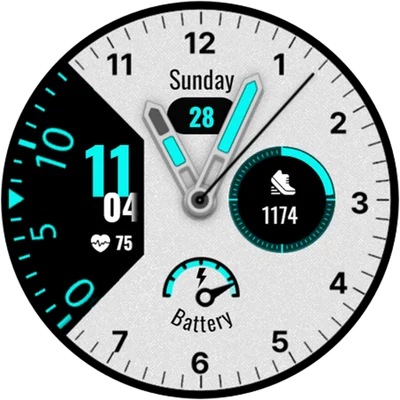
Wear OS デバイス向けのスポーティなウォッチフェイス
Wear OS デバイス向けのユニークでスポーティなウォッチフェイス。
ウォッチフェイスの機能。
-10x カラーオプション
-ステップカウンター
-心拍数
-時計の電池
-日付
-AOD画面
インストール手順:
1. 時計が Bluetooth 経由で携帯電話に接続されていることを確認します。
2. ウォッチフェイスをインストールし、ウォッチを選択してください。
3. Web ブラウザから Play ストアを開いてウォッチフェイスをインストールすることもできます。
4. Play ストアを開いてウォッチフェイスを検索してインストールすることで、ウォッチフェイスをウォッチに直接インストールできます。
ウォッチフェイスのインストール方法の詳細:
https://developer.samsung.com/sdp/blog/en-us/2022/04/05/how-to-install-wear-os-powered-by-samsung-watch-faces
ウォッチフェイスの開発者は、Play ストアでのインストール プロセスを制御できないことに注意してください。
さらにサポートが必要な場合は、v.akgul60@gmail.com までご連絡ください。
政治政策 https://justpaste.it/b8svf
原文を表示
Unique sportive watch face for wear os devices.
Watch face features;
-10x Color option
-Step counter
-Heart rate
-Watch battery
-Date
-AOD screen
Installation instructions:
1. Make sure your watch is connected to your cell phone via Bluetooth.
2. Install the watch face and make sure to select your watch.
3. You can also install the watch face by opening the Play Store via your web browser.
4. You can install the watch face directly on your watch by opening the Play Store and search and install your watch face.
How to install a watch face in detail:
https://developer.samsung.com/sdp/blog/en-us/2022/04/05/how-to-install-wear-os-powered-by-samsung-watch-faces
Please note that the developer of the watch face has no control over the installation process in the Play Store.
If you need further assistance, please contact v.akgul60@gmail.com.
Gizlilik politikası için https://justpaste.it/b8svf
データ セーフティ
このアプリが収集・共有するデータについて、VOKKIがGoogle Playで申告している内容です。
- 第三者と共有されるデータはありません詳しくは、デベロッパーが共有を申告する方法についての説明をご覧ください
- データは収集されません詳しくは、デベロッパーが収集を申告する方法についての説明をご覧ください
新機能
2025/11/1
• 16KB page size support added
• Updated to Android API 36
開発元の連絡先
- メールv.akgul60@gmail.com
- プライバシーポリシーsites.google.com
- 住所Yeşilkent Mahallesi 1891 Sokak No 8-10 Daire 7 Karakuş apt. 34515 Esenyurt/İstanbul Türkiye
情報
- 提供元
- VOKKI
- カテゴリ
- カスタマイズ
- 更新日
- 2025/11/1
- リリース
- 2024/1/7
- 対象年齢
- 3 歳以上
- 価格
- ¥120
- パッケージ名
- com.watchfacestudio.zephyr