
- 対象年齢4+
- カテゴリユーティリティ
- 開発元Sindre Sorhus
- 言語英語
- サイズ27.7 MB
App Storeの公式ページにリンクしています
Download.orgはActionsのファイルを一切ホストしていません。ボタンを押すと、Sindre Sorhusが公開しているApp Storeのアプリページが開きます。ページの最終確認:2026/11/22。
スクリーンショット

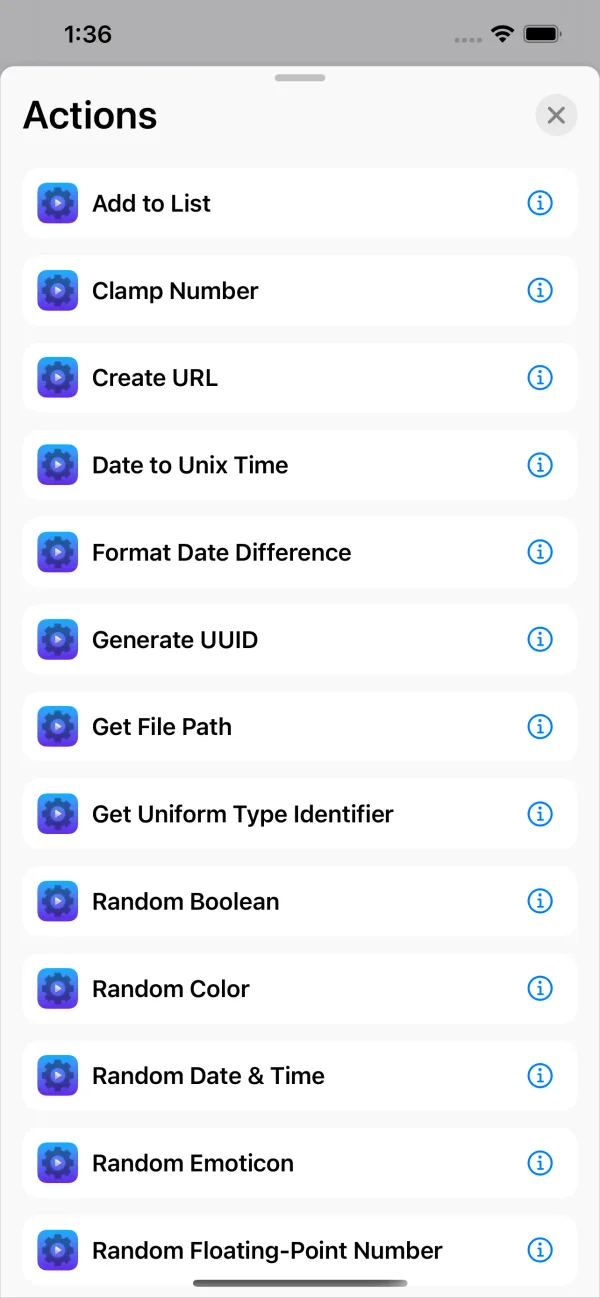
概要
開発元はこのテキストをお使いの言語で提供していません。
Supercharge your shortcuts with lots of useful actions.
It provides additional actions for the Shortcuts app.
IMPORTANT: Because of an iOS bug, to make the actions show up in the Shortcuts app, you need to first launch the app and then restart your device.
重要提示:由于 iOS 错误,要使操作显示在“快捷方式”应用程序中,您需要先启动该应用程序,然后重新启动设备。
WICHTIG: Aufgrund eines iOS-Fehlers müssen Sie, damit die Aktionen in der Shortcuts-App angezeigt werden, zuerst die App starten und dann Ihr Gerät neu starten.
IMPORTANT : en raison d'un bug iOS, pour que les actions s'affichent dans l'application Raccourcis, vous devez d'abord lancer l'application, puis redémarrer votre appareil.
The actions are not able to run on Apple Watch or HomePod.
Restart your device if the actions don't show up in the Shortcuts app.
■ Actions
- Add to List
- Apply Capture Date
- Ask for Text with Timeout
- Authenticate
- Blur Images
- Boolean
- Calculate with Soulver
- Choose from List (Extended)
- Clamp Number
- Color
- Combine Lists
- Combine Videos
- Convert Coordinates to Location
- Convert Date to Unix Time
- Convert Location to Geo URI
- Convert Unix Time to Date
- Create Color Image
- Create Menu Item
- Create URL
- Download File
- Edit URL
- Encrypt File
- Encrypt Text
- Filter List
- Find Music Playlist
- Format Currency
- Format Date Difference
- Format Duration
- Format Number as Ordinal
- Format Number — Compact
- Format Person Name
- Format Text List
- Generate CSV
- Generate Haptic Feedback
- Generate Random Data
- Generate Random Text
- Generate UUID
- Get All System Colors
- Get Audio Playback Destination
- Get Average Color
- Get Average Color of Image
- Get Battery State
- Get Bluetooth Device
- Get Bluetooth Devices
- Get Boolean from Input
- Get Compass Heading
- Get Device Details (Extended)
- Get Device Motion Activity
- Get Device Motion Data
- Get Device Orientation
- Get Dominant Colors of Image
- Get Elevation
- Get Emojis
- Get File Path
- Get High-Resolution Timestamp
- Get Image Capture Date / Set Image Capture Date
- Get Image Location / Set Image Location
- Get Index of List Item
- Get Map Image of Location
- Get Paragraphs from Text
- Get Query Item Value from URL
- Get Query Items from URL
- Get Query Items from URL as Dictionary
- Get Random Boolean
- Get Random Color
- Get Random Date and Time
- Get Random Emoticon
- Get Random Floating-Point Number
- Get Random Number from Seed
- Get Related Words
- Get Sentences from Text
- Get SF Symbol Image
- Get System Color
- Get Title of URL
- Get Uniform Type Identifier / Set Uniform Type Identifier
- Get User Details
- Get Values Using JSONPath
- Global Variable
- Hex Encode
- Hide Shortcuts App
- Invert Images
- Is Accessibility Feature On
- Is Audio Playing
- Is Bluetooth On
- Is Call Active
- Is Cellular Data On
- Is Cellular Low Data Mode On
- Is Conforming to Uniform Type Identifier
- Is Connected to VPN
- Is Dark Mode On
- Is Day
- Is Device Locked
- Is Device Moving
- Is Device Orientation
- Is Host Reachable
- Is Location Services Enabled
- Is Low Power Mode On
- Is Online
- Is Shaking Device
- Is Silent Mode On
- Is Time
- Is Time In Range
- Is Web Server Reachable
- Join Wi-Fi
- Merge Dictionaries
- Open URLs in Safari
- Overwrite File
- Parse CSV
- Parse JSON5
- Pick Color
- Pretty Print Dictionaries
- Remove Duplicate Lines
- Remove Duplicates from List
- Remove Emojis
- Remove Empty Lines
- Remove from List
- Remove Non-Printable Characters
- Reverse Lines
- Reverse List
- Round Number to Multiple
- Scan Documents
- Scan QR Codes in Image
- Set Creation and Modification Date of File
- Show Black Screen
- Show Notification
- Shuffle List
- Sort List
- Sort Months
- Spell Out Number
- Toggle Boolean
- Transform Lists
- Transform Text
- Transform Text with JavaScript
- Trim Whitespace
- Truncate List
- Truncate Number
- Truncate Text
- Wait Milliseconds
- Write or Edit Text
新機能
バージョン 4.2.0 · 2026/6/8
New actions:
- Is Bluetooth Device Connected
- Get Default Gateway IP Address
- Format URL
- Normalize URL
- Get Folder Size
- Calculate String Distance
- Sign JSON Web Token
- Encode Property List
- Trim Text
- Get/Set Extended Attribute
アプリのプライバシー
このアプリのデータの取り扱いについて、Sindre SorhusがApp Storeで申告している内容です。
-
ユーザーに関連付けられないデータ
収集される場合がありますが、ユーザーの識別情報には関連付けられません。
- 診断
プライバシーの取り扱いは、ご利用の機能やお客様の年齢などに応じて異なる場合があります。
情報
- 販売元
- Sindre Sorhus
- カテゴリ
- ユーティリティ
- バージョン
- 4.2.0
- 更新日
- 2026/6/8
- リリース
- 2021/10/28
- サイズ
- 27.7 MB
- 必要条件
- iOS 26.0以降
- 対象年齢
- 4+
- 価格
- 無料
- 言語
- 英語
- 著作権
- © Sindre Sorhus
こちらもおすすめ
-
 Toolbox Pro for Shortcutsユーティリティ
-
 Screens 5: VNCリモートデスクトップ高速で安全なコンピュータアクセス
-
 AllMyBatteriesここですべてのバッテリーを追跡しましょう
-
 PiPifierユーティリティ
-
 Clipboard Manager - OneTapユーティリティ
-
 Bark - Custom Notificationsユーティリティ
-
 Wolow - Wake on LANユーティリティ
-
 Quiche Browser ブラウザカスタマイズ性が高く、広告ブロック機能搭載、快適で使いやすい
-
 Cloud Batteryバッテリーを 1 か所に
-
 uBlock Origin LiteAn efficient content blocker