
- 対象年齢17+
- カテゴリメディカル
- 開発元Asleep Inc.
- 言語英語ほか5言語
- サイズ66.0 MB
App Storeの公式ページにリンクしています
Download.orgはApnotrackのファイルを一切ホストしていません。ボタンを押すと、Asleep Inc.が公開しているApp Storeのアプリページが開きます。ページの最終確認:2026/11/24。
スクリーンショット


概要
開発元はこのテキストをお使いの言語で提供していません。
Apnotrack analyzes breathing sounds collected through smart devices using an artificial intelligence algorithm to screen for moderate-to-severe sleep apnea. It provides specialized sleep analysis and highlights areas that may require improvement.
Apnotrack is not a diagnostic device for sleep apnea. It is a medical device for preliminary screening and cannot replace polysomnography (PSG) or serve as a diagnostic tool. Results from Apnotrack are intended to support physicians in determining the need for additional diagnostic testing and evaluation. An alarm is provided at the end of sleep to ensure smooth measurement.
Instructions for Use
1. Preparation Before Use
Ensure that your device is powered on and properly connected to Wi-Fi or a mobile network before using the Apnotrack App.
Follow the instructions below during sleep measurement:
- Place the smartphone within 1 meter of the subject's head.
- Position the smartphone on a bedside table with the microphone facing the subject's head. Avoid covering the microphone, as this may affect analysis results.
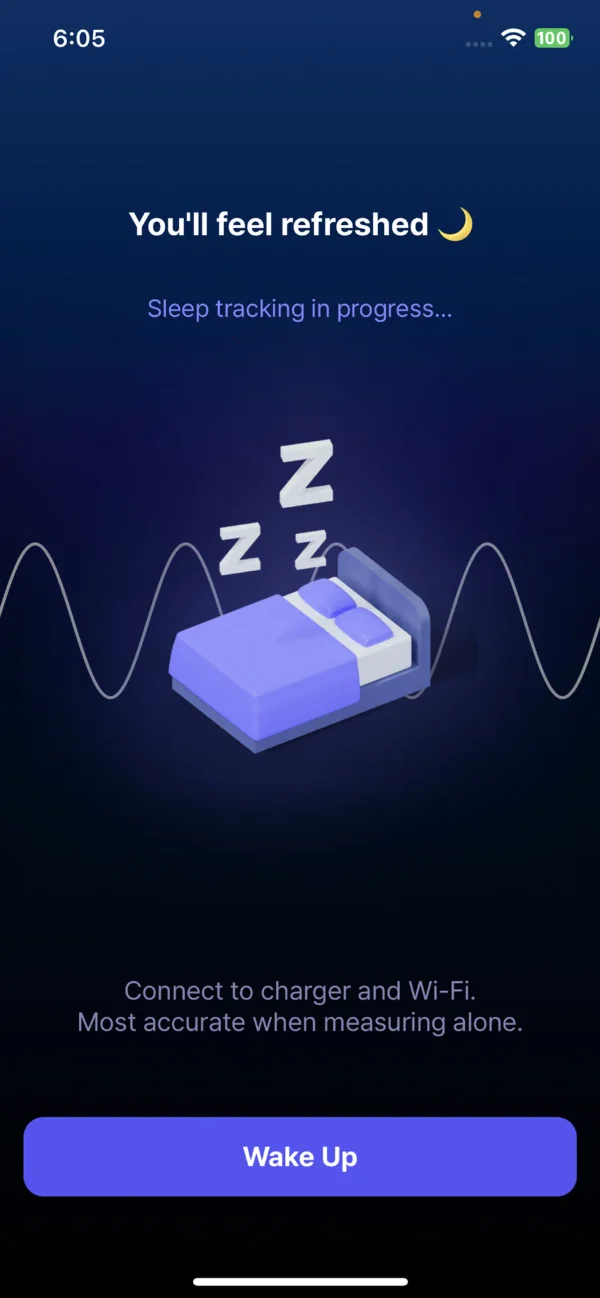
- Keep the app running during the measurement. It may run in the background, and the screen does not need to remain on.
- An internet connection is required. The smartphone must stay connected to Wi-Fi or a mobile network.
- For an 8-hour measurement, the device consumes approximately 25% of battery power. Keep the phone connected to a charger if battery level is low, to prevent shutdown during measurement.
Avoid the following during sleep measurement:
- Do not let wind blow directly into the microphone. While air conditioners or fans may be used, direct airflow toward the microphone can affect measurement accuracy.
- Measuring alone provides the most accurate results. In a shared sleeping environment, place the smartphone as far as possible from the bed partner.
- Do not play sounds (e.g., ASMR, music) during measurement, as this may interfere with accuracy.
- Avoid making phone calls, recordings, or using the camera during measurement. Events such as incoming calls, active alarms, or notifications may pause the measurement. Long interruptions may reduce accuracy.
- If other recording apps are running, the measurement may not function properly.
2. Sleep Breathing Measurement
1) On the permission screen, tap Allow to proceed to the measurement screen.
2) From the second use onward, tap 'Start Tracking' on the main screen to enter the measurement screen.
3) To finish measurement, tap 'Stop Tracking' on the measurement screen.
3. Viewing the Sleep Report
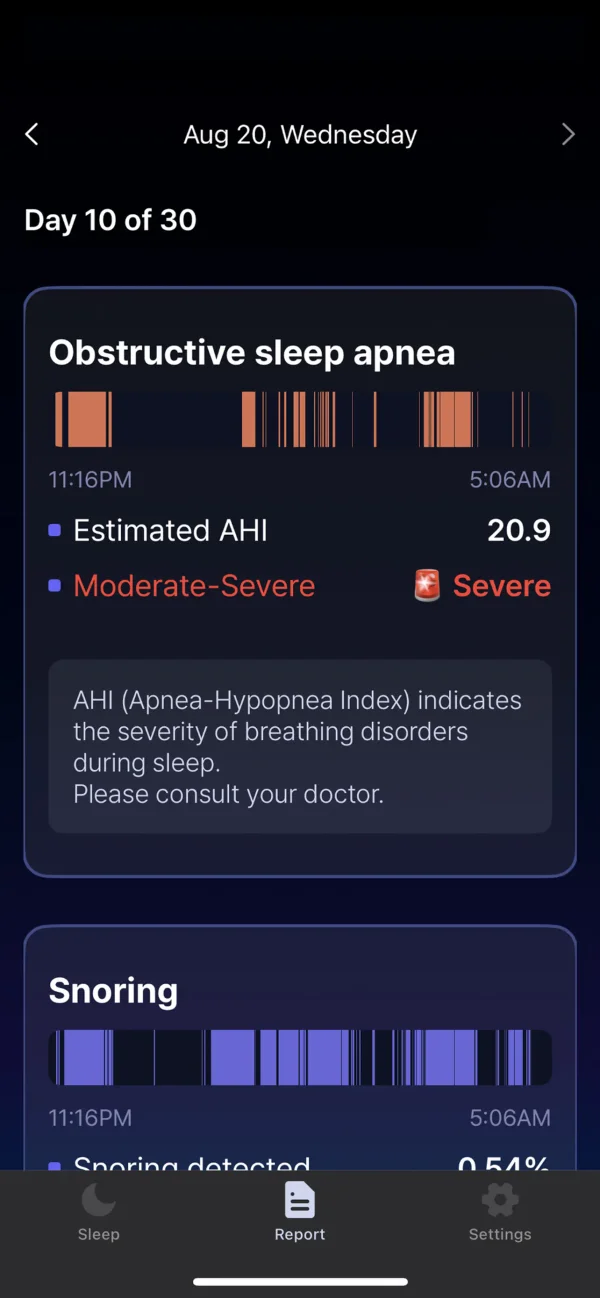
1) After tapping 'Stop Tracking', the app will display the sleep report screen.
2) The sleep report includes:
- Sleep apnea (Estimated AHI, moderate-to-severe apnea detection)
- Snoring analysis
- Sleep summary (Time in bed, Total Sleep Time, Sleep Onset Latency, Wake After Sleep Onset, Sleep Efficiency)
If the issue persists, please contact Asleep, Inc.
Tel: +82 02-567-3498
新機能
バージョン 1.1.9 · 2026/11/23
Improved usability and fixed bugs.
アプリのプライバシー
このアプリのデータの取り扱いについて、Asleep Inc.がApp Storeで申告している内容です。
-
ユーザーに関連付けられたデータ
収集され、ユーザーの識別情報に関連付けられる場合があります。
- 連絡先情報
- ID
- その他のデータ
プライバシーの取り扱いは、ご利用の機能やお客様の年齢などに応じて異なる場合があります。
情報
- 販売元
- Asleep Inc.
- カテゴリ
- メディカル
- バージョン
- 1.1.9
- 更新日
- 2026/11/23
- リリース
- 2025/11/28
- サイズ
- 66.0 MB
- 必要条件
- iOS 16.0以降
- 対象年齢
- 17+
- 価格
- 無料
- 言語
- 英語, フランス語, インドネシア語, 日本語, 韓国語, スペイン語
- 著作権
- © 2026 Asleep Inc.
こちらもおすすめ
-
 睡眠時無呼吸症候群 — Somnio+いびき録音
-
 いびき・寝言・睡眠録音 - Snore Timeline無呼吸・歯ぎしり記録。睡眠トラッカー&いびきチェッカー
-
 모바일 건강보험증メディカル
-
 건강보험25시メディカル
-
 いびきラボ | 睡眠アプリ | イビキ、すりーぷまいすたーいびきらぼ | 睡眠記録 | ねごと録音、いびき録音アプリ
-
 いびきラボ - いびき対策アプリ (SnoreLab)いびき録音&睡眠トラッカー
-
 いびきジム : いびきを低減静かな眠りのためのエクササイズ
-
 SleepWatch - Top Sleep Trackerヘルスケア/フィットネス
-
 Pillow: Sleep TrackerSmart Alarm & Snoring Recorder
-
 SleepImageヘルスケア/フィットネス