
Authenticator App • 2FA
2 Factor Authentication & MFA
iPhone, iPad, iPod touch向けに設計
無料 · アプリ内課金
- 対象年齢4+
- カテゴリ仕事効率化
- 開発元Mobile Ocean
- 言語英語ほか11言語
- サイズ63.3 MB
App Storeの公式ページにリンクしています
Download.orgはAuthenticator App • 2FAのファイルを一切ホストしていません。ボタンを押すと、Mobile Oceanが公開しているApp Storeのアプリページが開きます。ページの最終確認:2026/11/24。
スクリーンショット
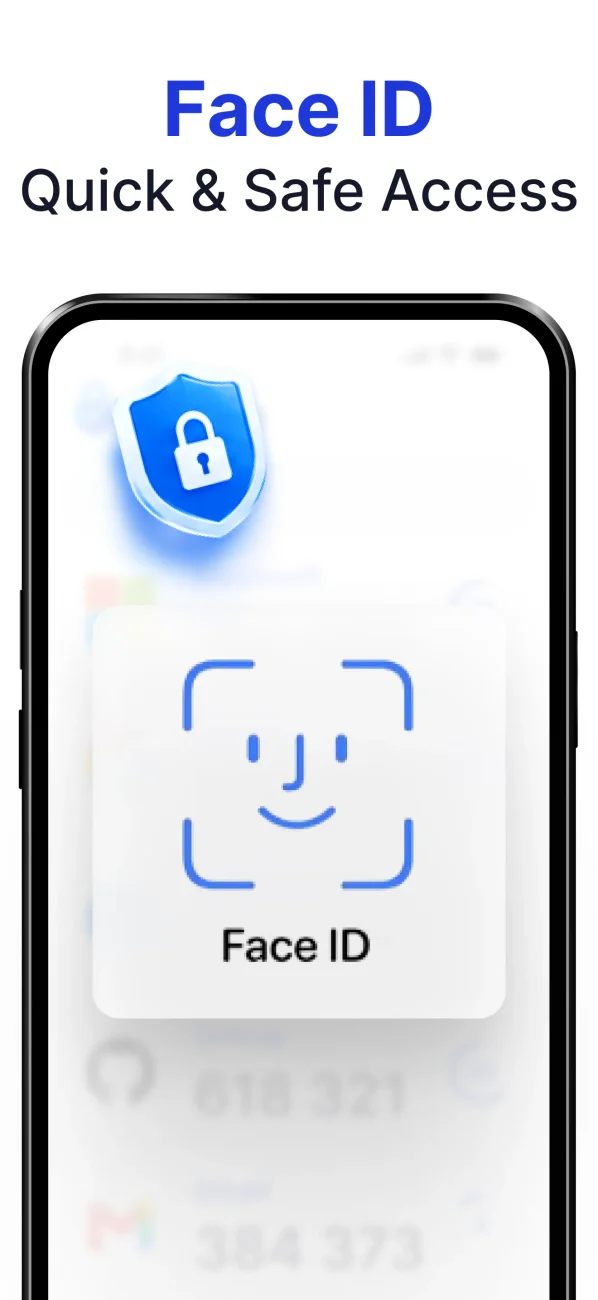
概要
開発元はこのテキストをお使いの言語で提供していません。
Protect your online identity and secure your digital life with Authenticator App • 2FA, the ultimate two-factor authentication (2FA) and multi-factor authentication (MFA) solution.
In today’s digital age, passwords alone are no longer enough to keep your private data safe from hackers and data breaches. Authenticator App • 2FA adds an impenetrable extra layer of security to your logins by generating time-based one-time passwords (OTPs) directly on your device.
Whether you are a crypto trader protecting your wallet, a gamer securing your loot, a business professional safeguarding company data, or simply someone who values personal privacy, Authenticator App • 2FA is designed to make top-tier security accessible, fast, and completely effortless.
Why Choose Authenticator App • 2FA?
Simple & Instant Setup
No technical knowledge required! Simply scan a QR code provided by your service or enter the setup key manually. You will start generating secure 2FA codes in a matter of seconds.
Universal Compatibility
Authenticator App • 2FA is built to work seamlessly wherever you need it. Secure thousands of online platforms including social media, productivity tools, and gaming accounts. Fully compatible with Google, Microsoft, Facebook, Instagram, Binance, Coinbase, Roblox, GitHub, Cisco, Authy, Whatsapp, Twitter (X), Telegram, Steam, Epic Games and countless others.
Encrypted iCloud Backup & Sync
Never experience the panic of being locked out of your accounts again. Authenticator App • 2FA securely backs up and syncs your 2FA codes across all your Apple devices using advanced encryption. Even if you lose, switch, or reset your phone, your tokens are always safe and easily recoverable.
Advanced Biometric Security:
Keep prying eyes away from your authentication codes. Use Face ID or Touch ID to lock the app, ensuring that only you can access your highly sensitive OTPs.
Core Features Built for Power Users
TOTP & HOTP Support: Fully compatible with industry-standard Time-based (TOTP) and Counter-based (HOTP) one-time password systems.
Multi-Device Synchronization: Your authentication tokens securely follow you. Whether you are on your iPhone or iPad, your codes are always updated and synced with end-to-end encryption.
Zero-Knowledge Privacy: Your data belongs to you, and only you. Authenticator App • 2FA operates with a strict privacy-first approach—we never collect, track, share, or store your personal information or account data on our servers.
Quick Search & Organization: Managing dozens of accounts is a breeze. Use the lightning-fast search bar to find the exact account you need instantly, keeping your digital life organized.
Your Security, Your Control
Take back control of your digital footprint. Authenticator App • 2FA helps you safeguard your digital identity with strong, reliable, and instantaneous authentication. Perfect for personal, professional, and crypto use, Authenticator App • 2FA guarantees that your login process remains fast, simple, and virtually unhackable. Download Authenticator App • 2FA today and step into a safer digital world!
About Subscriptions and Terms of Use:
- For Unlimited Features of Authenticator App • 2FA, some Premium subscriptions are needed.
- Payment will be made from your iTunes account after you confirm the purchase.
- Subscriptions will auto-renew at the end of each term if it is not canceled 24 hours before the end of the purchasing term.
- The user can manage subscriptions. Auto-renew can be turned off from iTunes account settings.
- You can cancel your subscriptions by entering: http://support.apple.com/en-us/HT202039
- Privacy Policy: https://sites.google.com/view/moauth/privacy-policy
- Terms of Use: https://sites.google.com/view/moauth/termsofuse
Support: help.moauth@gmail.com
新機能
バージョン 2.1.1 · 2026/7/1
- Minor bug fixes
アプリのプライバシー
このアプリのデータの取り扱いについて、Mobile OceanがApp Storeで申告している内容です。
-
ユーザーのトラッキングに使用されるデータ
他社のアプリやウェブサイトを横断してユーザーをトラッキングする目的で使用される場合があります。
- ID
-
ユーザーに関連付けられたデータ
収集され、ユーザーの識別情報に関連付けられる場合があります。
- ID
-
ユーザーに関連付けられないデータ
収集される場合がありますが、ユーザーの識別情報には関連付けられません。
- 位置情報
- ID
- 使用状況データ
- 診断
- その他のデータ
プライバシーの取り扱いは、ご利用の機能やお客様の年齢などに応じて異なる場合があります。
情報
- 販売元
- MOBILEOCEAN BILISIM YAZILIM ANONIM SIRKETI
- カテゴリ
- 仕事効率化
- バージョン
- 2.1.1
- 更新日
- 2026/7/1
- リリース
- 2025/10/28
- サイズ
- 63.3 MB
- 必要条件
- iOS 13.0以降
- 対象年齢
- 4+
- 価格
- 無料
- アプリ内課金
- あり
- 言語
- 英語, アラビア語, デンマーク語, オランダ語, フィンランド語, フランス語, ドイツ語, インドネシア語, ポルトガル語, ロシア語, スペイン語, トルコ語
- 著作権
- © MobileOcean
こちらもおすすめ
-
 Authenticator App!OTP Codes & Verification App
-
 Authenticator App:2FA・OTP認証安全ログインとMFA保護
-
 Authenticator App ℠2FA(二要素認証)
-
 オーセンティケーター: 2段階認証, ワンタイムパスワード認証システム: 二段階認証アプリ, コード表示
-
 Authenticator App – 2FA / MFAワンタイムパスワードオーセンティケーターセキュリティシステム
-
 認証アプリ ワンタイムパスワードアプリ 2段階認証オーセンティケーター セキュリティー ワンタイムパス 認証コ
-
 2段階認証アプリ- 2FAオーセンティケーター
-
 Authenticator App – 2FA & MFAワンタイムパスワードオーセンティケーターセキュリティシステム
-
 Authenticator Ⓡ App認証アプリ - MFA & セキュリティ
-
 Authenticator Auth -2FA App認証子 2FA / OTP / MFA