
- 対象年齢4+
- カテゴリミュージック
- 開発元Dave Bernier
- 言語英語ほか1言語
- サイズ7.1 MB
App Storeの公式ページにリンクしています
Download.orgはChordsheet Makerのファイルを一切ホストしていません。ボタンを押すと、Dave Bernierが公開しているApp Storeのアプリページが開きます。ページの最終確認:2026/11/23。
スクリーンショット

概要
開発元はこのテキストをお使いの言語で提供していません。
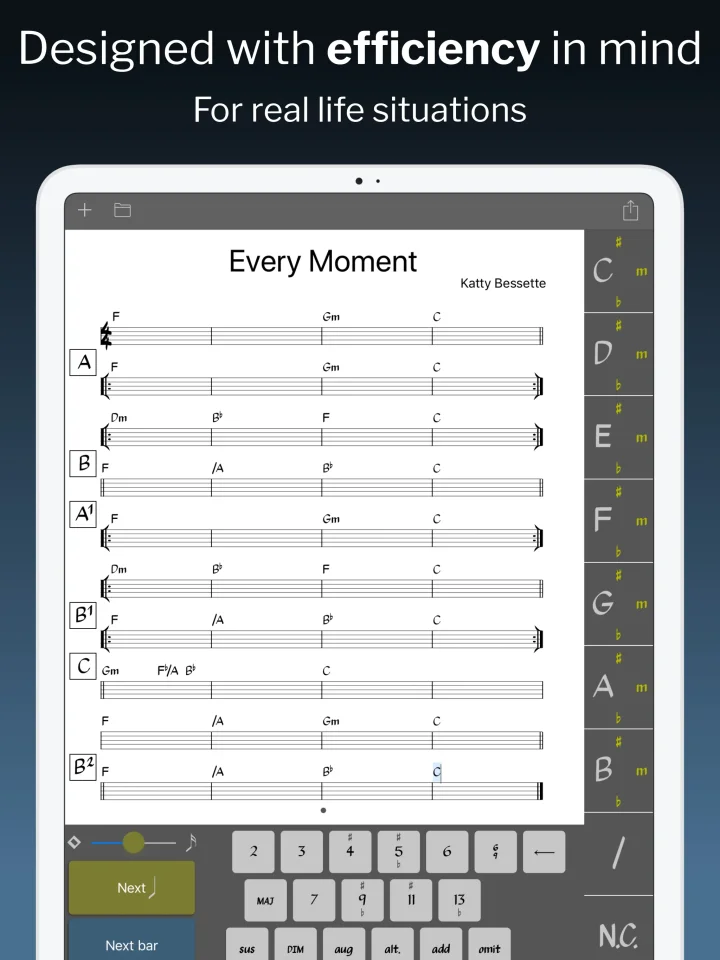
Stop rewriting chord charts by hand. Built for freelance musicians and musical directors, ChordSheet Maker lets you write a clean chord chart on your iPad as fast as you hear the song, then send it to your band as a PDF before rehearsal starts.
No menus to dig through. You tap the chords, the app does the layout.
"This is PERFECT. Incredibly intuitive... Nailed it guys!" Damian Erskine, App Store review
WHY MUSICIANS USE IT
• One touch per chord. Touch a root to enter it. Where your finger lands adds the sharp, flat or minor, so C#m takes one touch, not three.
• Extensions without hunting. A keyboard made for chords puts 6ths, 7ths, 9ths, 11ths, 13ths and alterations right under your fingers.
• A chart that lays itself out. Bars, lines and pages fall into place while you write. You think about the music, not the spacing.
• Relevant info for all. Add punches, breaks and rhythm slashes where they matter, plus sections, segno, coda and time signatures
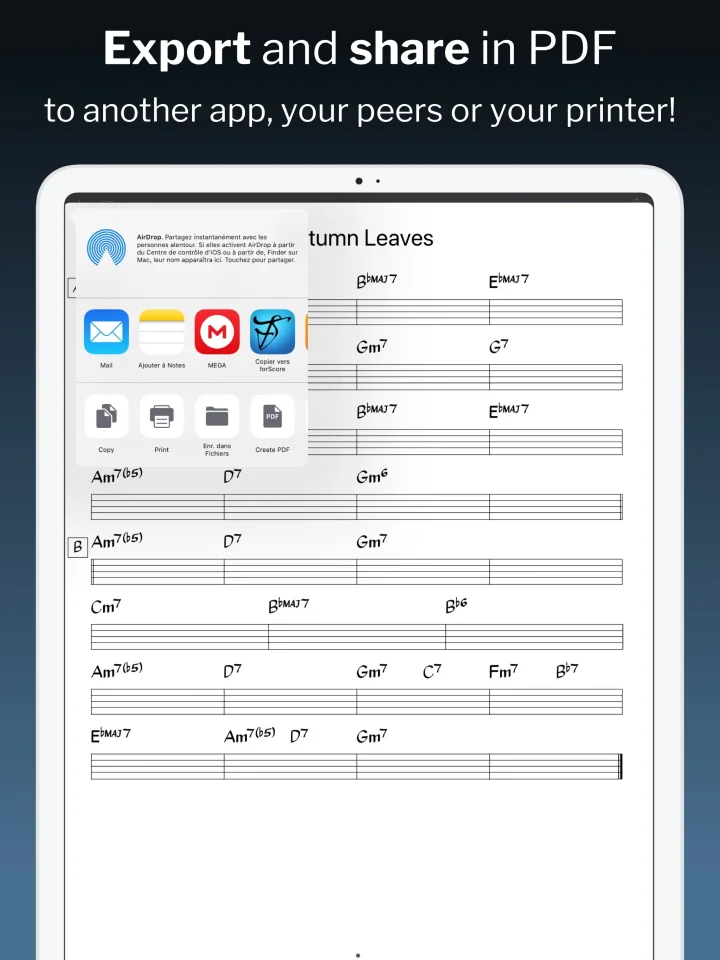
• Send it anywhere. Export a PDF and share it by AirDrop, Mail, Messages or Files, or send it straight to the printer.
• Your charts are safe. Back up your whole library in one file. Restore it on a new iPad, or merge a bandmate's library and choose, song by song, which version to keep.
Download Chordsheet Maker today!
新機能
バージョン 0.5.7 · 2026/11/18
Back up and restore your library
- Export your whole library as one backup file from the gear menu, and save it wherever you like.
- Restore a backup from the same menu, or just tap a backup file in Files. Before anything changes, the app shows what the backup holds: new songs, songs you already have, and songs that differ.
- Replace all, or merge: Merge adds the new songs and lets you choose, song by song, whether to keep yours, take the backup's, or keep both.
- Before replacing your library, the app offers to save a copy of it first.
Long songs
- Very long songs open, scroll and export to PDF without crashing.
- Exporting a long song to PDF shows its progress, and you can cancel it.
Fixes and polish
- Fixe some missing auto-save in specific conditions when writing.
- A confirmation now appears when a PDF or a backup has been saved or sent.
- Fixed a crash when adding a measure right after deleting one.
- The cursor keeps working after you delete the measure it was on.
- Fixed a crash at launch when the last song you opened had no measures.
- Some older songs that would not open now open normally.
- A damaged song no longer closes the app: it tells you the song cannot be opened.
- Fixed a freeze that could happen at launch or when opening the PDF export.
- Slash rhythms keep their duration after a save, a backup or a copy.
- Section names are counted correctly when you reopen a song.
- Chords positions are consistent between the editor and pdf export
- The final bar stays on the last measure after adding or deleting measures.
- Editor buttons are easier to read on iPadOS 26.
アプリのプライバシー
このアプリのデータの取り扱いについて、Dave BernierがApp Storeで申告している内容です。
-
ユーザーに関連付けられないデータ
収集される場合がありますが、ユーザーの識別情報には関連付けられません。
- 診断
プライバシーの取り扱いは、ご利用の機能やお客様の年齢などに応じて異なる場合があります。
情報
- 販売元
- Dave Bernier
- カテゴリ
- ミュージック
- バージョン
- 0.5.7
- 更新日
- 2026/11/18
- リリース
- 2020/8/15
- サイズ
- 7.1 MB
- 必要条件
- iOS 15.0以降
- 対象年齢
- 4+
- 価格
- ¥1,500
- 言語
- 英語, フランス語
- 著作権
- © 2019 - 2027 Dave Bernier
こちらもおすすめ
-
 Fumenbook:コード譜作成アプリコード譜・リズム譜の作成
-
 iGigBook Sheet Music Manager XPro Tools For Every Musician
-
 Songs - The App For Musiciansミュージック
-
 LiveSetミュージック
-
 Staventabs: Compose & Notateミュージック
-
 AudioKit Digital D1 Synthミュージック
-
 Dorico - 楽譜作成・作曲アプリ記譜・音楽スコアメーカ
-
 SongSheet Pro: Setlist helperミュージック
-
 Guitar Proタブ譜&スコアプレイヤー
-
 iReal Pro楽譜とバッキングトラック