
- 対象年齢4+
- カテゴリユーティリティ
- 開発元Connectzero. inc
- 言語英語ほか1言語
- サイズ145.4 MB
App Storeの公式ページにリンクしています
Download.orgはDuo Keyboard: Resize & Splitのファイルを一切ホストしていません。ボタンを押すと、Connectzero. incが公開しているApp Storeのアプリページが開きます。ページの最終確認:2026/11/12。
スクリーンショット

概要
開発元はこのテキストをお使いの言語で提供していません。
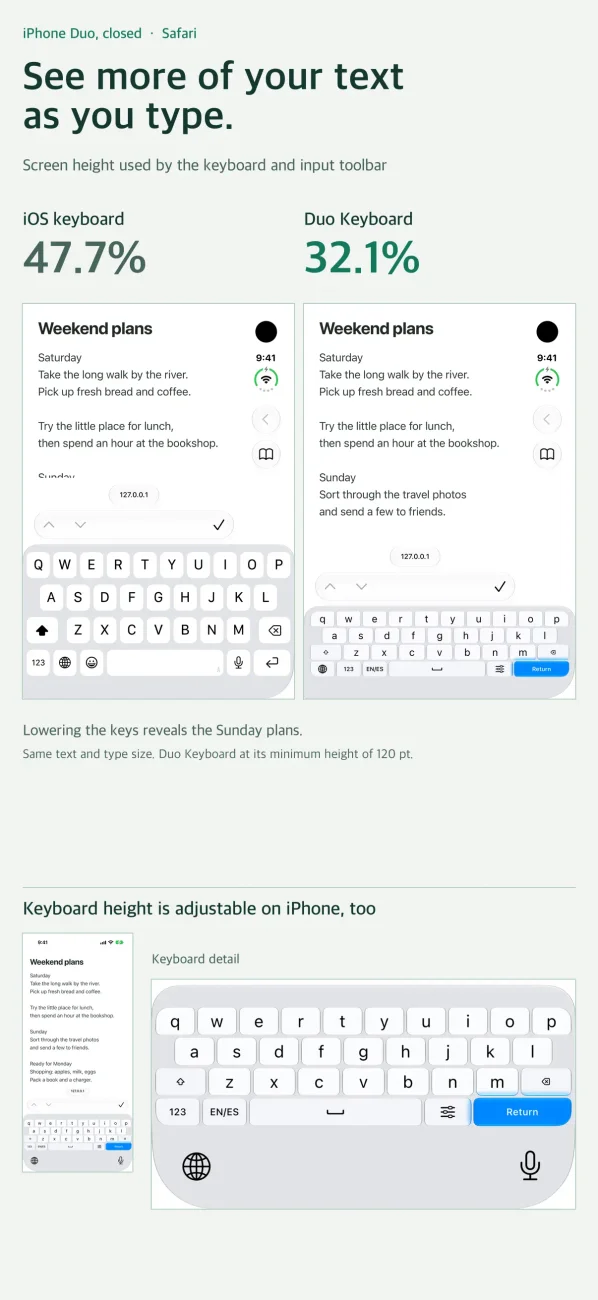
On a closed iPhone Duo, lower the keyboard to keep more of the message in view while you write your reply.
Look for Sunday’s plans in the first screenshot. With the same Safari note open, switching from the English system keyboard to Duo Keyboard at 120 pt reduced the keyboard and input toolbar from 47.7% to 32.1% of the screen height. Two more lines of the note came into view. This example was measured on a closed iPhone Duo simulator in portrait on iOS 27.1.
WHEN YOU CHANGE HANDS
Swipe the language switch key left for a left-handed keyboard or right for a right-handed keyboard. You can also swipe the empty space beside the keys to bring them over to the other side.
WHEN YOU OPEN YOUR DUO
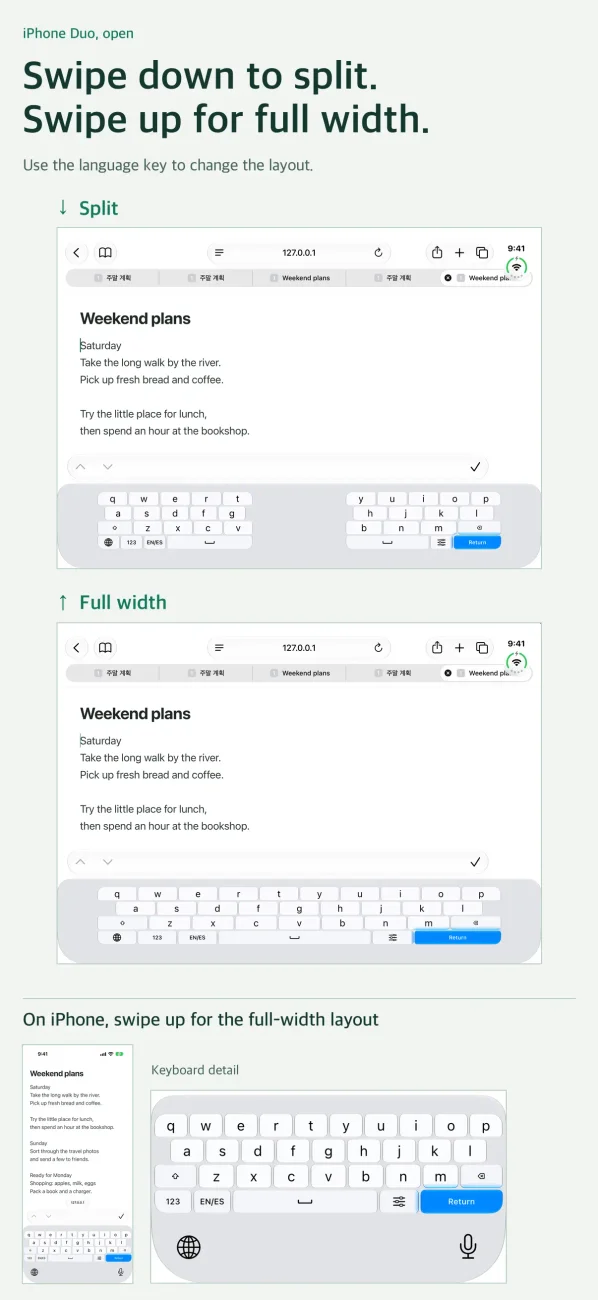
On a wide screen, swipe down on the switch key to split the keys between your thumbs. Swipe up to bring them back together at full width. Duo Keyboard remembers your size and position separately for narrow and wide screens.
YOUR SIZE AND LANGUAGES
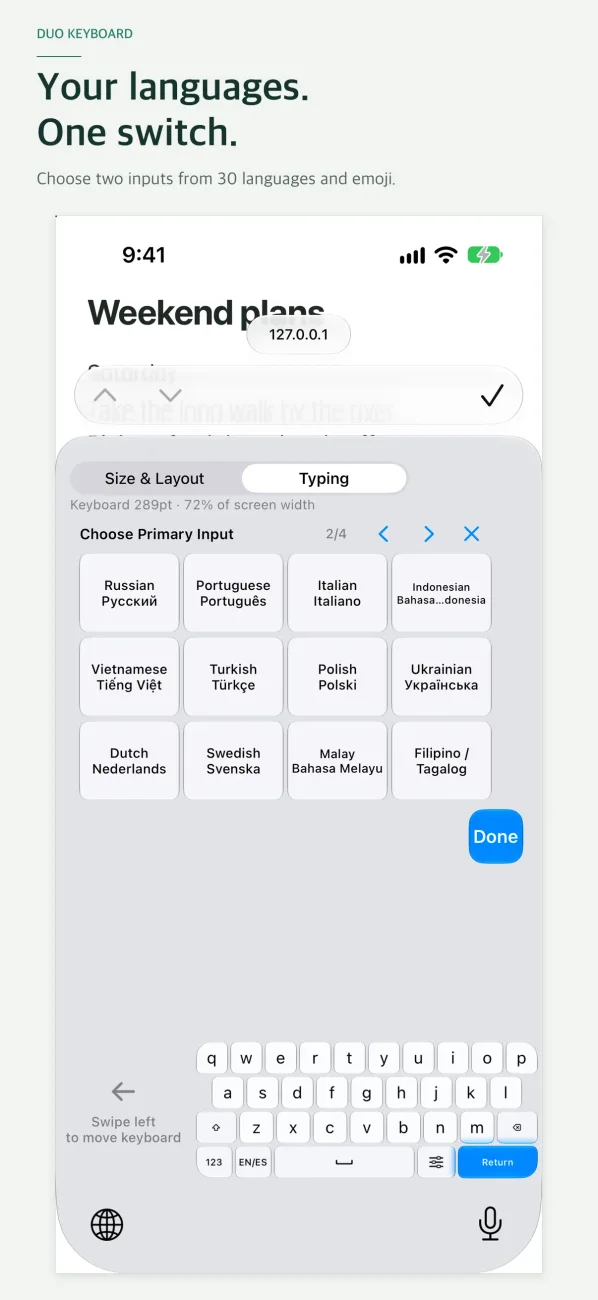
Hold the switch key to open settings above the keyboard. Adjust height and width while watching the keys change. In Typing, choose two inputs from 30 languages and emoji, then tap the switch key to swap between them. Try Korean and English, English and Spanish, or French and emoji. One purchase includes all layouts.
30 INPUT LANGUAGES
Korean, English, Spanish, French, German, Russian, Portuguese, Italian, Indonesian, Vietnamese, Turkish, Polish, Ukrainian, Dutch, Swedish, Malay, Filipino/Tagalog, Arabic, Hindi, Thai, Bengali, Urdu, Persian, Chinese, Japanese, Marathi, Javanese, Nigerian Pidgin, Telugu and Tamil.
Chinese supports Pinyin with Simplified and Traditional conversion; Japanese supports romaji with kana and kanji conversion; Vietnamese supports Telex. Arabic, Hindi, Thai, Bengali, Urdu, Persian, Marathi, Telugu and Tamil use paged character entry. Javanese uses Latin script. General autocorrection and next-word prediction are not provided.
FAMILIAR LAYOUTS, USEFUL CONTROLS
• English QWERTY and 12-key
• Korean QWERTY, Danmoum, Cheonjiin, Naratgeul, Cheonjiin Plus and Vega
• Three-column number and symbol pads for compact layouts
• Optional number row and settings key, switch-key placement and English auto-capitalization
• Adjustable glass opacity; Liquid Glass on iOS 26 and later, with a compatible appearance on earlier supported versions
• Swipe on Space to move the text cursor
• Return follows the input field's action; hold it for a newline
NO FULL ACCESS REQUIRED
Keyboard input is not logged or automatically transmitted. All typing, including Chinese and Japanese conversion, runs on your device. Full Access is not required. Optional bug reports are emails you review and send yourself; the report and reply address are received for support.
GET STARTED
1. Open Settings > General > Keyboard > Keyboards.
2. Tap Add New Keyboard and choose Duo Keyboard.
3. In a text field, hold the globe key and select Duo Keyboard.
4. Hold the actual keyboard's switch key to set size, placement and inputs.
BEFORE YOU BUY
• iOS controls the available width and bottom system area. Margins may remain on some devices or in some apps. Split mode requires a wide enough input area.
• Empty areas around or between the keys remain part of the keyboard. They do not reveal the document underneath. There is no free-floating keyboard or system mouse pointer.
• iOS may use its own keyboard in password or certain phone fields, and in apps that disallow third-party keyboards. Some fields do not accept newlines.
• In-app practice settings are separate from the actual keyboard's saved settings.
• On a wide screen, after moving the keys and reopening the keyboard, the previous position may briefly appear before the saved position is displayed.
新機能
バージョン 1.1.1 · 2026/11/7
The new App Store screenshots compare the system keyboard and Duo Keyboard on the same text on a closed iPhone Duo. They also show how to switch hands and how to move between split and full width on the open display.
アプリのプライバシー
このアプリのデータの取り扱いについて、Connectzero. incがApp Storeで申告している内容です。
-
ユーザーに関連付けられたデータ
収集され、ユーザーの識別情報に関連付けられる場合があります。
- 連絡先情報
- ユーザーコンテンツ
- 診断
プライバシーの取り扱いは、ご利用の機能やお客様の年齢などに応じて異なる場合があります。
情報
- 販売元
- connectzero. inc
- カテゴリ
- ユーティリティ
- バージョン
- 1.1.1
- 更新日
- 2026/11/7
- リリース
- 2026/10/28
- サイズ
- 145.4 MB
- 必要条件
- iOS 17.0以降
- 対象年齢
- 4+
- 価格
- ¥500
- 言語
- 英語, 韓国語
- 著作権
- © 2026 connectzero. inc
こちらもおすすめ
-
 EmpireClockユーティリティ
-
 DSClock Widgetユーティリティ
-
 Dialshade: Clock Widgetsユーティリティ
-
 AA時計 - ホーム画面おしゃれ着せ替えウィジェットアナログもデジタルも文字盤81種|砂時計
-
 Dzvin: Morphing Clock Widgetユーティリティ
-
 Pax - Spam Call Blockerユーティリティ
-
 Pure Clock for older systemsユーティリティ
-
 PivotClock自由な角度で固定できる時計
-
 Time - Minimalist Clock Widgetユーティリティ
-
 Clockist: 置き時計とカウントダウンフリップ時計・ニキシー管・記念日ウィジェット