
- 対象年齢4+
- カテゴリユーティリティ
- 開発元君 盛
- 言語英語
- サイズ130.7 MB
App Storeの公式ページにリンクしています
Download.orgはDuoMiniMacのファイルを一切ホストしていません。ボタンを押すと、君 盛が公開しているApp Storeのアプリページが開きます。ページの最終確認:2026/11/25。
スクリーンショット



概要
開発元はこのテキストをお使いの言語で提供していません。
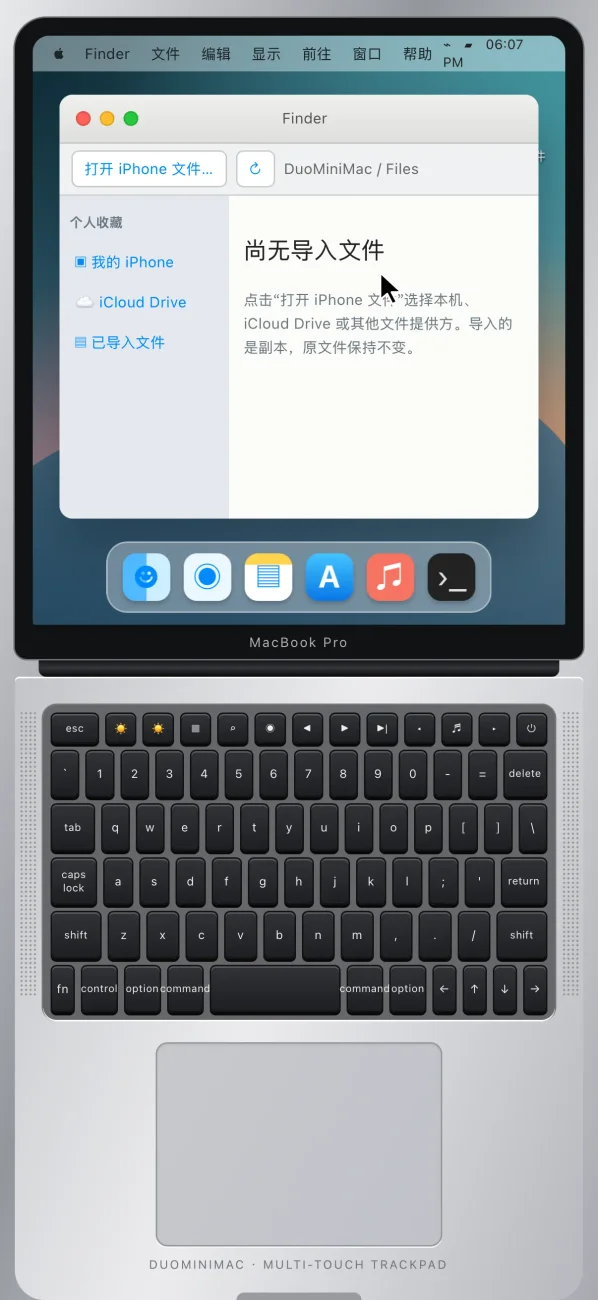
DuoMiniMac brings a laptop-inspired desktop to iPhone Duo. On the unfolded display, the upper half shows the desktop, windows, menu bar, and Dock. The lower half gives you a virtual keyboard and trackpad for typing and pointing.
Open files you select from the Files app, write in the text editor, and browse the web. Play local videos in a desktop window with the keyboard and trackpad still available. In full-screen video mode, the upper half displays the video and the lower half provides playback, seeking, and video selection controls.
Play local music with a vinyl turntable, a CD player, or a portable cassette player. Browse your song list on the inner display and use the selected player on the outer display when the device is folded.
DuoMiniMac simulates a desktop interface on iOS. It runs as an iPhone app.
新機能
バージョン 1.11 · 2026/11/24
Refines the tent clock layout and retro digital clock, and lets you choose cities for the world clocks.
アプリのプライバシー
このアプリのデータの取り扱いについて、君 盛がApp Storeで申告している内容です。
-
データの収集なし
開発元はこのアプリからデータを収集しません。
プライバシーの取り扱いは、ご利用の機能やお客様の年齢などに応じて異なる場合があります。
情報
- 販売元
- 君 盛
- カテゴリ
- ユーティリティ
- バージョン
- 1.11
- 更新日
- 2026/11/24
- リリース
- 2026/11/2
- サイズ
- 130.7 MB
- 必要条件
- iOS 17.0以降
- 対象年齢
- 4+
- 価格
- ¥800
- 言語
- 英語
- 著作権
- © 盛君
こちらもおすすめ
-
 HashingPass: Secure Passwordsユーティリティ
-
 Tomaco - リモートデスクトップPCをなめらかに遠隔操作 · 120Hz
-
 Headroom: リモートデスクトップAI エージェントを、ソファから見守る
-
 YonderClockユーティリティ
-
 手書きキーボードアプリに直接手書き入力。オフライン対応
-
 Remio Remote Desktopリモートデスクトップ・遠隔操作・リモート操作・画面共有
-
 マダマダ:ピンインで打てる日本語キーボードピンインで漢字、英語でカタカナ、長押しで敬語
-
 WiFi Tools & AnalyzerIP Scanner, Network Ping, DNS
-
 Nova: AI Chatbot Assistantユーティリティ
-
 Sill – Mac Streamingユーティリティ