- 対象年齢4+
- カテゴリミュージック
- 開発元Vincent Macaluso
- 言語英語
- サイズ11.4 MB
DupeSnoopは現在App Storeで入手できない可能性があります
前回の確認時、ストアのページにアクセスできませんでした。リンク先は引き続きApp Storeの公式ページです。
スクリーンショット


概要
開発元はこのテキストをお使いの言語で提供していません。
Tired of seeing multiple versions of the same song cluttering your Apple Music library? DupeSnoop helps you identify and manage duplicate tracks, special editions, remasters, and variations - making it easy to keep only the versions you want.
Key Features:
* Smart Duplicate Detection: No AI.
* Visualize Duplicate Groups: View all versions of a song grouped to easily compare and choose your preferred version
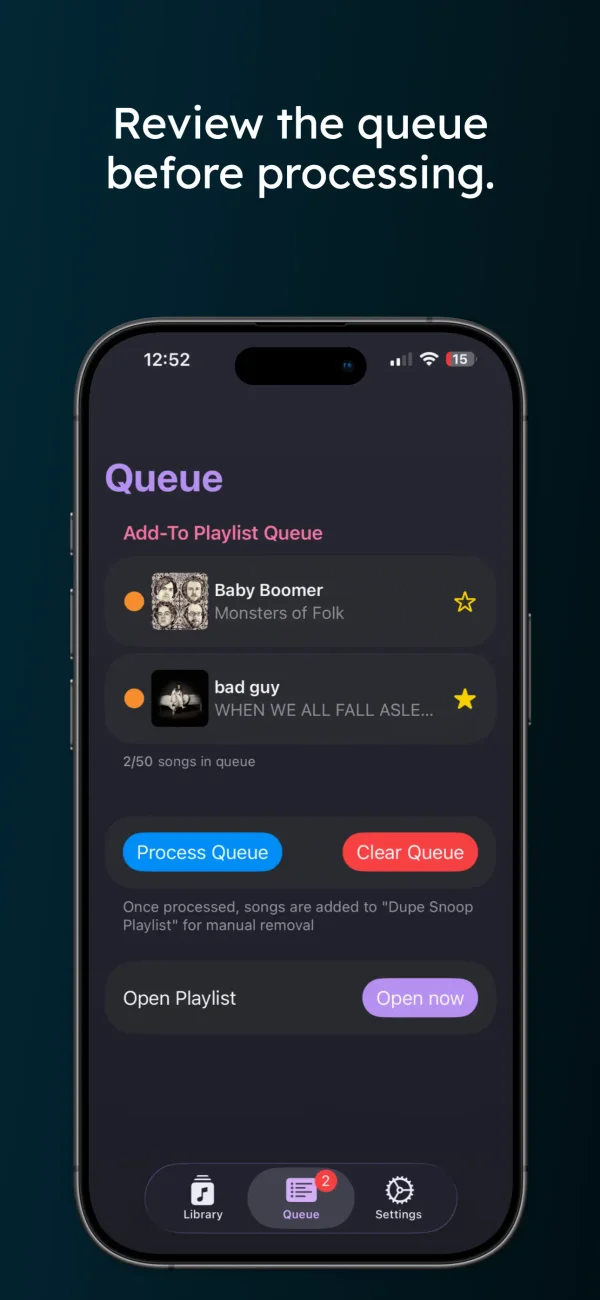
* Queue-Based Workflow: Select unwanted songs and add them to a removal queue for batch processing from within Apple Music
* Favorite Integration: Favorite your preferred versions right from the app
* Advanced Filtering: Filter your library by duplicates, favorites, explicit/clean, special editions, etc.
* Hide False Positives: Hide duplicate groups you want to keep, which automatically reappear if new versions are added
* View which playlists are common amongst the duplicate songs and merge them before processing.
* Catalog Search: Search Apple Music's catalog to find alternate versions and compare release dates
* Detailed Song Information: View comprehensive metadata including release dates, track numbers, play counts, and more
* Sorting Options: Sort your library by title, artist, or album in ascending or descending order
Free vs "Deluxe Special Edition"
* Free version is 100% functional to find and remove duplicate songs in your Apple Music library
* Deluxe Special Edition unlocks hidden groups, additional filter types, custom icons, and more themes.
Important Notes:
* Apple Music Subscription Required: An active Apple Music subscription is necessary to use DupeSnoop's features
* Manual Deletion Required: Due to restrictions imposed by Apple on third-party developers, DupeSnoop cannot delete songs directly from your library. Instead, songs queued for removal are added to a special playlist called "Dupe Snoop Playlist" which you can open in Apple Music to manually delete the songs
* Library Access Required: DupeSnoop requires permission to access your Apple Music library to function
* Local Library Only: The app works with songs in your local library and does not modify your iCloud Music Library directly
Take control of your music collection and say goodbye to duplicates with DupeSnoop!
https://www.apple.com/legal/internet-services/itunes/dev/stdeula/
新機能
バージョン 2026.02.28 · 2026/3/3
- Added an alert when you reach the 50-track maximum in the queue.
- Added new track tags to the song row view: Remix, Demo, Musical.
- Changed the release year tag to always display.
- Made all metadata tags from Apple white on dark grey to differentiate them from programmatically created tags.
- Updated the display of the Favorite, Search, and Queue buttons in the Song Detail view.
- Reworked the Onboarding tutorial to avoid confusion.
アプリのプライバシー
このアプリのデータの取り扱いについて、Vincent MacalusoがApp Storeで申告している内容です。
-
データの収集なし
開発元はこのアプリからデータを収集しません。
プライバシーの取り扱いは、ご利用の機能やお客様の年齢などに応じて異なる場合があります。
情報
- 販売元
- Vincent Macaluso
- カテゴリ
- ミュージック
- バージョン
- 2026.02.28
- 更新日
- 2026/3/3
- リリース
- 2026/1/16
- サイズ
- 11.4 MB
- 必要条件
- iOS 18.6以降
- 対象年齢
- 4+
- アプリ内課金
- あり
- 言語
- 英語
- 著作権
- © 2025 Vincent Macaluso