
- 対象年齢4+
- カテゴリビジネス
- 開発元Skydance Air, Inc.
- 言語英語
- サイズ4.0 MB
App Storeの公式ページにリンクしています
Download.orgはFlight Operation Trackerのファイルを一切ホストしていません。ボタンを押すと、Skydance Air, Inc.が公開しているApp Storeのアプリページが開きます。ページの最終確認:2026/11/12。
スクリーンショット


概要
開発元はこのテキストをお使いの言語で提供していません。
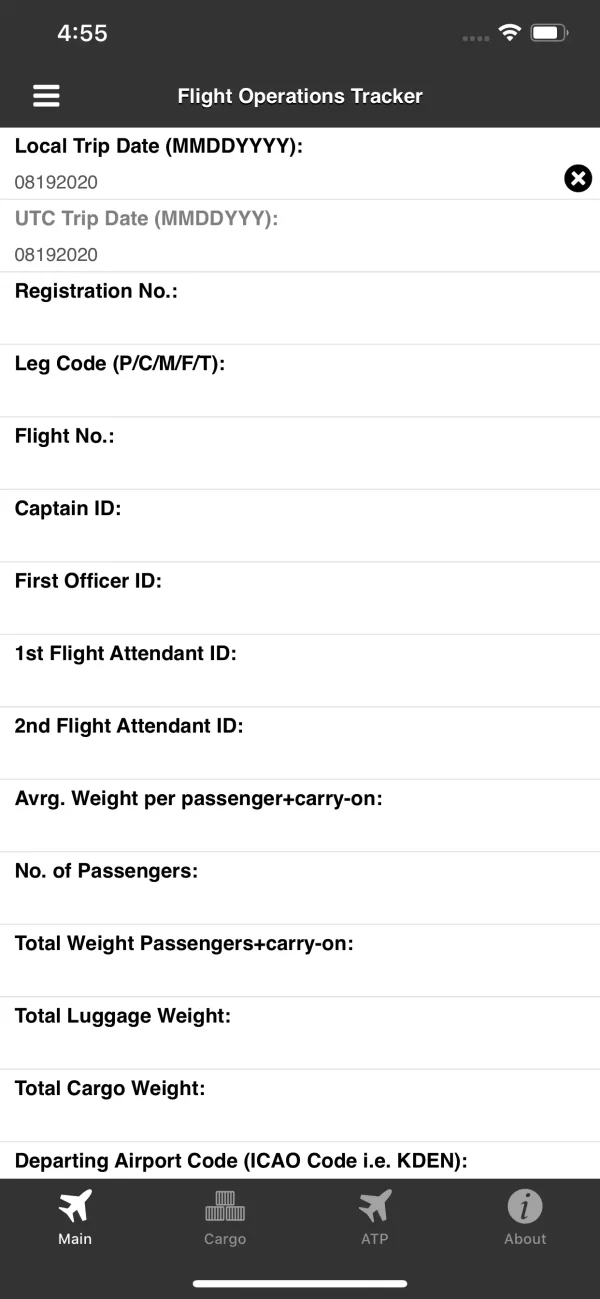
Introducing SkyTrax – Pilot-driven and controlled from the cockpit! MIFOS is a flight operations management tool for individual aircraft owners, corporate flight departments, charter operators and flying clubs under FAR part 91, 135, or small 121 operations. Please visit our website at Skydanceair.com for a Demo Video.
The pilot settles into the cockpit and enters essential flight data into an iPhone or iPad. Block and flight times may be entered and transmitted at this time as required for flights ops. Times are local and recorded when touching the time field. UTC times are auto calculated based on time zones. At arrival, the pilot enters on- and in-block times and transmits.
The AW Linux Server flight operations management program processes the data.
Highlights:
• Analyzes operational performance, reliability and efficiency;
• Supports snapshots of flights operations’ profit/loss which can interface with accounting programs through an Excel spreadsheet;
• Enables automatic invoicing of passenger and cargo revenue;
• Facilitates pilots’ compliance, recent experience and duty time records;
• Tracks fuel consumption, FBO/airport ID versus fuel cost and associated fees;
• Enables pilots and flight attendants to track, view and print flight records. Store flight records, send to their email address and open in Excel.
• Provides analysis of pilots’ standard operating procedure.
The App has three input screens, where screen #1 is the Flight Ops Tracker, screen #2 the Cargo Tracker and screen #3 Aircraft TOF data.
To learn more about this Flight Ops app please go to our website Skydanceair.com
Pilots and flight attendants regardless of their company is on MIFOS, can store a maximum of 200 Flight Ops records on the device. The file can be submitted to their email address and opened in column format in "Excel" work book or "Numbers". The log provides a complete record of the pilot and/or flight attendant flight operations including the pilot's flight ops performance data. No need to enter the internet to retrieve your flight ops log.
Instructions for Crew Flt Ops Log
Import Crew Flt Ops Log into "Excel" or "Numbers" Work Book.
1. After completion of the flight click on the icon in the upper left of the screen. You may either store or select “YES” to export previously stored flight log records to your email address. Locate the file in the input email folder.
2. Click on the file “main.CVS” then save as for example “FltOpLog” in a directory of your choice.
3. First time import, open a new work book in Excel and name it for example “YourNameFltOpLog”
4. Then click on the “Data” Tab in the toolbar, then click on “from text” and find the “FltOpLog” file (main.CSV) you want to open in "Excel" or "Numbers" and click on this file. You will have a complete flight log records of all flights to date
新機能
バージョン 1.7 · 2026/6/4
Updated the options menu design.
アプリのプライバシー
このアプリのデータの取り扱いについて、Skydance Air, Inc.がApp Storeで申告している内容です。
-
ユーザーに関連付けられないデータ
収集される場合がありますが、ユーザーの識別情報には関連付けられません。
- 連絡先情報
プライバシーの取り扱いは、ご利用の機能やお客様の年齢などに応じて異なる場合があります。
情報
- 販売元
- Skydance Air, Inc.
- カテゴリ
- ビジネス
- バージョン
- 1.7
- 更新日
- 2026/6/4
- リリース
- 2015/12/13
- サイズ
- 4.0 MB
- 必要条件
- iOS 12.0以降
- 対象年齢
- 4+
- 価格
- 無料
- 言語
- 英語
- 著作権
- © Copyright 2015 (C) SkyDance Air, Inc.