- 対象年齢17+
- カテゴリ仕事効率化
- 開発元EMiR EMRAH UCKAN
- 言語英語
- サイズ5.3 MB
App Storeの公式ページにリンクしています
Download.orgはLink Captureのファイルを一切ホストしていません。ボタンを押すと、EMiR EMRAH UCKANが公開しているApp Storeのアプリページが開きます。ページの最終確認:2026/11/18。
スクリーンショット


概要
開発元はこのテキストをお使いの言語で提供していません。
Stop retyping links you see in screenshots. LinkCapture reads the URLs right out of your images and saves them as tidy, searchable bookmarks — all on your device, no account required.
Point it at a screenshot, a photo, or something on your clipboard, and LinkCapture pulls out every link it finds, right on your device. One image with three links becomes three bookmarks. Emails are detected too. Then it offers something no camera roll does: once your link is safe, delete the source image and reclaim the storage.
**WHAT YOU CAN DO**
• Extract links from screenshots, photos, the camera, or the clipboard
• Get every URL in an image at once — save one bookmark per link
• See every link with its site's favicon, in a list or a grid
• Organize with colorful, icon-tagged categories
• Search and filter your whole collection instantly
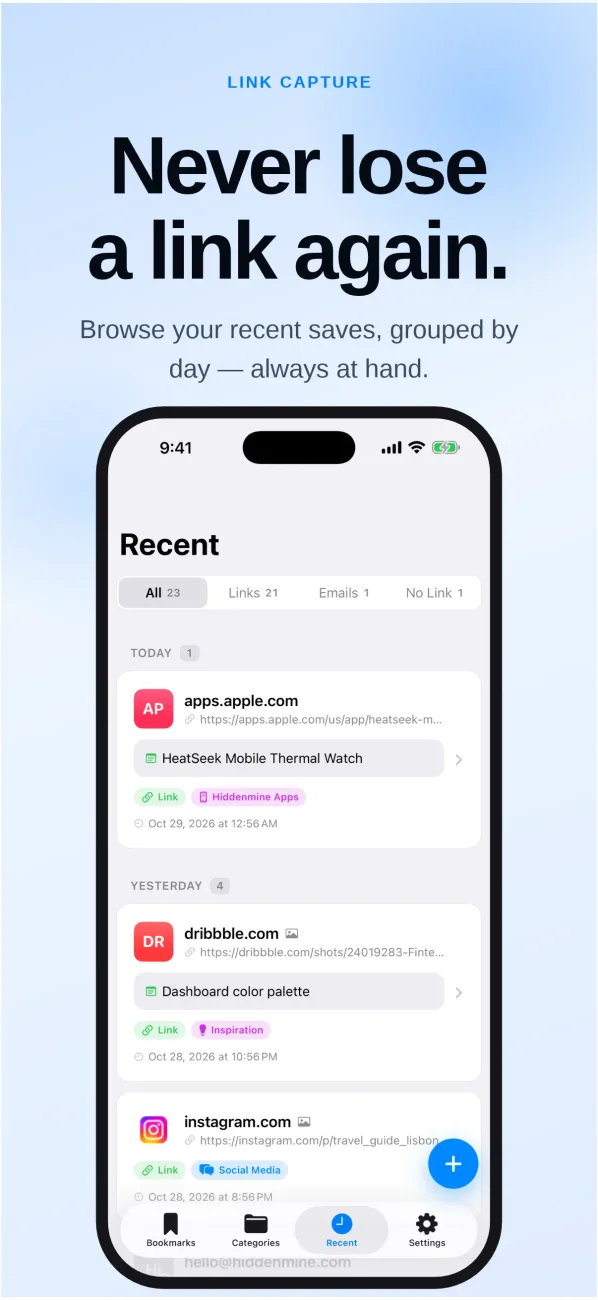
• Browse a Recents timeline grouped by date
• Open links in an in-app browser, or copy and share them
• Automatically strip tracking clutter (?fbclid=…, utm_…) off every link
• Detect email addresses, file them in their own category, and pick which mail app opens them
• Edit a saved link anytime — or add one to a "no-link" capture
• Pin your favorite bookmarks and categories to the top
• Save a pasted or typed link without an image
• Back up your links, categories and pins to iCloud
• Your extraction balance syncs across your iPhone, iPad and Mac
• Reclaim storage by deleting the source photo — now or later
**SHARE SHEET BUILT IN**
Send an image to LinkCapture straight from Photos, Safari, or any app via the Share sheet. It extracts the links and saves them without leaving what you were doing.
**PRIVATE BY DESIGN**
Extraction and storage happen entirely on your iPhone or iPad — no servers, no account, and your images never leave your device (bookmarks only go to your own iCloud if you turn on backup). Favicons are fetched directly from each site, not a third-party icon service. LinkCapture is free to use with ads; subscribe to Pro to remove them.
**PRO — GO DEEPER**
Some links wrap across multiple lines in a screenshot. LinkCapture Pro reconstructs those full, deep links automatically, removes ads, and adds 100 extractions to your balance every month. $4.99/month — cancel anytime.
Start with 30 free extractions — each link you save uses one. Grab a pack whenever you need more.
LinkCapture Pro is an auto-renewable subscription: Grants 100 Extraction every month for$4.99 (USD) per month, billed to your Apple Account. It renews automatically unless canceled at least 24 hours before the end of the current period. Manage or cancel anytime in your App Store account settings.
Terms of Use (EULA): https://www.apple.com/legal/internet-services/itunes/dev/stdeula/
Privacy Policy: https://www.hiddenmine.com/apps/linkcapture/privacy
新機能
バージョン 1.9.4 · 2026/11/4
# What's New — v1.9.4
• Pro deep links are more reliable: long links that wrap across several lines, like Google Forms links, are now captured in full instead of being cut off partway.
• iPad and Mac: in landscape, Settings, the welcome walkthrough, and the Bookmarks, Categories and Recent lists use a two-column layout.
• iPad and Mac: larger grid cards and rows with bigger site icons and text, and buttons that no longer stretch across the screen.
• Extractions are now spent when you save a link — one per link — so discarding an extraction costs nothing. Pasted and typed links also use one extraction.
• The Bookmarks screen is tidier: the redundant "Library" title is gone.
• iPad and Mac: a bookmark's page now shows more bookmarks from the same category.
• Restoring from an iCloud backup now brings back your pinned bookmarks and categories.
• Extraction credits now sync across your iPhone, iPad and Mac through iCloud.
• The tracking permission prompt now appears more reliably on first launch.
# What's New — v1.9.3
• Pin categories: pinned categories get their own section at the top of Categories and lead the filter chips on Bookmarks.
• Welcome to Pro: new subscribers get a welcome card showing their first 100 extractions and everything Pro includes.
• Every extraction pack purchase now shows what you bought and your new balance.
• After a purchase, LinkCapture takes you back home to see it.
• Pro subscribers can see a countdown to their next 100 extractions.
• Separate Upgrade and Buy buttons on the extractions card, and smoother switching between list and grid in Categories.
# What's New — v1.9.2
• Save copied links: copy a URL anywhere, tap +, then Paste. Saving a link uses no extraction. You can also type a link in.
• Pin your favorites: pinned bookmarks get their own group at the top, with a Pinned filter to see just them.
• Collapse the Pinned and Bookmarks groups with a tap on their title bar.
• A refreshed walkthrough covering the new features, with bigger, easier-to-read pages on iPad.
• Pro subscribers get a celebration when their monthly 100 extractions arrive.
• iPad and Mac: tidier banner placement that stays centered when you rotate or resize.
# What's New — v1.9.0
• All-new design: cleaner cards, deeper dark mode, and crisper colors throughout, in both Light and Dark appearance.
• Bookmarks: a new extractions card, roomier category filters, and richer grid cards that show each link's path or note and how long ago you saved it.
• Categories: now in list or grid, with search, bookmark counts, and the latest sites saved in each.
• Recent: a richer feed with your notes up front, plus quick filters for Links, Emails, and No Link captures.
• Bookmark details redesigned, with big, easy-to-tap Edit, Copy, Share, and Open buttons and a two-column layout on iPad and Mac.
• On iPad, search sits right under the title, and Settings fits a comfortable column.
アプリのプライバシー
このアプリのデータの取り扱いについて、EMiR EMRAH UCKANがApp Storeで申告している内容です。
-
ユーザーのトラッキングに使用されるデータ
他社のアプリやウェブサイトを横断してユーザーをトラッキングする目的で使用される場合があります。
- 使用状況データ
-
ユーザーに関連付けられないデータ
収集される場合がありますが、ユーザーの識別情報には関連付けられません。
- 使用状況データ
プライバシーの取り扱いは、ご利用の機能やお客様の年齢などに応じて異なる場合があります。
情報
- 販売元
- EMiR EMRAH UCKAN
- カテゴリ
- 仕事効率化
- バージョン
- 1.9.4
- 更新日
- 2026/11/4
- リリース
- 2026/8/11
- サイズ
- 5.3 MB
- 必要条件
- iOS 18.0以降
- 対象年齢
- 17+
- 価格
- 無料
- アプリ内課金
- あり
- 言語
- 英語
- 著作権
- © Hiddenmine Labs & EEU Apps