
- 対象年齢17+
- カテゴリユーティリティ
- 開発元Shenzhen Smart Display Vision Software Technology Co., Ltd
- 言語英語ほか9言語
- サイズ22.9 MB
App Storeの公式ページにリンクしています
Download.orgはM-Signのファイルを一切ホストしていません。ボタンを押すと、Shenzhen Smart Display Vision Software Technology Co., Ltdが公開しているApp Storeのアプリページが開きます。ページの最終確認:2026/11/13。
スクリーンショット


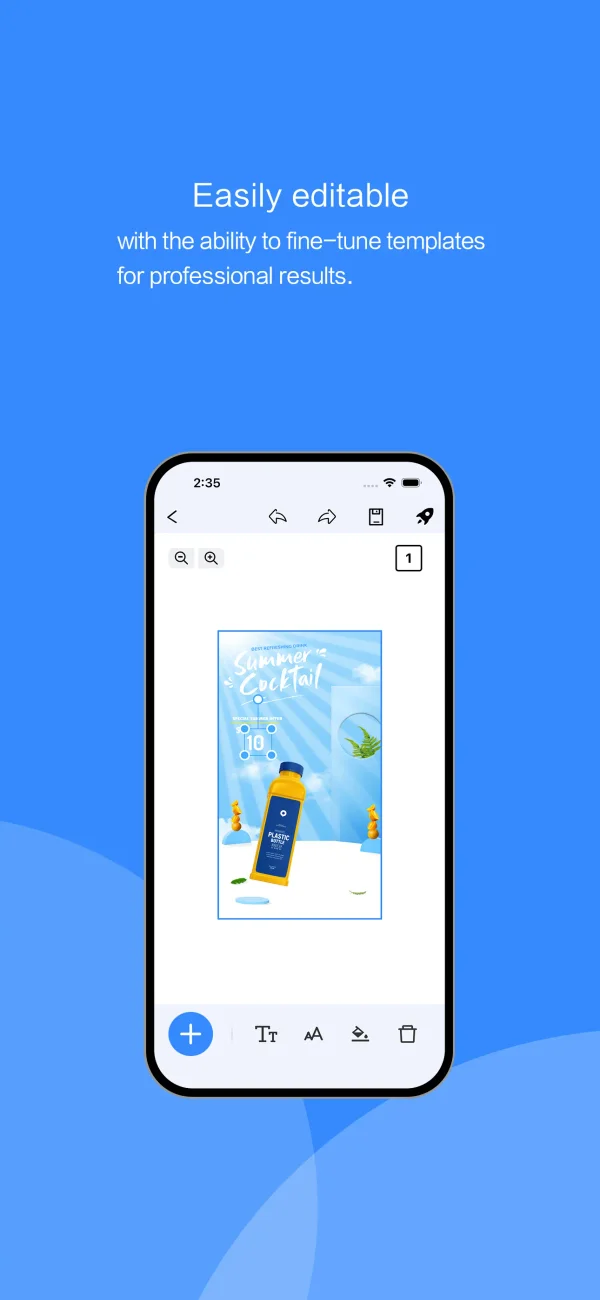
概要
開発元はこのテキストをお使いの言語で提供していません。
An amazing app for displaying ads on TV platforms.
It allows you to use your mobile phone to publish advertisement images, and place them on large TV screens with high image quality, real-time response, and stability; instant release, instant modification, and instant control of the display effect of TV advertisements.
You can also control some basic settings of the TV directly from your phone.
Simple operation and fast delivery: it only takes 30 seconds for you to complete the ad setup, and one minute to complete the display of the ad on the M-Sign digital signage.
Mobile M-Sign allows you to create and publish large-screen advertisements anytime, anywhere!
【Main Features】
+ Directly place local advertisement pictures and video advertisements: Support the placement of photos and videos on mobile phones on the large digital signage screen, so that the online advertising is no longer complicated!
These features are not only supported on this brand of digital signage terminals, but also on TVs with M-Sign TV installed:
+ Use the mobile phone template function to create ads: Provide mobile creative templates, you can create beautiful advertisements with simple modifications, allowing you to feel the pleasure of advertising creation!
+ Monitor TV advertising screen: Using the device control function of a mobile phone M-Sign can not only control the brightness, volume, and other parameters of the terminal but also monitor the situation of the screen in real-time (switch status and real-time advertising page)!
+ Setting timed advertisements: You can set a schedule for advertisements, and display advertisements on M-Sign terminals within a specified time.
【Supporting Device】
+Most smart TVs, including Nokia TV, Xiaomi TV, Amazon fire TV, Hisense TV, etc.
【Use suggestions】
+ Make sure your smart TV has M-Sign installed or use our terminal advertising machine directly.
+ Make sure you have registered our web-end background advertising account
+ It is recommended to connect the TV or advertisi
新機能
バージョン 1.19.260407 · 2026/4/7
fixed several bugs.
アプリのプライバシー
このアプリのデータの取り扱いについて、Shenzhen Smart Display Vision Software Technology Co., LtdがApp Storeで申告している内容です。
-
データの収集なし
開発元はこのアプリからデータを収集しません。
プライバシーの取り扱いは、ご利用の機能やお客様の年齢などに応じて異なる場合があります。
情報
- 販売元
- Shenzhen Smart Display Vision Software Technology Co., Ltd
- カテゴリ
- ユーティリティ
- バージョン
- 1.19.260407
- 更新日
- 2026/4/7
- リリース
- 2023/2/28
- サイズ
- 22.9 MB
- 必要条件
- iOS 12.0以降
- 対象年齢
- 17+
- 価格
- 無料
- 言語
- 英語, アラビア語, フランス語, ドイツ語, ギリシャ語, イタリア語, 韓国語, 簡体字中国語, スペイン語, 繁体字中国語
- 著作権
- © 2015 Shenzhen Qianhai Moka Soft Technology Co., Ltd. Inc
こちらもおすすめ
-
 Fast Cast - スクリーン投射小さな画面から大きな画面へ
-
 mysalamユーティリティ
-
 Saudi Energyユーティリティ
-
 画面をTV・PC・スマホにミラーリング画面をキャストしてファイル共有
-
 IP Camera Viewer - IPCamsユーティリティ
-
 画面ミラーリング・スマホをTVへキャスト写真・動画・音楽を大画面でワイヤレス再生
-
 SmartLife-SmartHomeユーティリティ
-
 Screen Mirroring · Smart TVSmart View · Share & Cast
-
 画面ミラーリング・TVキャストミラーキャスト・共有・接続
-
 スクリーンミラーリング・TV キャスト・#1 プロジェクターReplica・Screen Mirroring Cast