
- 対象年齢4+
- カテゴリユーティリティ
- 開発元Frank Weigand
- 言語英語ほか1言語
- サイズ10.1 MB
App Storeの公式ページにリンクしています
Download.orgはMagicPingのファイルを一切ホストしていません。ボタンを押すと、Frank Weigandが公開しているApp Storeのアプリページが開きます。ページの最終確認:2026/11/16。
スクリーンショット


概要
開発元はこのテキストをお使いの言語で提供していません。
One tap, and your computer wakes up.
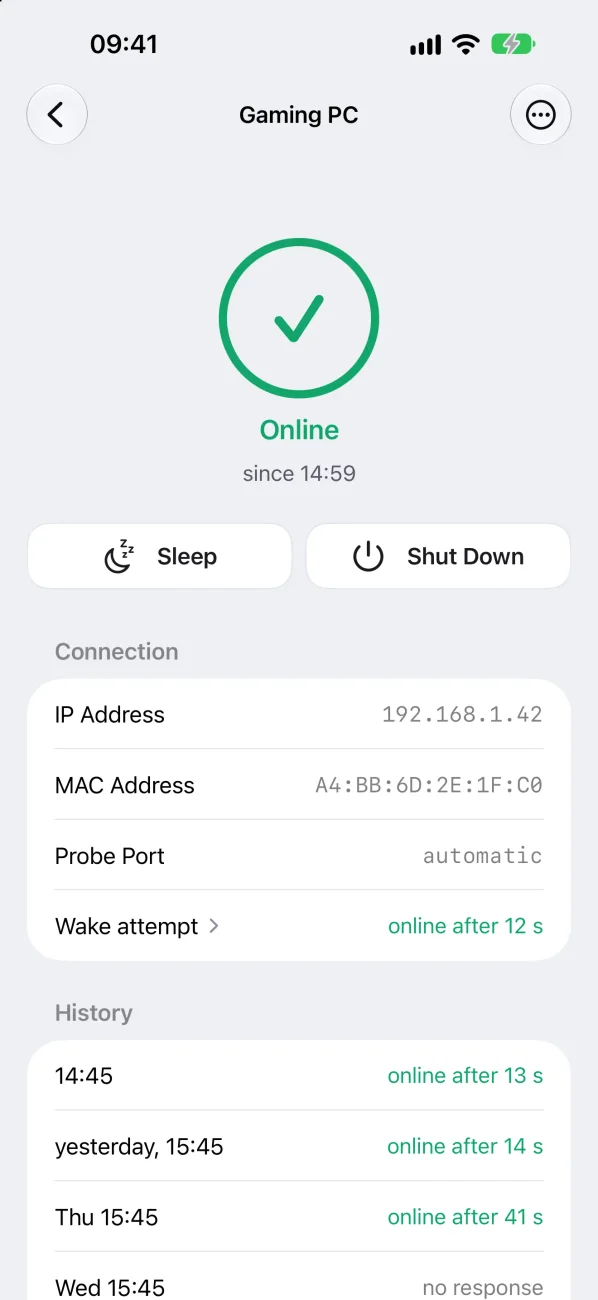
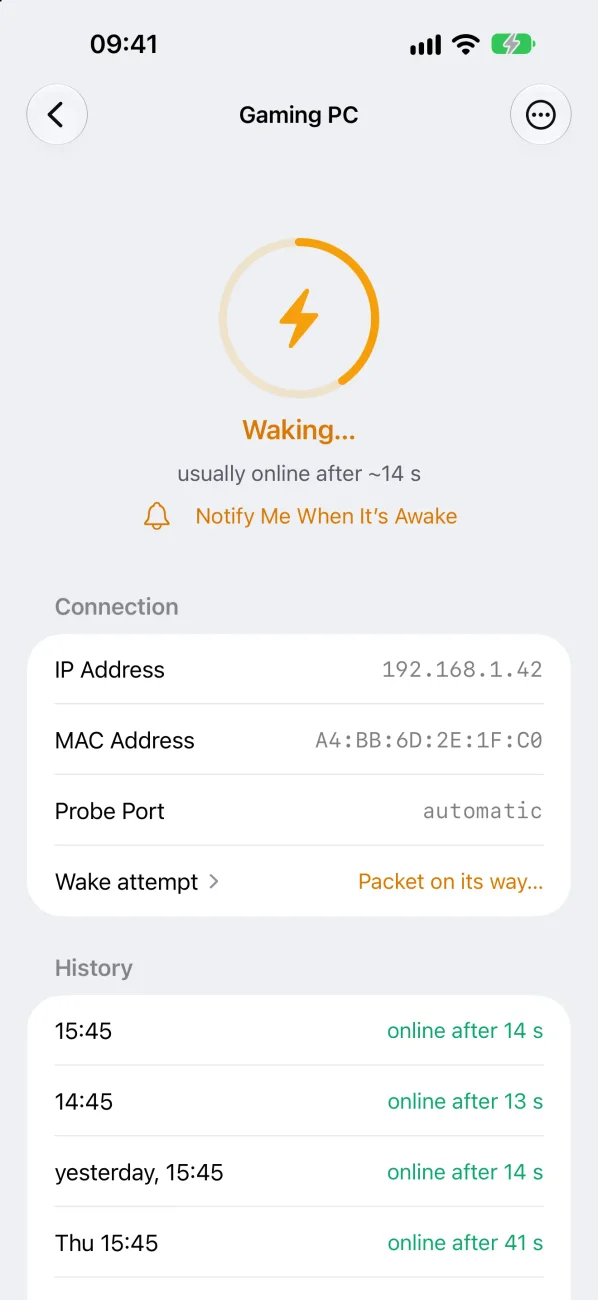
MagicPing wakes PCs, Macs, NAS boxes, and servers on your home network via Wake-on-LAN — from your iPhone, your Mac, your Apple TV, and your Apple Watch. And when you're done, MagicPing shuts them down again over SSH.
BUILT FOR THE LIVING ROOM
The Apple TV launcher starts your gaming PC right from your television — before you stream via Moonlight/Sunshine or Steam Link. MagicPing even shows you when the streaming service is ready to accept connections.
YOUR COMPUTERS, EVERYWHERE
Enter a computer once and it appears on all your devices: the list syncs through iCloud — no account, no sign-up, no server run by us.
WHAT MAGICPING DOES
• Wake computers with a magic packet (Wake-on-LAN)
• Live status: see who is online — and since when
• Shut down over SSH (Linux, macOS, and Windows with OpenSSH)
• Apple Watch: wake machines right from your wrist
• Apple TV: the fastest way from couch to running gaming PC
• Probe port selectable or automatic (Sunshine, RDP, SSH, SMB)
• Type MAC addresses without colons — MagicPing formats as you type
PRIVATE BY DESIGN
MagicPing collects no data. Your computer list lives in your private iCloud; SSH passwords are stored only in the keychain. No ads, no tracking, no accounts.
GOOD TO KNOW
Wake-on-LAN must be enabled on the target machine (BIOS/UEFI and network adapter). Shutting down requires SSH access to the target. iCloud sync requires a signed-in iCloud account.
新機能
バージョン 2.5.0 · 2026/11/1
MagicPing now wakes your PlayStation 5, too, and makes use of the unfolded iPhone Duo.
• iPhone Duo: unfolded, your device list and the selected device sit side by side, one on each side of the fold.
• iPad: the sidebar now stands clearly apart from the device view, just like on the Mac.
• PlayStation 5: link once (PIN from "Link Device" plus your PSN account), then wake it from rest mode and put it back to sleep from iPhone, Mac, Apple TV and Watch. MagicPing shows whether the console is running or asleep.
• Siri, Shortcuts, Spotlight and the Action button: wake devices by voice or with a single press.
• Wake with progress: the ring fills against the learned boot time, and a notification tells you when the device is awake. A history lists recent wake-ups.
• "No response" instead of a silent offline, with a way out, even when your router has handed out a new address.
• Mac: menu bar panel by keyboard (↑/↓, Return, 1–9), reworked menus and shortcuts.
• New device: network scan first, clearer forms, better VoiceOver.
The PlayStation doesn't offer a full shutdown from the network.
アプリのプライバシー
このアプリのデータの取り扱いについて、Frank WeigandがApp Storeで申告している内容です。
-
データの収集なし
開発元はこのアプリからデータを収集しません。
プライバシーの取り扱いは、ご利用の機能やお客様の年齢などに応じて異なる場合があります。
情報
- 販売元
- Frank Weigand
- カテゴリ
- ユーティリティ
- バージョン
- 2.5.0
- 更新日
- 2026/11/1
- リリース
- 2026/8/15
- サイズ
- 10.1 MB
- 必要条件
- iOS 17.0以降
- 対象年齢
- 4+
- 価格
- 無料
- 言語
- 英語, ドイツ語
- 著作権
- © Frank Weigand
こちらもおすすめ
-
 Wakivo: Wake on LAN & Shutdownユーティリティ
-
 WakeyTooユーティリティ
-
 WakeCast: Wake-on-LANネットワーク起動ユーティリティ
-
 PowMote: Remote Power Controlユーティリティ
-
 Magic Knock – Wake On LANユーティリティ
-
 Wakey - Wake on LanLAN内PCをワンタップ起動
-
 WOL - Wake on Lan Proユーティリティ
-
 WakeUp Proユーティリティ
-
 SayBoot — turn on your PCユーティリティ
-
 Power Remote - Sleep Wake Lockユーティリティ