- 対象年齢4+
- カテゴリユーティリティ
- 開発元CHENG-YU WANG
- 言語繁体字中国語ほか1言語
- サイズ11.6 MB
App Storeの公式ページにリンクしています
Download.orgはMiles / 1966のファイルを一切ホストしていません。ボタンを押すと、CHENG-YU WANGが公開しているApp Storeのアプリページが開きます。ページの最終確認:2026/11/22。
スクリーンショット
概要
開発元はこのテキストをお使いの言語で提供していません。
MILES / 1966
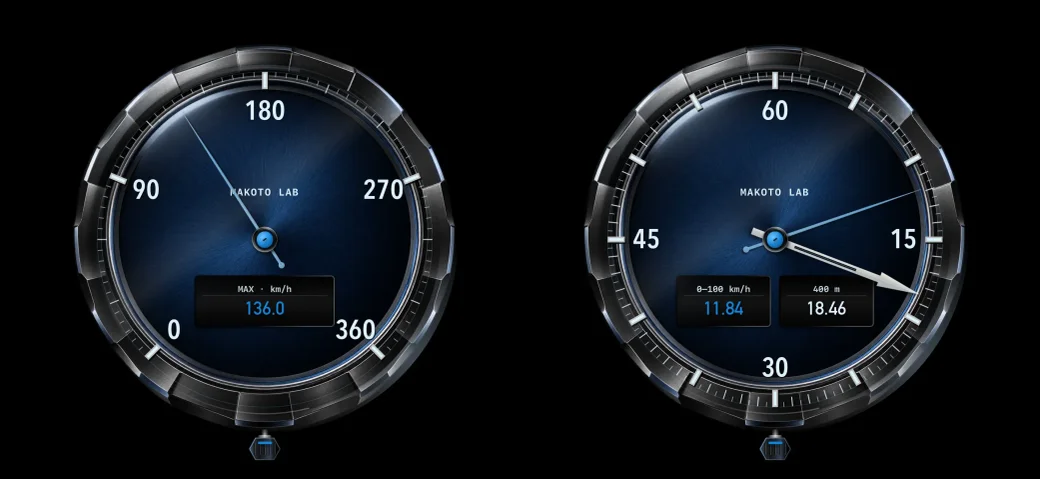
A mechanical cockpit. A clearer story behind every run.
Miles is a focused straight-line performance logger for legal, controlled testing environments. Record a run, look beyond the final number, and keep its conditions beside the result. One purchase, without subscriptions, ads or a Miles account.
UNDERSTAND YOUR RUN
New runs save a time series for speed splits, an available-GPS timeline and evidence-based run insights. Select a finding to inspect its interval. Compare two runs at matching speeds to see where time differences emerge.
Missing or unreliable intervals remain unavailable. Miles does not invent samples or diagnose braking, gear changes or wheelspin from a speed trace alone.
A GARAGE FOR YOUR RESULTS
Save cars and motorcycles, then browse each vehicle's runs. Selecting a vehicle is optional: assign, change or unlink it after testing without removing the result. A test-day notebook keeps setup, tyre pressure, payload and conditions together.
ROUTES, ELEVATION AND WEATHER
Switch between a minimal route outline and Apple Maps, including map-backed result-card export. New runs retain usable GPS altitude samples to estimate elevation gain and loss. When available, nearby weather conditions are fetched automatically and saved with the run: temperature, humidity and wind. Cached conditions reduce repeat requests; testing still works offline or when weather is unavailable.
GPS elevation and area weather are estimates, not road-gradient certification, road temperature or instantaneous wind at the vehicle. Map exports can reveal the route location; review before sharing.
FOUR INSTRUMENT DESIGNS
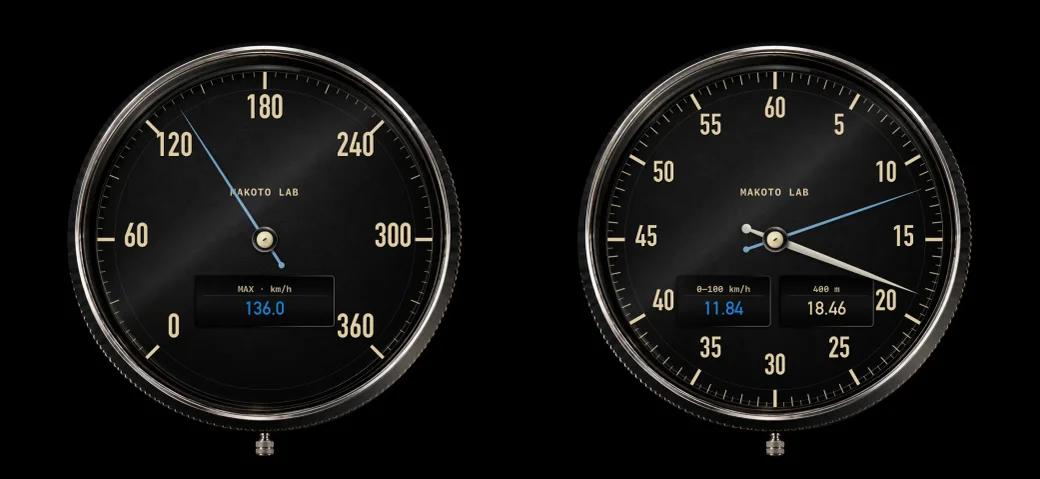
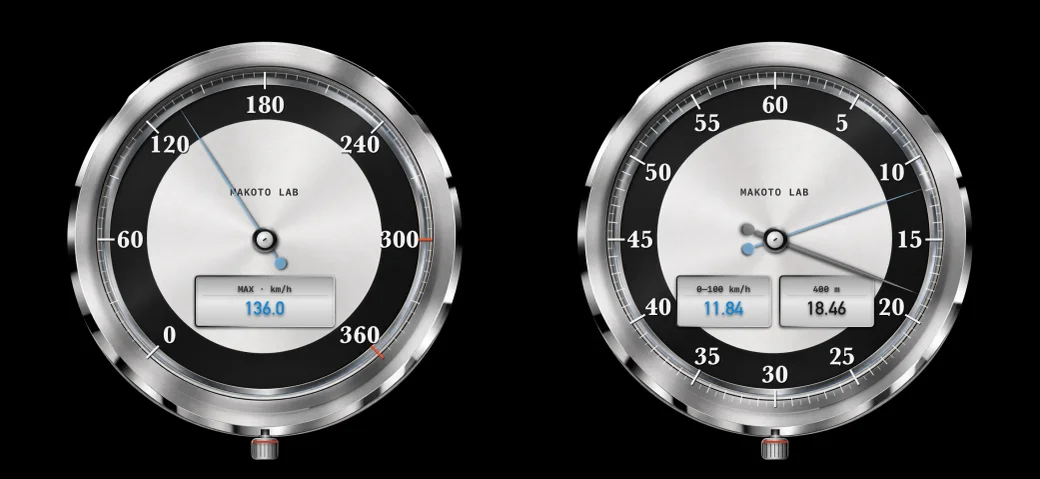
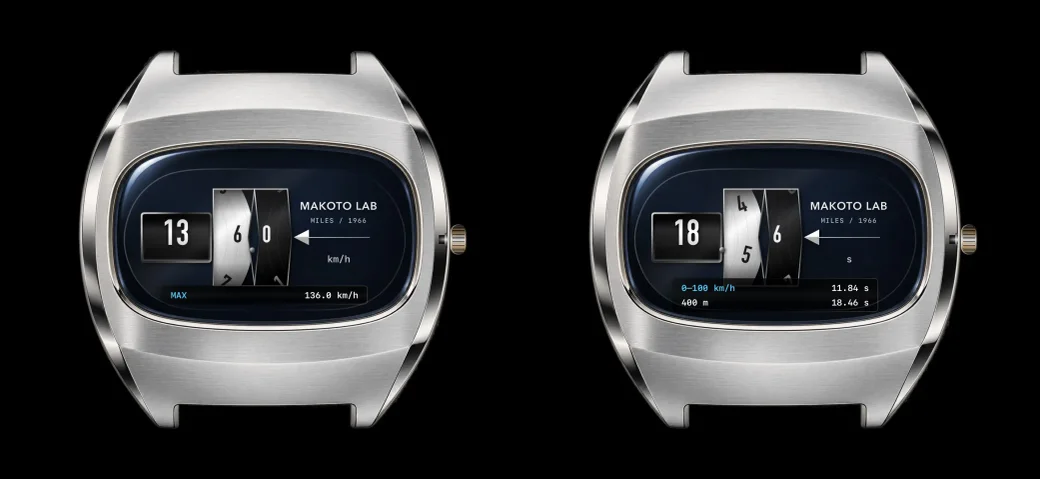
Rotate your iPhone to landscape for 1966, RALLY, MIDNIGHT and JUMP / 70. Distinct faces, hands, typography and cases sit against a pure-black background. Subtle reflections respond to phone tilt.
• Live speed with a separate peak-speed hand
• Milestone timing with a frozen first-result hand
• Rotating numeral displays in JUMP / 70
• Crown controls for reset, arming and optional direction calibration
• Swipe designs while no test is armed or running
• Historical instrument views and configurable instrument sharing
On iPhone Duo, layouts adapt to available space and folding posture, with separate instruments and controls in the folded cockpit. Wider history views support side-by-side review.
MEASUREMENT TARGETS
• Metric standard: 0–100 km/h and 400 m
• Metric short: 0–60 km/h and 200 m
• Imperial standard: 0–60 mph and 1/4 mile
• Imperial short: 0–30 mph and 1/8 mile
• Peak speed, acceleration G-force trace and route recording
• Car/motorcycle modes and optional 1-foot rollout
• Spoken start, milestone-time, timeout, cancel and completion cues
BETWEEN GPS UPDATES
A target crossing often falls between location updates. Miles interpolates between samples to estimate that crossing time, reducing the timing granularity of simply using the next GPS timestamp. Interpolation does not increase the sensor's sampling rate or remove GPS, mounting or environmental errors. Results are comparative measurements, not certified instrumentation.
KEEP YOUR HISTORY
Save notes, export cards to Photos and use optional private iCloud backup. Existing records remain readable; missing historical telemetry, weather and altitude are not fabricated. Restore replaces local history and keeps a pre-restore snapshot. Complete garage backups require version 1.4.0 or later to restore.
Traditional Chinese and English follow the system language initially, with manual selection in Settings.
SAFETY FIRST
Use only on closed courses or other legal, controlled grounds. Secure the phone before moving. Never operate it while driving or riding. Direction calibration is optional; GPS timing remains available without it.
ANIMATED GUIDES
First-launch onboarding and replayable, page-specific guides explain testing, instruments, garage, reports and sharing. Card navigation stays visible below.
新機能
バージョン 1.4.0 · 2026/11/5
A clearer story behind every run.
• Garage: save cars and motorcycles and browse their runs. Vehicle selection is optional; assign, change or unlink it later.
• Run reports: speed splits, available-GPS timelines and evidence-based insights.
• Two-run comparison aligned at matching speeds.
• Minimal route outlines or Apple Maps, including result-card export.
• Usable GPS elevation samples for gain/loss estimates and automatic nearby weather when available.
• Test-day notes for setup, tyre pressure, payload and conditions.
• Persistent weather cache, request limits and failure backoff.
• Optional direction calibration with fewer posture-change reminders.
• Clear Car / Motorcycle controls on the dashboard and in the garage.
• Existing-record compatibility, complete garage backup and local recovery protection.
Missing historical data is not fabricated. Complete garage backups require 1.4.0 or later to restore. Use only in legal, controlled testing environments.
• Animated onboarding and replayable guides.
• Fixed Back, Share and Photos controls on result cards.
アプリのプライバシー
このアプリのデータの取り扱いについて、CHENG-YU WANGがApp Storeで申告している内容です。
-
データの収集なし
開発元はこのアプリからデータを収集しません。
プライバシーの取り扱いは、ご利用の機能やお客様の年齢などに応じて異なる場合があります。
情報
- 販売元
- CHENG-YU WANG
- カテゴリ
- ユーティリティ
- バージョン
- 1.4.0
- 更新日
- 2026/11/5
- リリース
- 2026/10/1
- サイズ
- 11.6 MB
- 必要条件
- iOS 16.4以降
- 対象年齢
- 4+
- 価格
- ¥500
- 言語
- 繁体字中国語, 英語
- 著作権
- © 2026 MAKOTO LAB