- 対象年齢4+
- カテゴリミュージック
- 開発元Yufei Zhang
- 言語英語
- サイズ914.0 KB
App Storeの公式ページにリンクしています
Download.orgはMiniControlのファイルを一切ホストしていません。ボタンを押すと、Yufei Zhangが公開しているApp Storeのアプリページが開きます。ページの最終確認:2026/11/20。
スクリーンショット


概要
開発元はこのテキストをお使いの言語で提供していません。
Introducing MiniControl 5.0: A Significant Update
MiniControl 5.0 brings a range of new features and improvements to this long-standing app, enhancing your experience and making control even more intuitive and adaptable.
What's New in 5.0:
- Flexible Control Panel Placement: Now you can choose to position the control panel on the right-hand side of your iPad in landscape mode, giving you greater flexibility and comfort as you work.
- Customizable Meter and Layout Options: 3 level meter presets and 4 channel layout presets added.
- Adjustable Brightness: Take control of your visual environment with adjustable brightness settings for LED indicators, labels, and buttons, ensuring clear visibility in any lighting condition.
====================================
Key features:
====================================
- Streamlined and purposeful tools
- Effortless setup with zero configuration on Mac
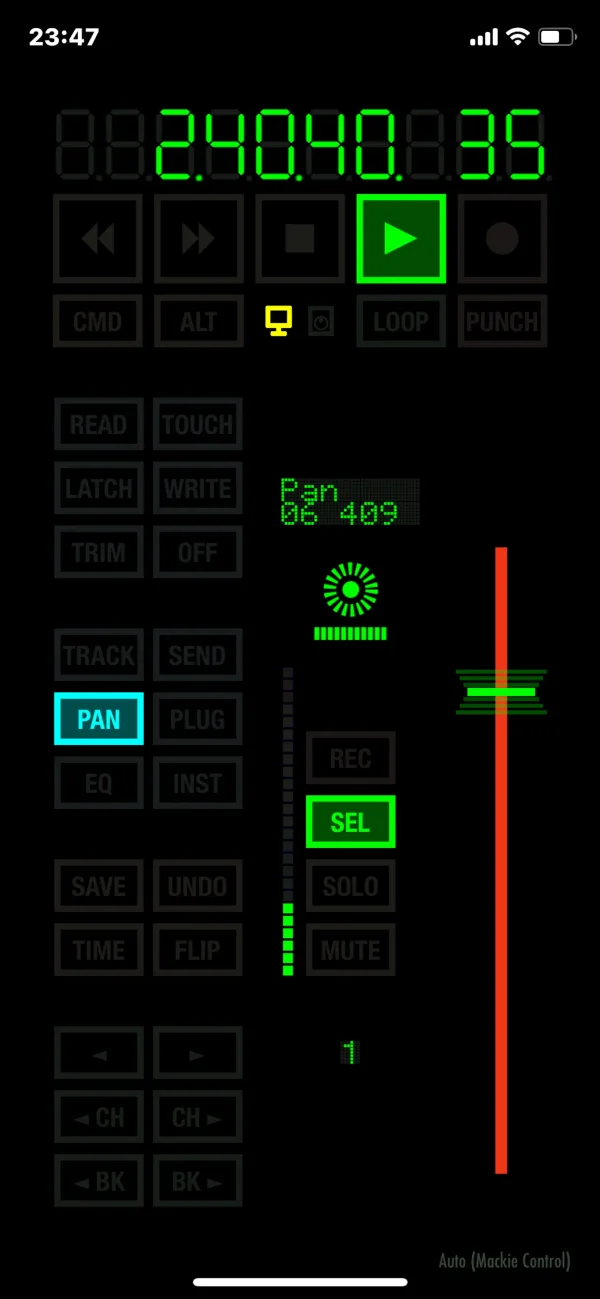
- 8 multitouch faders (1 on iPhone)
- 8 versatile multi-function encoders (1 on iPhone)
- 8-channel text display (1 on iPhone)
- Channel control: automation, record, select, solo, mute, and track label for each channel
- Basic transport controls
- Time display
- Seamless integration with Mackie HUI and Mackie Control protocols
- Automatic protocol selection for convenience (manual override available in System Settings)
- Customizable encoder touch sensitivity for tailored performance
- Dark interface ideal for low-light environments
- Versatile portrait and landscape modes optimized for iPad
- Universal Binary ensuring compatibility across devices
====================================
Tested and Confirmed Compatibility with Leading DAWs:
====================================
- Pro Tools (Mackie HUI)
- Logic Pro (Mackie HUI and Mackie Control*)
- Nuendo / Cubase (Mackie HUI* and Mackie Control)
- Live (Mackie Control)
- Reason (Mackie Control)
* Preferred
====================================
How to connect:
====================================
1. Ensure your iOS device and computer are on the same network. USB cable connection is also supported on iOS 10.
2. Launch MiniControl on your device.
3. Open Audio MIDI Setup in Applications / Utilities.
4. Navigate to the MIDI Window.
5. Double-click on Network and create a new session (or use an existing one).
6. Select and connect your iOS device to the session. For multiple MiniControl devices, create separate network sessions.
7. Launch your DAW and configure a new Mackie HUI or Mackie Control device using the MIDI port from the previous step for input and output. Avoid using "All inputs" or "All outputs" whenever possible.
====================================
Notes:
====================================
- To connect multiple iOS devices as separate interfaces, create a unique network session and configure MIDI controllers accordingly.
- Disable Multitasking Gestures to control more than 3 faders simultaneously on iPad.
- DAWs may vary in protocol implementation, functionality, and performance. Please adjust settings accordingly for optimal performance.
- While auto protocol detection is available, manual protocol selection is recommended to avoid potential message loss during setup.
新機能
バージョン 5.1.0 · 2025/10/3
Updated the UI for iOS 26 and new devices.
アプリのプライバシー
このアプリのデータの取り扱いについて、Yufei ZhangがApp Storeで申告している内容です。
-
データの収集なし
開発元はこのアプリからデータを収集しません。
プライバシーの取り扱いは、ご利用の機能やお客様の年齢などに応じて異なる場合があります。
情報
- 販売元
- Yufei Zhang
- カテゴリ
- ミュージック
- バージョン
- 5.1.0
- 更新日
- 2025/10/3
- リリース
- 2012/6/4
- サイズ
- 914.0 KB
- 必要条件
- iOS 12.0以降
- 対象年齢
- 4+
- 価格
- ¥2,000
- 言語
- 英語
- 著作権
- © 2025 audio.ninja
こちらもおすすめ
-
 MicSwap MultiTrack Pro: 録音 DAWマルチトラック, 音楽スタジオ, マイク, レコーダー
-
 ProStudio3 - With AIミュージック
-
 DrumPerfect Proミュージック
-
 TGX-99/77 Sample Libraryミュージック
-
 Mini_controlミュージック
-
 BlueBeast - Yamaha EX5 Libraryミュージック
-
 Mini Orchestraミュージック
-
 MIDI Strummer AUv3 Pluginミュージック
-
 FabFilter Pro-R 2ミュージック
-
 ProRemote Light Editionミュージック