
- 対象年齢4+
- カテゴリミュージック
- 開発元ChorusLogic Ltd.
- 言語英語
- サイズ49.9 MB
App Storeの公式ページにリンクしています
Download.orgはNotationPlayerのファイルを一切ホストしていません。ボタンを押すと、ChorusLogic Ltd.が公開しているApp Storeのアプリページが開きます。ページの最終確認:2026/11/18。
スクリーンショット



概要
開発元はこのテキストをお使いの言語で提供していません。
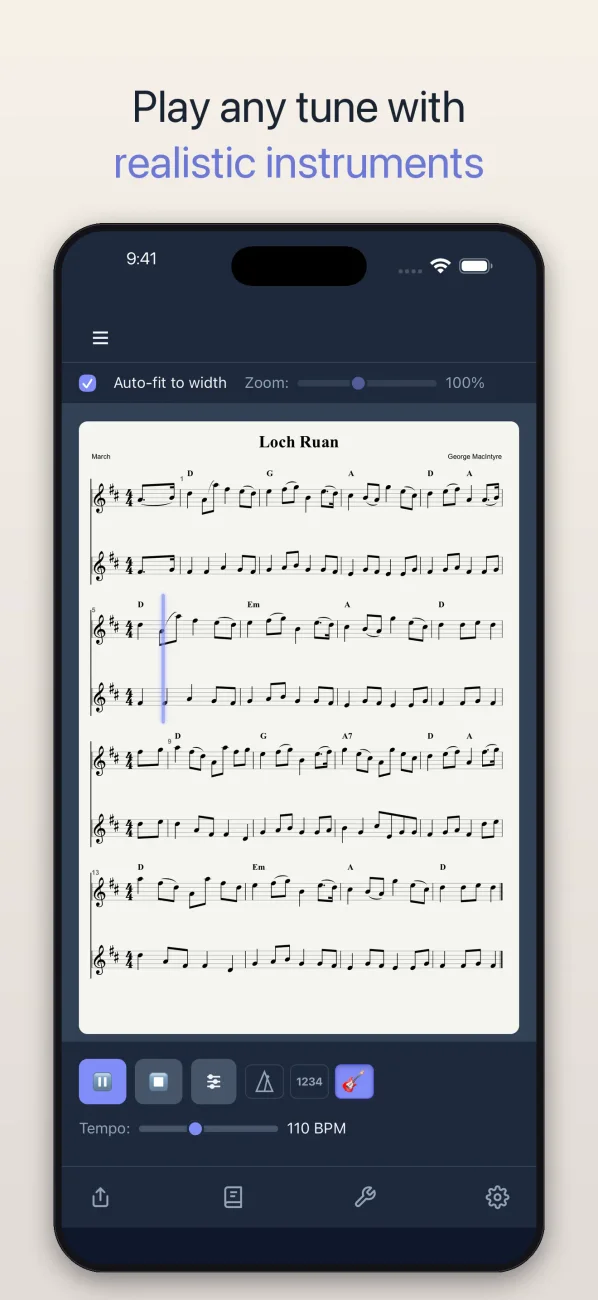
NotationPlayer turns your sheet music into sound. Open any MusicXML or ABC file, choose from over 100 realistic instruments, and hear your music played back instantly - with full tempo control, transposition, and a built-in metronome.
Try every feature free for 7 days. After that, a single one-time purchase keeps NotationPlayer fully working - no subscription, no ads.
Built for trad and folk musicians, with full MusicXML support for classical, jazz, choral, and any sheet music you read. Now in English, Spanish and German.
PLAY YOUR MUSIC
• Play MusicXML and ABC notation files with realistic instrument sounds
• Adjust tempo from half speed to double speed without changing pitch
• Transpose to any key with one tap
• Built-in metronome with click, woodblock, and bodhrán sounds
• Count-in option for a clean start
• Auto-scroll follows the music as it plays
FIND NEW TUNES
• Search over 30,000 traditional tunes from The Session
• Browse the ABC Notation archive and Henrik Norbeck's collection
• Paste ABC or MusicXML notation directly into the app
• 55 sample tunes included - Celtic, Classical, Bluegrass, and Jazz
LEARN AND PRACTISE
• Tap any note to set a cue point and play from there
• Loop any section by selecting start and end notes - perfect for tricky passages
• Show note names on every note - as letters (C, D, E), in solfège (Do, Re, Mi) or German style (H, B)
• Lyrics displayed and synced to playback
• Swing control for jazz and traditional styles
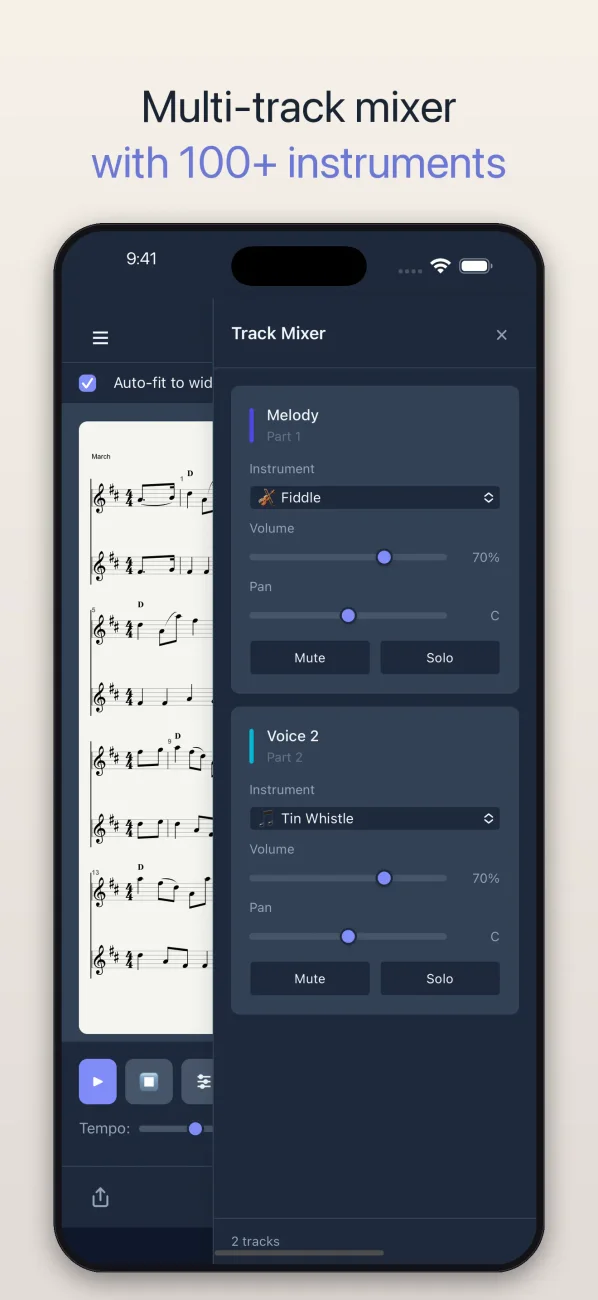
MULTI-TRACK MIXER
• Assign different instruments to each voice or part
• 100+ instruments including fiddle, tin whistle, mandolin, piano, guitar, flute, choir, and more
• Volume, pan, mute, and solo controls per track
• Hide parts from the score - see just your own line while the others keep playing
• Guitar chord accompaniment from chord symbols
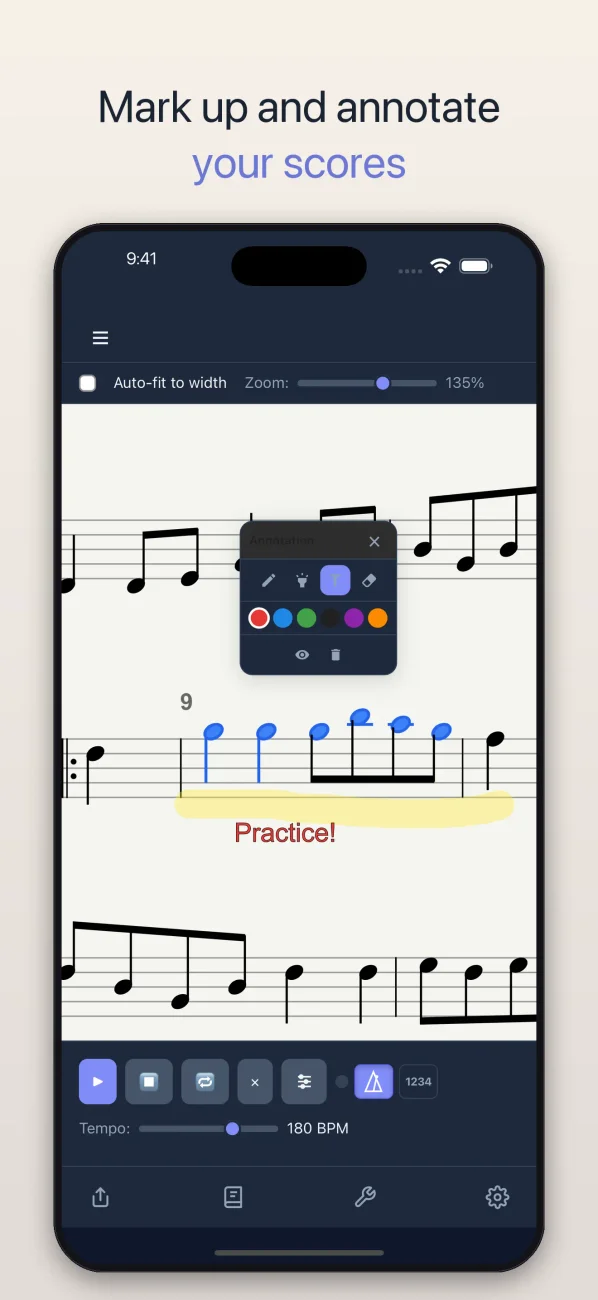
ANNOTATE YOUR SCORES
• Draw on your scores with pen and highlighter
• Add text notes anywhere on the page
• Multiple colours and tools
• Your annotations are saved with each tune
ORGANISE YOUR MUSIC
• Build tune sets - group tunes into medleys that play seamlessly
• Create playlists with sets and individual tunes
• Ensemble mode - add backing instruments to your playlists
• Speed control for playlist playback
• Favourites and search across your library
EXPORT AND SHARE
• Export scores as PDF for printing or sharing with bandmates
• Export audio as MP3
• Share with other musicians
WORKS OFFLINE
NotationPlayer works without an internet connection. Your tunes, instruments, and playlists are always available - perfect for rehearsals, sessions, and practice anywhere.
FREE TRIAL, THEN BUY ONCE
Every feature is unlocked for your first 7 days. After the trial, scores still open and play a 30-second preview; a one-time purchase unlocks everything again, for good. There is no subscription, and purchases can be restored on a new device.
Built for musicians who want their notation to do more than just sit on the page.
Terms of Use (EULA): https://www.apple.com/legal/internet-services/itunes/dev/stdeula/
新機能
バージョン 1.2.9 · 2026/11/2
Playback keeps proper time. The sound engine now runs on its own audio thread, so every note lands where it should, and fast reels and jigs no longer stumble.
Hornpipes swing. Tunes marked as a hornpipe, barndance or fling are written as even notes but played long-short, and NotationPlayer now plays them that way. Triplets stay even. Turn it off in Settings to hear them exactly as written. The Swing setting now really moves the notes, for any tune.
Tablature: show tab for guitar (standard or DADGAD), mandolin, or tenor banjo (GDAE or CGDA) under any ABC tune. The frets are worked out from the notes, using open strings and keeping your hand in one position. In Settings > Display, choose notation and tab, notation only, or tab only. Tap a fret number to play from that note; the playing note lights up in both.
Medleys: when one ABC tune holds a whole set, each tune's name is shown where it starts, with a separator between the tunes.
During playback, the whole line of music stays in view, tab included.
アプリのプライバシー
このアプリのデータの取り扱いについて、ChorusLogic Ltd.がApp Storeで申告している内容です。
-
データの収集なし
開発元はこのアプリからデータを収集しません。
プライバシーの取り扱いは、ご利用の機能やお客様の年齢などに応じて異なる場合があります。
情報
- 販売元
- ChorusLogic Ltd.
- カテゴリ
- ミュージック
- バージョン
- 1.2.9
- 更新日
- 2026/11/2
- リリース
- 2026/2/25
- サイズ
- 49.9 MB
- 必要条件
- iOS 16.0以降
- 対象年齢
- 4+
- 価格
- 無料
- アプリ内課金
- あり
- 言語
- 英語
- 著作権
- © 2026 ChorusLogic Ltd.
こちらもおすすめ
-
 Scorelio – 楽譜プレーヤー合唱・吹奏楽の練習に。パート別再生&伴奏
-
 Opuscan: Score Scanner写真・PDFをMusicXML/MIDIに変換
-
 ScorePDF: 楽譜閲覧アプリ簡単に譜めくりできる楽譜閲覧アプリ
-
 ピアノ+ - ピアノ 楽譜 作曲家ピアノの鍵盤を弾くピアノを弾く
-
 楽譜Pro - 楽譜作成、作曲、曲作り音楽作成、キーボードで楽譜を作る
-
 Notion 楽譜とタブ譜どこでも作曲
-
 PlayScore 2完全楽譜スキャナ
-
 Newzik:楽譜読み取りアプリ「ニュージック」でいつでもどこからでも楽譜にアクセス
-
 Notation Pad - 作曲、楽譜作成&音楽を作る楽曲、五線譜、楽譜 読み取り、音楽作成
-
 楽譜スキャナー Sheet Music Scanner譜面スキャン, 楽譜読み取り& 譜面音符読み取りアプリ