
- 対象年齢4+
- カテゴリ仕事効率化
- 開発元Robert Bell
- 言語英語
- サイズ8.0 MB
App Storeの公式ページにリンクしています
Download.orgはOTask: Task Widgetsのファイルを一切ホストしていません。ボタンを押すと、Robert Bellが公開しているApp Storeのアプリページが開きます。ページの最終確認:2026/11/20。
スクリーンショット


概要
開発元はこのテキストをお使いの言語で提供していません。
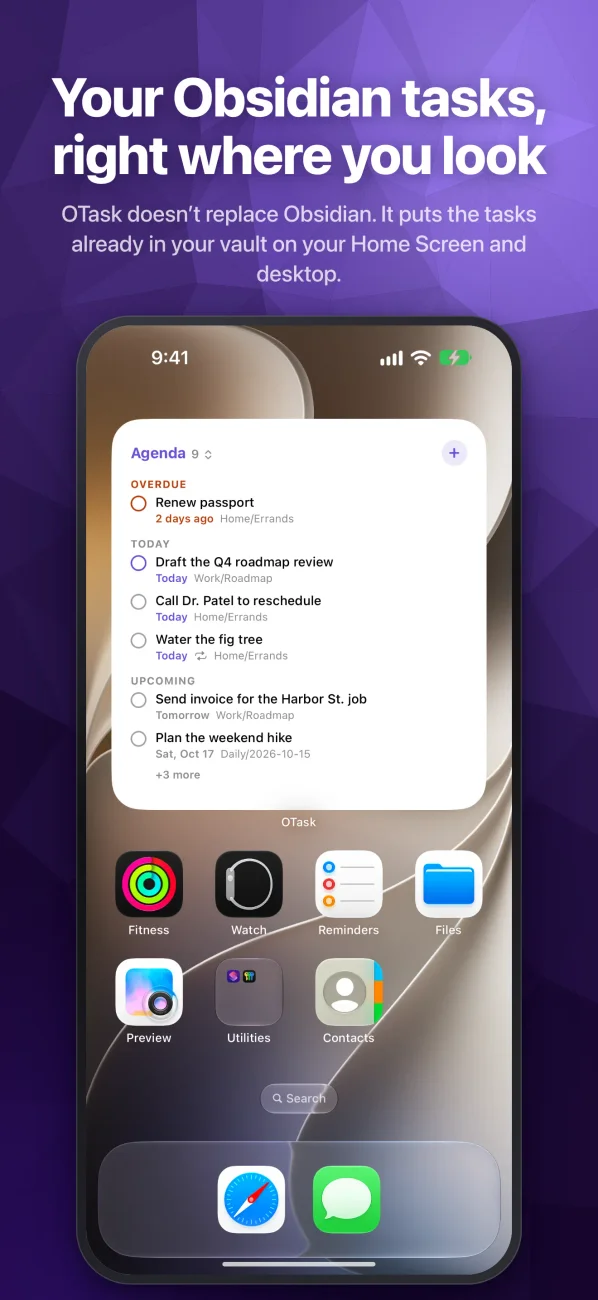
Your tasks already live in your notes. OTask doesn't move them, copy them or ask you to keep a second list. It puts them where you'll see them, so you get them done.
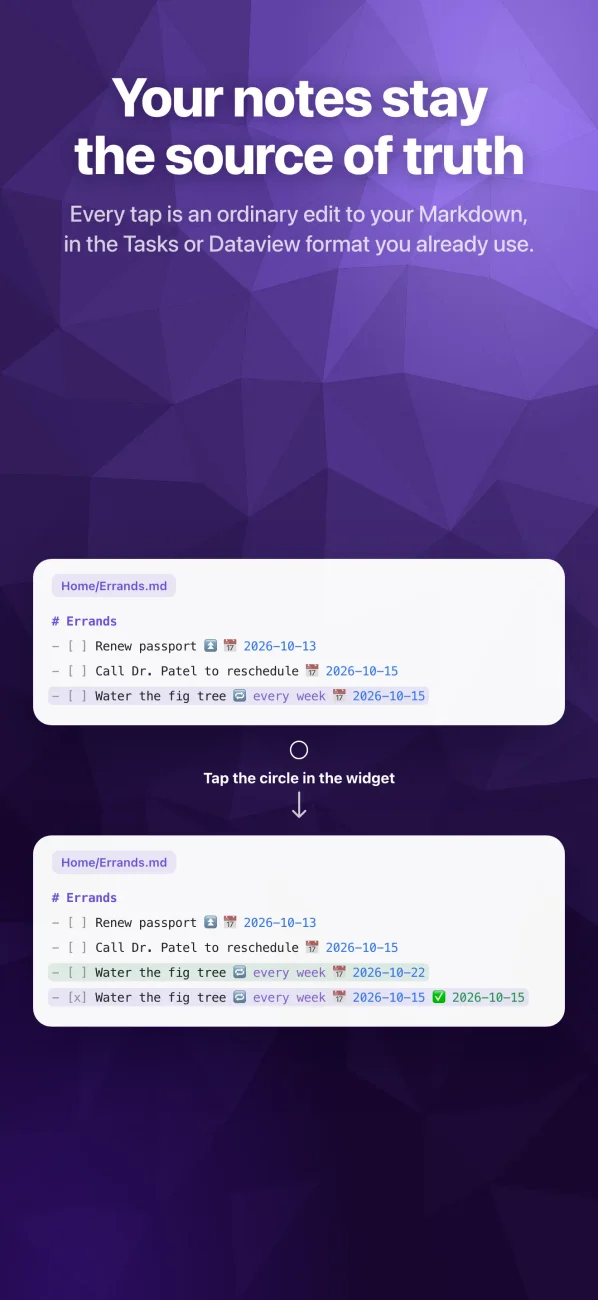
Other apps replace Obsidian with their own task manager. OTask is the opposite: Obsidian stays where you plan and write, and OTask is the tappable layer on top. Every change is an ordinary edit to your Markdown, so your notes, plugins and queries keep working.
WIDGETS YOU CAN USE, NOT JUST LOOK AT
• Tap a circle to complete a task.
• Tap a task to move it to today, tomorrow or next week, cancel it, or open its note in Obsidian.
• Every change can be undone from the widget for a minute.
• Tap the view's name to step through your other views.
• Small, medium, large and extra large on Mac, iPhone and iPad. Extra large shows two views side by side.
• On iPhone, Lock Screen widgets show what's due without unlocking, and a Control Center button starts a new task.
VIEWS THAT READ LIKE SENTENCES
Build views from plain conditions: "Due date is between today and in a week", "Tags don't include #someday". Combine them with all, any or none; sort and group by date, note, folder, heading, priority or tag. Or paste a Tasks plugin query.
CAPTURE IN PLAIN WORDS
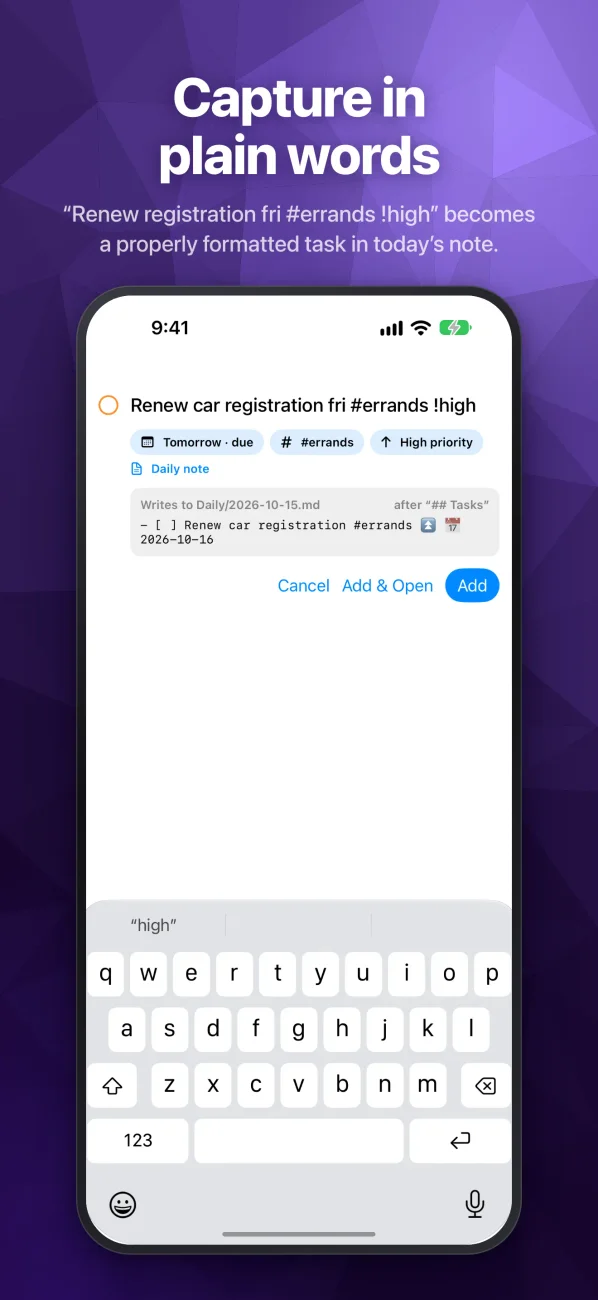
Type "Renew registration fri #errands !high" and OTask fills in the due date, tag and priority. You see the exact line it will write, and where: today's daily note after your chosen heading, or an inbox note.
SHARE IT, AND IT'S A TASK
• Share a page from Safari and OTask makes it a task linked to that page, named after it.
• Share selected text from any app, including an email, and it becomes the task's words.
• On the Mac, choose New Task while an email is selected in Mail: the task is named after it and links back to that email. Or drag a message in.
• Add a date, tag or priority before you save, just as in quick capture.
FAITHFUL TO YOUR MARKDOWN
• Reads and writes both the Tasks plugin's emoji dates and Dataview fields ([due:: 2026-10-15]), task by task.
• Completing adds the done date; cancelling marks the task cancelled, as the Tasks plugin does.
• Recurring tasks (every week, every month on the 1st, every weekday, when done) create their next occurrence.
• Honors the Tasks plugin's global filter, and only looks in the folders you choose.
• If a task was edited since OTask last read it, OTask refuses the change rather than guessing.
AT HOME ON THE MAC
OTask lives in the menu bar, starts at login and watches your vault, so widgets update within a second of an edit in Obsidian. Press Command-N from the menu for quick capture.
SETTINGS THAT TRAVEL WITH YOUR VAULT
Views, capture settings and scope are saved in your vault, so every Mac, iPhone and iPad that opens it sees the same setup. Text size and row counts stay per device.
FREE TO TRY, ONE SUBSCRIPTION FOR EVERY DEVICE
OTask is free to download, and setting up your vault, views and quick capture are free. The widgets come with OTask Yearly, which starts with a free week and covers your Mac, iPhone and iPad. Payment is charged to your Apple Account when the free week ends. The subscription renews yearly unless you cancel at least 24 hours before the end of the current period; manage or cancel it in your Apple Account settings.
Terms of Use: https://www.apple.com/legal/internet-services/itunes/dev/stdeula/
Privacy Policy: https://clusterflux.io/otask/privacy/
PRIVATE BY DESIGN
No account, no server, no sync service of our own. OTask reads the folder you choose and nothing else. Your vault syncs however it already does: iCloud Drive, Obsidian Sync or anything else. No data is collected.
GOOD TO KNOW
• OTask works with any folder of Markdown files; Obsidian itself doesn't need to be installed for the widgets to work.
• On the Mac, widget taps are saved by OTask's menu bar app, so keep it running (it starts at login by default).
• On iPhone and iPad, iOS decides how often widgets refresh; opening OTask refreshes them immediately.
新機能
バージョン 1.1.2 · 2026/11/12
Minor updates.
アプリのプライバシー
このアプリのデータの取り扱いについて、Robert BellがApp Storeで申告している内容です。
-
データの収集なし
開発元はこのアプリからデータを収集しません。
プライバシーの取り扱いは、ご利用の機能やお客様の年齢などに応じて異なる場合があります。
情報
- 販売元
- Robert Bell
- カテゴリ
- 仕事効率化
- バージョン
- 1.1.2
- 更新日
- 2026/11/12
- リリース
- 2026/10/22
- サイズ
- 8.0 MB
- 必要条件
- iOS 26.0以降
- 対象年齢
- 4+
- 価格
- 無料
- アプリ内課金
- あり
- 言語
- 英語
- 著作権
- © 2026 Robert Bell
こちらもおすすめ
-
 LuxTask - To-Do List & Tasks繰り返し・進行期間・チェックリスト
-
 Markdown Viewer Editor仕事効率化
-
 Study Timer: Studyscape仕事効率化
-
 Dawnlet仕事効率化
-
 Task App - Task beautifully仕事効率化
-
 Remindera: Persistent Reminder仕事効率化
-
 Reminders Hub仕事効率化
-
 TODO.md - Markdown Task List仕事効率化
-
 diReminder: To Do ListTasks, Countdowns, Reminders
-
 Cinch – Reminders & TasksReminders, made beautiful.