
- 対象年齢4+
- カテゴリ仕事効率化
- 開発元Antoniel Mariano
- 言語英語ほか4言語
- サイズ10.3 MB
App Storeの公式ページにリンクしています
Download.orgはPaslyのファイルを一切ホストしていません。ボタンを押すと、Antoniel Marianoが公開しているApp Storeのアプリページが開きます。ページの最終確認:2026/11/18。
スクリーンショット


概要
開発元はこのテキストをお使いの言語で提供していません。
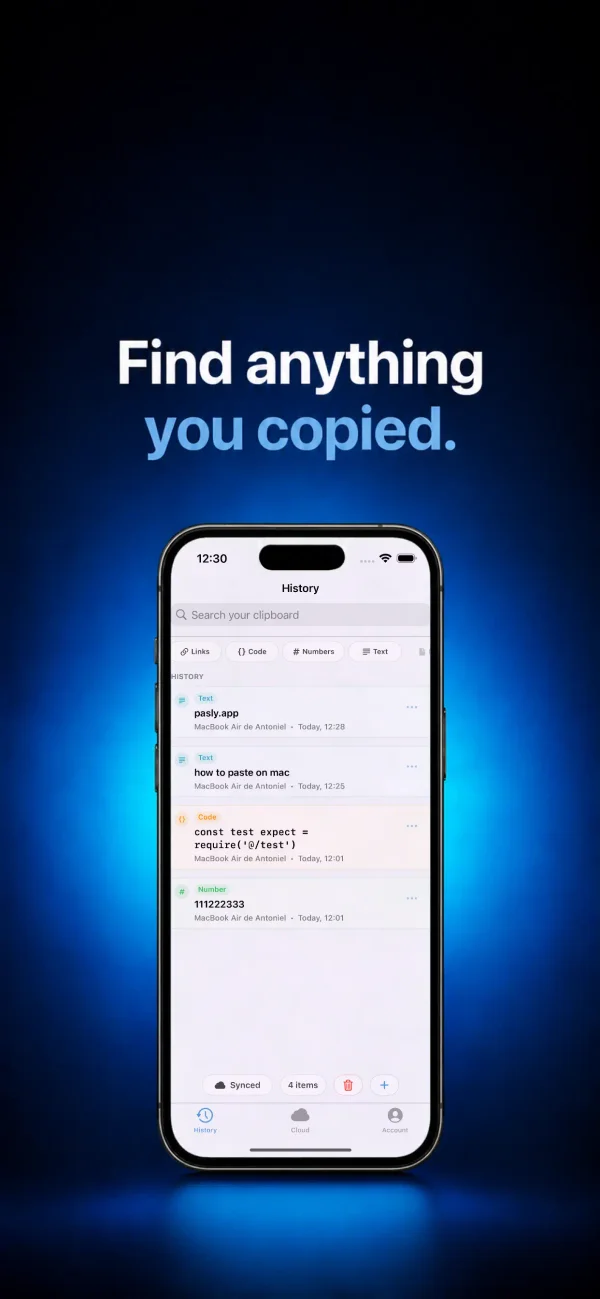
Pasly makes your clipboard history available across Mac, iPhone, and iPad.
Keep important links, text, images, and files within reach without emailing them to yourself or relying on your devices being nearby.
With Pasly Cloud, your clipboard history syncs through your private CloudKit database using Apple’s iCloud infrastructure. Pasly does not operate separate servers to store or sync your clipboard content.
KEY FEATURES
• Smart Clipboard History: Automatically captures text, links, images, and files you copy on your Mac.
• Cross-Device Sync: Access your clipboard history across your Macs, iPhone, and iPad, even when the devices are not nearby or connected to the same network.
• File Sync: Sync files copied on your Mac through CloudKit, including multiple files at once.
• Smart Paste: Bring recent clipboard items directly into your regular Command-V workflow on Mac.
• Paste Stack: Copy multiple items and paste them one after another.
• Search & Favorites: Quickly find important clipboard items and keep frequently used content close at hand.
• Live Activities & Dynamic Island: Keep recent clipboard items accessible from your iPhone Lock Screen or Dynamic Island.
• Push Notifications: Get notified when new clipboard content arrives from another device.
• Native Apple Experience: Built for macOS, iOS, and iPadOS with a fast, familiar interface.
PRIVACY FIRST
Your clipboard content is stored and synced through your private CloudKit database associated with your iCloud account. It uses Apple’s iCloud infrastructure instead of Pasly-owned clipboard sync servers.
On Mac, Pasly can automatically capture supported clipboard content. Due to iOS and iPadOS system restrictions, adding new clipboard items from those devices currently requires a manual action.
Make your clipboard history available wherever you work with Pasly.
Terms of Use (EULA):
https://www.apple.com/legal/internet-services/itunes/dev/stdeula/
Privacy Policy:
https://pasly.app/privacy
新機能
バージョン 3.2 · 2026/11/15
Pasly 3.2 is a big update focused on privacy, Pasly Cloud and five languages.
NEW
• End-to-end encryption for Pasly Cloud: your items, files and device names are encrypted before they leave your devices. It turns on by itself once every device you use runs Pasly 3.2.
• Privacy & Exclusions: Pasly skips passwords and one-time codes, copies from password managers, and anything bigger than a size you choose. You can also exclude file extensions and file names.
• Receive Only: a Mac can get items from your other devices without sending its own copies or deletions.
• File size limits for Pasly Cloud: choose which files go to Cloud and which download on their own.
• Temporary items: choose Delete After on any item and it is removed from every device when the time is up.
• Keep your whole history with Pasly Pro, with no item limit and no time limit.
• Edit an item's text, change its category (Text, Link, Code or Number), and favorite the categories you use most to show their filters first.
• Press ⌘1 to ⌘9 to pick one of the first nine items. Hold ⌘ to see the numbers.
• Pasly now speaks Portuguese (Brazil), Spanish, French and Russian. Choose a language in Settings → General and Pasly switches right away.
IMPROVEMENTS
• Hide the menu bar icon if you prefer, and open Settings from the gear in the history.
• A clearer Settings layout, with exclusions shown as tags.
• When the filters don't all fit, scroll them with the arrows or your mouse wheel.
• Changes from your other devices arrive within seconds while you use Pasly, and Pasly checks less often when idle to save energy.
• Paste with a custom separator remembers your last separator.
• When iCloud isn't ready, Pasly tells you exactly what to check.
FIXES
• You no longer get signed out of your Pasly account after a few days.
• Your history is no longer lost if Pasly opens before your Mac's Keychain is unlocked.
• Items no longer go missing from Pasly Cloud, and Cloud no longer turns itself off after a temporary iCloud error.
• Changes made while Cloud was paused or offline are sent once it's back.
• A missing file or a very large text no longer blocks your other items from syncing.
• Flush Data can also remove the cleared items from iCloud.
アプリのプライバシー
このアプリのデータの取り扱いについて、Antoniel MarianoがApp Storeで申告している内容です。
-
データの収集なし
開発元はこのアプリからデータを収集しません。
プライバシーの取り扱いは、ご利用の機能やお客様の年齢などに応じて異なる場合があります。
情報
- 販売元
- Antoniel Mariano
- カテゴリ
- 仕事効率化
- バージョン
- 3.2
- 更新日
- 2026/11/15
- リリース
- 2026/4/18
- サイズ
- 10.3 MB
- 必要条件
- iOS 17.0以降
- 対象年齢
- 4+
- 価格
- 無料
- アプリ内課金
- あり
- 言語
- 英語, フランス語, ポルトガル語, ロシア語, スペイン語
- 著作権
- © Pasly
こちらもおすすめ
-
 Plans:メモとToDoリストシンプルなタスク管理と予定
-
 Binly: Notes, Links & Files仕事効率化
-
 Prazo: カレンダーとタスクスケジュール・リマインダー・買い物リスト
-
 Stash: リンクを保存ブックマーク・あとで読む
-
 YepNotes:クイックメモ&ノートやることリストとリマインダー
-
 Shortboard: ショートカットをウィジェットにホーム画面とロック画面をおしゃれにカスタマイズ
-
 ClipBox: クリップボード管理と履歴コピペを拡張するキーボード
-
 choclift: Workflow Sweetenerdesktop touch controls
-
 Open Minis仕事効率化
-
 Raycast: Keyboard, AI and more仕事効率化