PlayOn Cloud - Streaming DVR
Record your favorite streams..
iPhone, iPad, Mac, iPod touch向けに設計
無料 · アプリ内課金
- 対象年齢4+
- カテゴリエンターテインメント
- 開発元MediaMall Technologies, Inc.
- サイズ155.0 MB
App Storeの公式ページにリンクしています
Download.orgはPlayOn Cloud - Streaming DVRのファイルを一切ホストしていません。ボタンを押すと、MediaMall Technologies, Inc.が公開しているApp Storeのアプリページが開きます。ページの最終確認:2026/11/17。
スクリーンショット
概要
開発元はこのテキストをお使いの言語で提供していません。
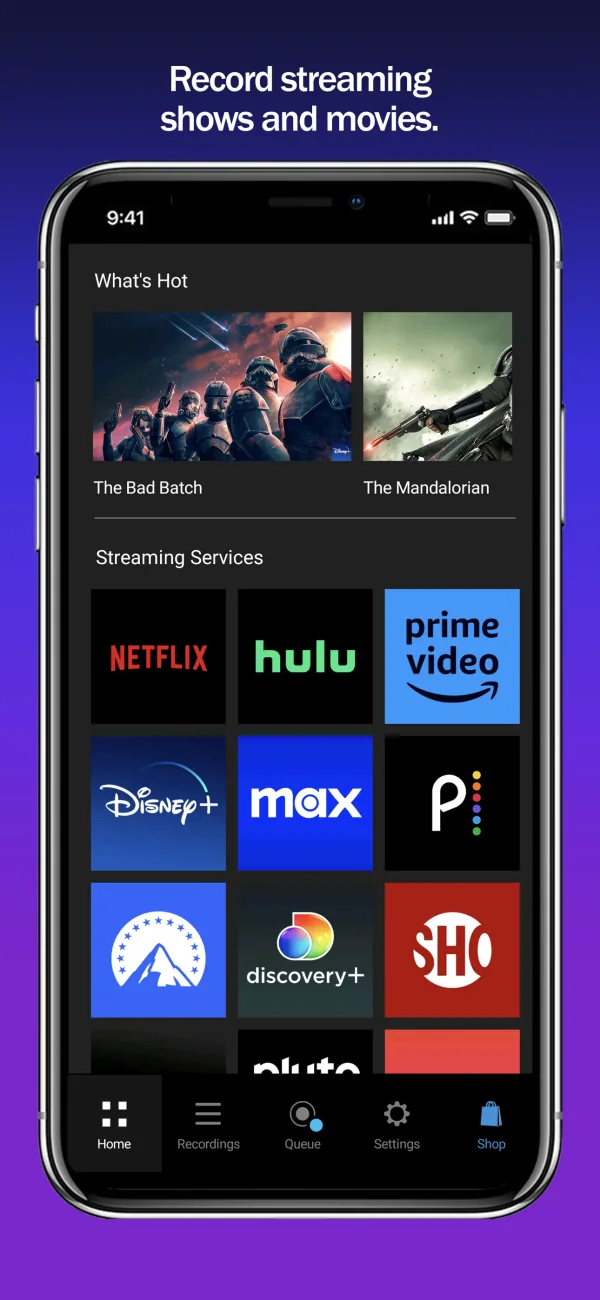
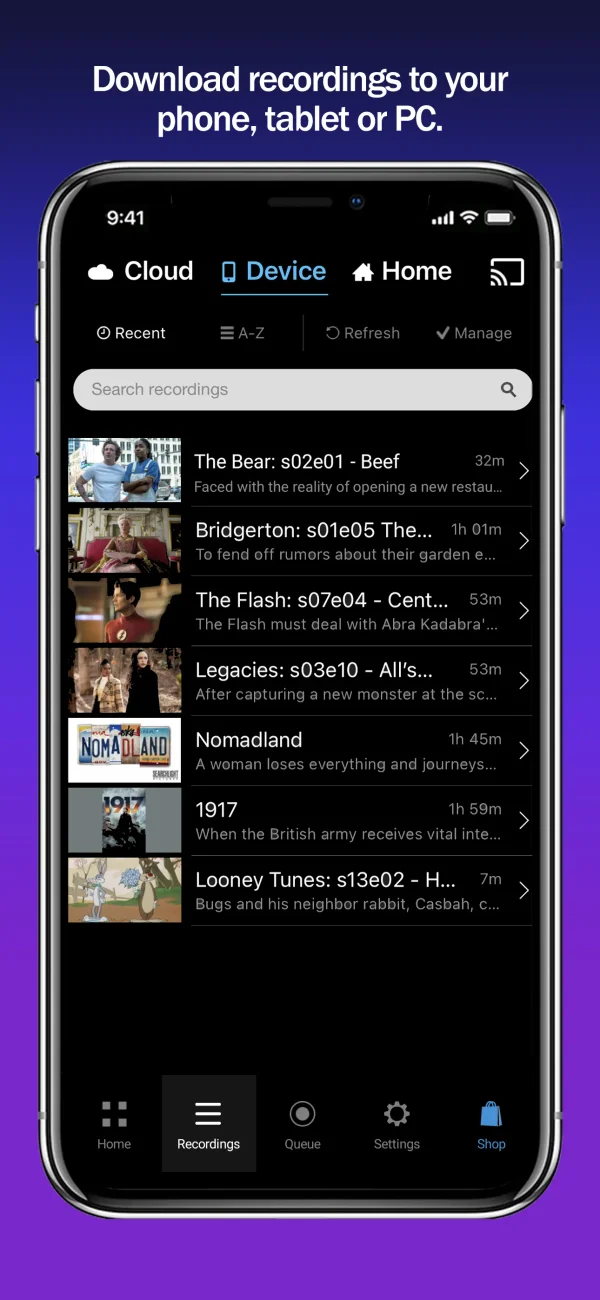
Record and download any streaming video from Netflix, Disney+, Hulu, Amazon Prime, HBO Max, Peacock, Paramount+, The CW, Discovery+, Showtime, STARZ, Vudu, Pluto, Tubi, CBS, NBC, ABC, FOX, PBS, The Roku Channel, and BBC iPlayer, Acorn, Xfinity, and Spectrum. PlayOn Cloud downloads never expire. Download Big Bang Theory, The Bear, House of Dragon, Superman & Lois, Star Trek: Strange New Worlds, Yellowstone, Gotham Knights, Chicago Fire, Grey's Anatomy, or any of your favorite movies and shows; watch anytime, anywhere, even offline.
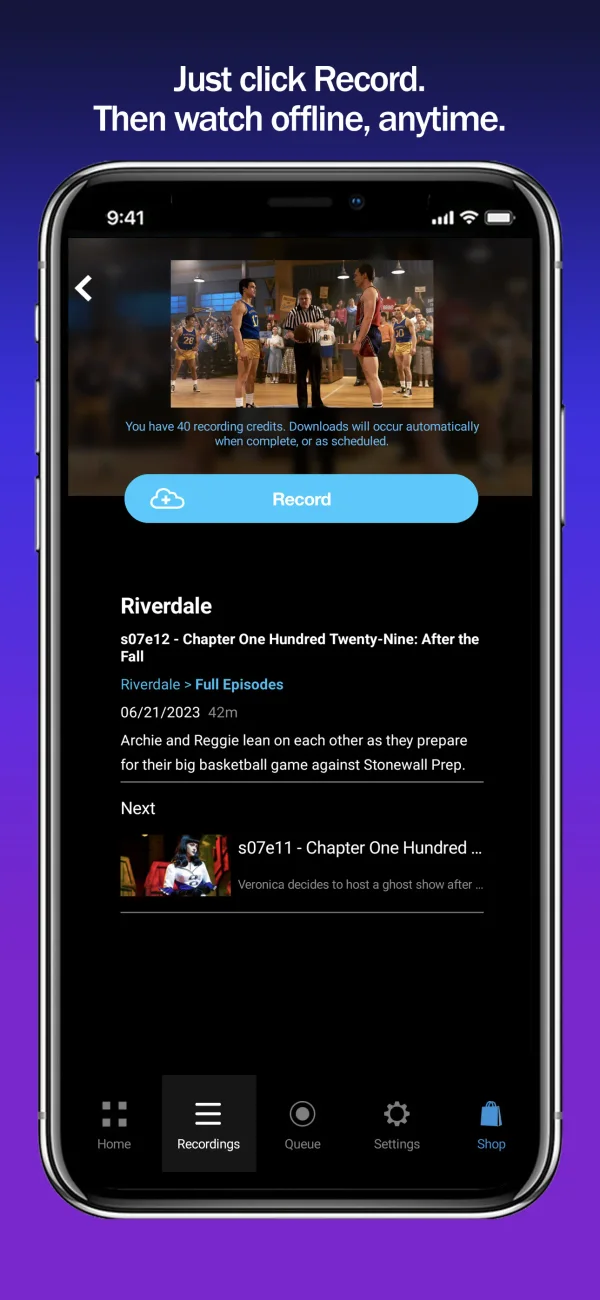
Save hundreds of dollars a year by subscribing to the Ad-supported tiers of Netflix, Hulu, Disney+, HBO Max, Peacock, and Paramount+ and then skip over the ads when you watch with PlayOn (just like you do with your cable DVR). Record and download videos from Netflix before they go offline then watch them anywhere, anytime, even after they have been removed from Netflix. No need to select only the videos that Netflix lets you download, with PlayOn Cloud you can download ANY Netflix or Hulu video. Record and download Disney+ videos to watch offline. The simple PlayOn Cloud app gives you easy access to download all streaming videos from Netflix, Disney+, Hulu, Amazon Prime, HBO Max, Peacock, Paramount+, The CW, Discovery+, Showtime, STARZ, Vudu, Pluto, Tubi, CBS, NBC, ABC, FOX, PBS, The Roku Channel, and BBC iPlayer, Acorn, Xfinity, and Spectrum.– over 20 of the most popular streaming services. Love House of Dragon, Game of Thrones, Jack Ryan or want to watch Moon Knight when you’re offline? Simply select the show you want and hit record. Once recorded, a streaming show or movie will be available for you to download to your mobile device or PC. You can even set it to automatically download to your phone, tablet, or TV as soon as the recording is finished. You can skip right over the recordings automatically when you watch. You can even watch your recordings on your Roku, Chromecast, Fire TV, or Apple TV (and skip the recordings). The recording happens in the PlayOn Cloud so no data is used to make the recording.
Once your PlayOn Cloud recording is downloaded, you can watch it anytime and anywhere. You can watch it on your big screen TV with your Roku, Chromecast, Fire TV, or Apple TV. No more worrying about a Netflix video leaving. You can even download it to your Mac, PC or other device. No more WiFi requirement to watch on your mobile device – you can download Netflix and watch when you're not on WiFi without using data. Want to watch your downloaded PlayOn Cloud recordings on your TV? You can cast to your TV with Roku, Chromecast or Fire TV or AirPlay it to your Apple TV. Have a long flight tomorrow? Queue up Game of Thrones, Jack Ryan or The Mandalorian tonight and they’ll be downloaded and waiting when you take off. Long subway ride to work? With PlayOn Cloud, you’ll be watching downloaded Netflix, The CW, or Disney+ videos the entire time. Need a selection of safe shows for your kids to watch? PlayOn Cloud makes it easy to fill up your kid's device with safe streaming shows - and watch them without using any cellular data, or watching any commercials. When you watch recordings that have commercials, you have an option to automatically skip the ads. How great is that?
Want to make PlayOn Cloud even more powerful? Get an optional PlayOn Cloud Storage and Credit plan.
You'll get a week to make 7 free recordings. After that you'll be billed $4.99 per month for 30 recordings and 100GB cloud storage. You’ll be charged as a recurring transaction through your iTunes account. Your subscription will automatically renew unless canceled at least 24 hours before the end of the current billing period. Your account will be charged for renewal within 24 hours prior to the end of the current period. You can manage your subscription and turn off auto-renewal by going to your iTunes Account Settings after purchase.
Terms of Use: https://www.playon.tv/eula
Privacy Policy: http://www.playon.tv/privacy
新機能
バージョン 1.2.127.37153 · 2024/9/10
--Bug fixes
アプリのプライバシー
このアプリのデータの取り扱いについて、MediaMall Technologies, Inc.がApp Storeで申告している内容です。
-
ユーザーのトラッキングに使用されるデータ
他社のアプリやウェブサイトを横断してユーザーをトラッキングする目的で使用される場合があります。
- 連絡先情報
- 使用状況データ
- 診断
-
ユーザーに関連付けられたデータ
収集され、ユーザーの識別情報に関連付けられる場合があります。
- 連絡先情報
- 使用状況データ
- 診断
プライバシーの取り扱いは、ご利用の機能やお客様の年齢などに応じて異なる場合があります。
情報
- 販売元
- MediaMall Technologies, Inc.
- カテゴリ
- エンターテインメント
- バージョン
- 1.2.127.37153
- 更新日
- 2024/9/10
- リリース
- 2016/10/3
- サイズ
- 155.0 MB
- 必要条件
- iOS 12.4以降
- 対象年齢
- 4+
- 価格
- 無料
- アプリ内課金
- あり
- 著作権
- © 2023 MediaMall Technologies, Inc.
こちらもおすすめ
-
 Channels: Whole Home DVRエンターテインメント
-
 Yidio - Streaming Guideエンターテインメント
-
 HDHomeRunエンターテインメント
-
 Reelgood - Streaming Guideエンターテインメント
-
 FreeCast: TV Shows & Moviesエンターテインメント
-
 Movie Downloader:映画を見る名作映画をオフライン視聴
-
 Classix映画とテレビ番組
-
 Watchworthy - What To Watchエンターテインメント
-
 Channels for HDHomeRun!エンターテインメント
-
 Tea TV Movies & Theater Finderエンターテインメント