- 対象年齢4+
- カテゴリグラフィック/デザイン
- 開発元Mithila Muralidharan
- 言語英語
- サイズ31.7 MB
App Storeの公式ページにリンクしています
Download.orgはPulseCraft Studioのファイルを一切ホストしていません。ボタンを押すと、Mithila Muralidharanが公開しているApp Storeのアプリページが開きます。ページの最終確認:2026/11/17。
スクリーンショット

概要
開発元はこのテキストをお使いの言語で提供していません。
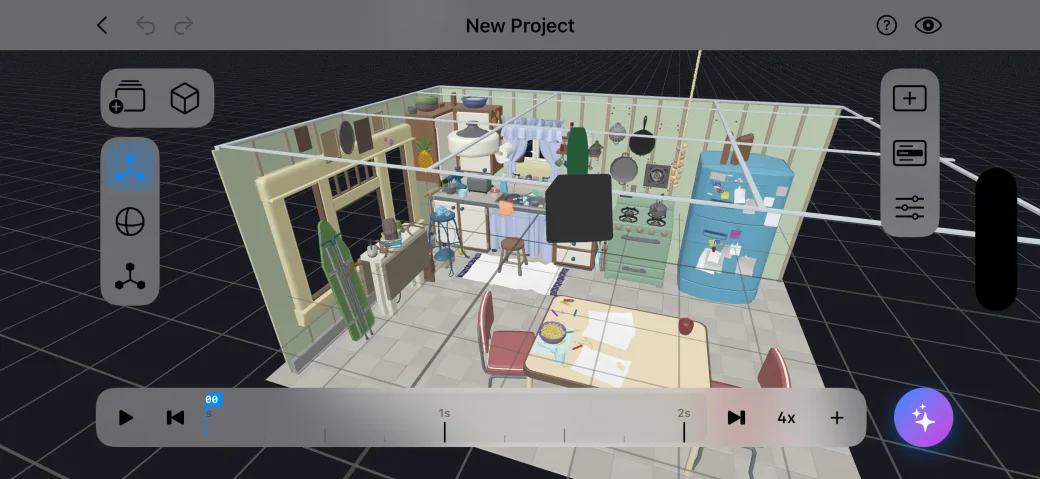
PulseCraft Studio is a powerful 3D scene builder and animation editor designed for iPhone and iPad. Create complete 3D worlds, keyframe-animate anything, export cinematic videos, and collaborate with an AI creative assistant — all on iOS.
AI Creative Assistant
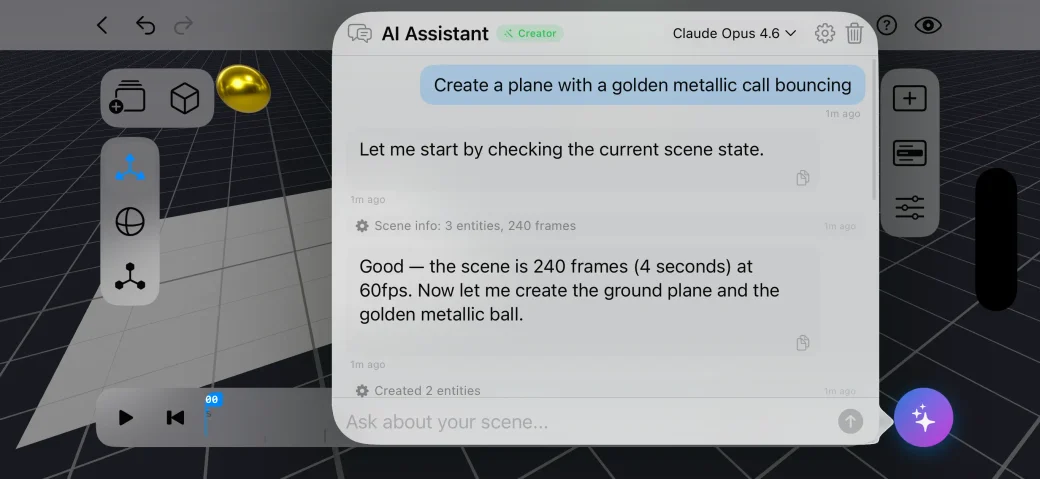
Describe what you want and watch it appear. The built-in AI assistant can create objects, set up lighting, adjust materials, animate scenes, and modify properties — all through natural conversation. Choose from cloud models (Claude, GPT-4o, Gemini) or run models entirely on-device with Apple Silicon for complete privacy. Toggle thinking mode to see the AI reason through complex scene setups step by step.
Create 3D Scenes Fast
Start from 11 built-in primitives: box, sphere, cylinder, cone, capsule, pyramid, torus, tube, plane, and extruded 3D text. Import your own USDZ models with live preview, full materials, and optional skeleton animations. Place and edit objects using touch-friendly move, rotate, and scale gizmos in the 3D viewport.
Materials That Look Real
Build physically-based (PBR) materials with controls for base color, metalness, roughness, specular, clearcoat, opacity, and emission. Add texture maps for base color, metalness, roughness, normal, and emission. Create glass and translucent surfaces using Index of Refraction and transmission controls.
Pro Lighting
Add ambient, directional, point, and spot lights. Adjust color, intensity, temperature, soft shadows, and falloff. Shape spotlights with inner and outer cone angles — and animate every light property over time.
Animate Everything at 60 fps
Keyframe position, rotation, scale, materials, lights, cameras, and geometry dimensions. Scrub the timeline, set keyframes on any frame, and preview smooth playback instantly.
Cinematic Cameras
Use multiple cameras with field of view, near/far clipping, and depth of field controls. Navigate with orbit, pinch-to-zoom, and quick view snaps. Optional HDR tone mapping for richer output.
Dual Rendering: Fast or Photoreal
Export with either renderer:
• RealityKit Rasterizer — fast real-time rendering on every device
• Metal Ray Tracer — photorealistic path tracing with soft shadows and realistic refraction (A14 chip or later)
Tune quality with up to 512 samples per pixel and up to 8 light bounces.
Export Up to 4K
Render videos as HEVC MP4 or export stills as PNG. Choose 480p, 720p, 1080p, or 4K UHD, preview before export, then share via the Share Sheet.
Designed for Touch
Tap to select, drag to orbit, pinch to zoom, long-press to focus. Color-coded XYZ gizmos keep editing intuitive, and full undo/redo lets you iterate confidently.
Projects & Safe Saves
Manage multiple projects with thumbnail previews. Scenes save locally in an efficient JSON format with built-in version migration.
Whether you're prototyping motion ideas, learning 3D, creating social content, or experimenting with AI-driven scene design — PulseCraft Studio gives you a full 3D animation pipeline anywhere you go.
新機能
バージョン 2.0.2 · 2026/3/30
Bug fixes
アプリのプライバシー
このアプリのデータの取り扱いについて、Mithila MuralidharanがApp Storeで申告している内容です。
-
データの収集なし
開発元はこのアプリからデータを収集しません。
プライバシーの取り扱いは、ご利用の機能やお客様の年齢などに応じて異なる場合があります。
情報
- 販売元
- Mithila Muralidharan
- カテゴリ
- グラフィック/デザイン
- バージョン
- 2.0.2
- 更新日
- 2026/3/30
- リリース
- 2024/10/30
- サイズ
- 31.7 MB
- 必要条件
- iOS 26.0以降
- 対象年齢
- 4+
- 価格
- 無料
- 言語
- 英語
- 著作権
- © 2026 Mithila M
こちらもおすすめ
-
 SnapPrint - Passport Photoグラフィック/デザイン
-
 Wrap For Teslaカスタムスクリーンラップ
-
 LogoAIAIロゴ&ステッカーメーカー
-
 わんこ消しゴム - AI消去人物・文字・不要物を削除
-
 Forma3D - 3Dモデリングと3DプリントSTL・3MF・メッシュ修復
-
 AI動画編集・エフェクト・背景削除・アニメ化・映画風: VE動画生成・動画加工・フィルター・イラスト化・人物消し・漫画風
-
 Pixel3D - 夢を 3D 現実に夢のドット絵、3D創作
-
 Omniscient - カメラトラッキングBlender CGI VFX撮影
-
 Blur Photo.グラフィック/デザイン
-
 Pofi Create:3Dポーズ・デッサン人形イラスト・マンガの構図と人体を立体で確認