- 対象年齢4+
- カテゴリミュージック
- 開発元Andrew Smith
- 言語英語ほか8言語
- サイズ29.6 MB
App Storeの公式ページにリンクしています
Download.orgはRTAのファイルを一切ホストしていません。ボタンを押すと、Andrew Smithが公開しているApp Storeのアプリページが開きます。ページの最終確認:2026/11/6。
スクリーンショット



概要
開発元はこのテキストをお使いの言語で提供していません。
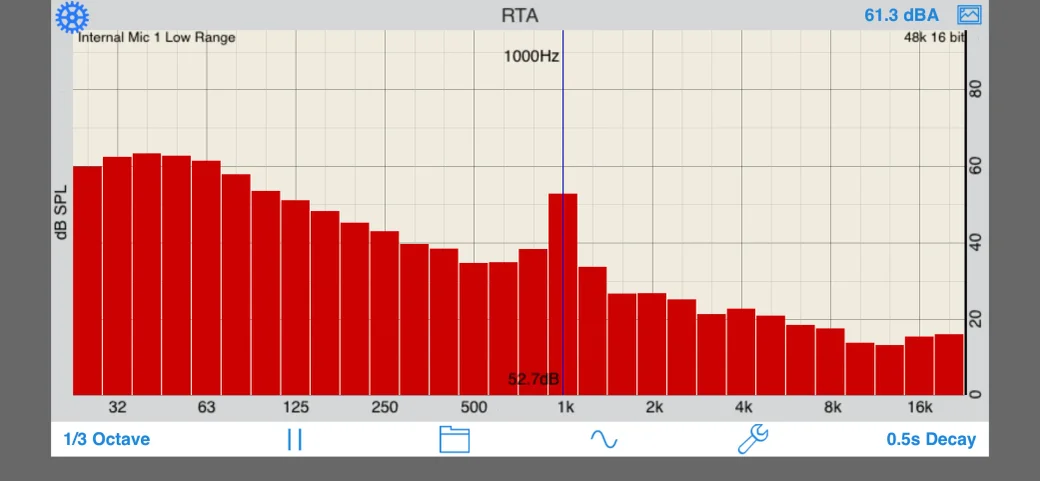
A Real Time Analyzer for the iPhone, iPad and iPod Touch. Test your speakers, tune your room, do acoustical analysis work or just have a better understanding of audio frequencies. RTA is a professional-grade acoustical analysis tool. All filters meet or exceed ANSI and IEC Class 1 specifications.
Includes Octave and 1/3 Octave modes, with selectable decay times, as well as Peak Hold and true linear Average mode.
*** iOS Microphones
We have analyzied every iOS device, including all of the iPads, all iPhones, and iPod touches, and have created microphone compensation files that are applied automatically. You can trust the results you are getting, often within just a few dB of a far more expensive analyzer. Calibration is updated regularly, automatically, from our cloud-based calibration database.
Upgrade to our iTestMic or iAudioInterface2 to bring your system up to full professional specs.
*** Save and Recall Graphs
You can save and recall graphs, marked with the GPS location, date & time, and your comment, as well as store the image to your photo roll.
Export the data as an XLS formatted file to your computer for inclusion in reports or further analysis.
*** Max and Min Bars
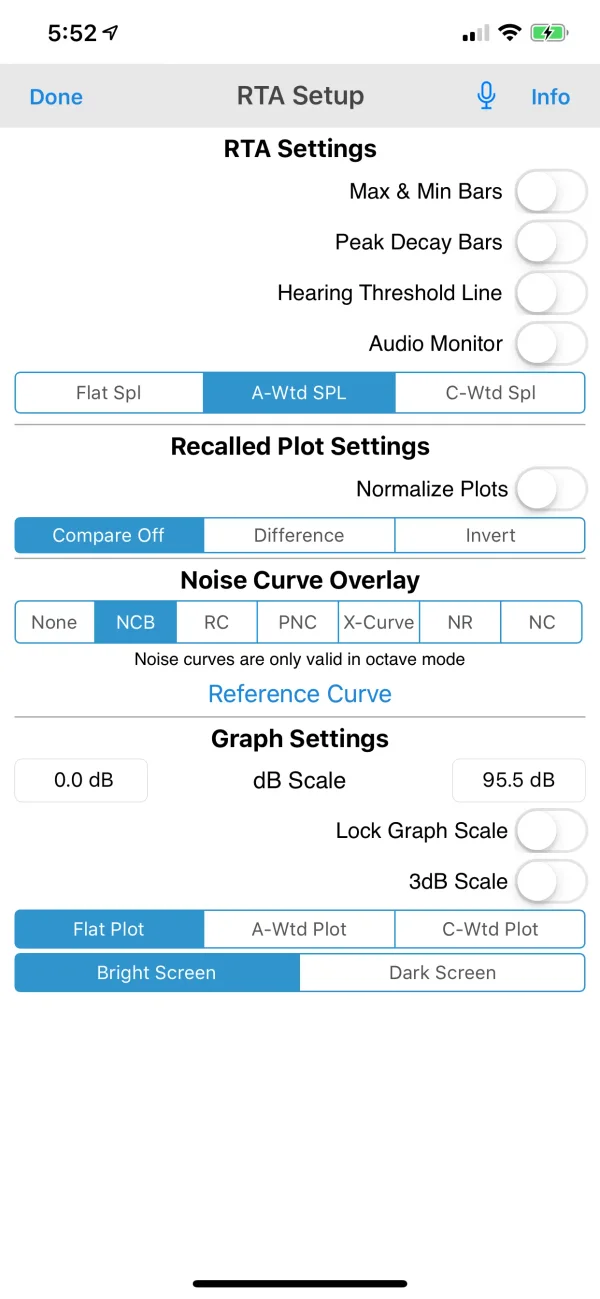
You can also turn on resettable Max/Min bars (see image #4) to capture peaks. Double-tap to reset the bars.
*** Specifications and Devices
The internal iPhone mic has a noise floor near 30 dB, and if your are running iOS 6, clips around 120 dB.
*** Touch GUI
Fully interactive touch GUI features includes scroll up/down, pinch to zoom or compress the vertical dB scale, or swipe horizontally to get a cursor that reads out the exact dB level and frequency across the screen. To make the cursor disappear, swipe it off the graph to the left.
The landscape-mode display flips 180 degrees so that you can face the internal mic in either direction.
*** Overlay Curves
Also included are optional noise curve overlays, in NCB, RC, PNC, NC, X-Curve and NR mode. See picture #2 for an example. Use this feature to get a quick reading on the noise levels in a room. Also includes the cinema large-room X-curve overlay.
*** Calibration
RTA can be fully calibrated, whether you are using it with the internal iOS microphone, or one of our professional test & measurement mic solutions. And, if you are using iTestMic, the mic calibration is transmitted directly to the app, so you are always calibrated.
*** RTA or FFT?
If you are wondering if you should download this app or our FFT app, check out our website, we have a page devoted to this topic.
See our other acoustics and audio apps, including AudioTools.
新機能
バージョン 11.12 · 2026/10/20
New in this release:
- Ready for iPhone Duo: every screen adapts to closed, open, book and tent, with controls in the side strip.
- iOS 26 appearance adopted.
- Bug fixes and stability improvements
アプリのプライバシー
このアプリのデータの取り扱いについて、Andrew SmithがApp Storeで申告している内容です。
-
データの収集なし
開発元はこのアプリからデータを収集しません。
プライバシーの取り扱いは、ご利用の機能やお客様の年齢などに応じて異なる場合があります。
情報
- 販売元
- Andrew Smith
- カテゴリ
- ミュージック
- バージョン
- 11.12
- 更新日
- 2026/10/20
- リリース
- 2008/12/14
- サイズ
- 29.6 MB
- 必要条件
- iOS 15.0以降
- 対象年齢
- 4+
- 価格
- ¥500
- アプリ内課金
- あり
- 言語
- 英語, フランス語, ドイツ語, 日本語, ポーランド語, 簡体字中国語, スペイン語, スウェーデン語, 繁体字中国語
- 著作権
- © Andrew Smith