
- 対象年齢9+
- カテゴリビジネス
- 開発元Aware360 Ltd
- 言語英語ほか1言語
- サイズ31.0 MB
App Storeの公式ページにリンクしています
Download.orgはSafetyAwareのファイルを一切ホストしていません。ボタンを押すと、Aware360 Ltdが公開しているApp Storeのアプリページが開きます。ページの最終確認:2026/11/14。
スクリーンショット
概要
開発元はこのテキストをお使いの言語で提供していません。
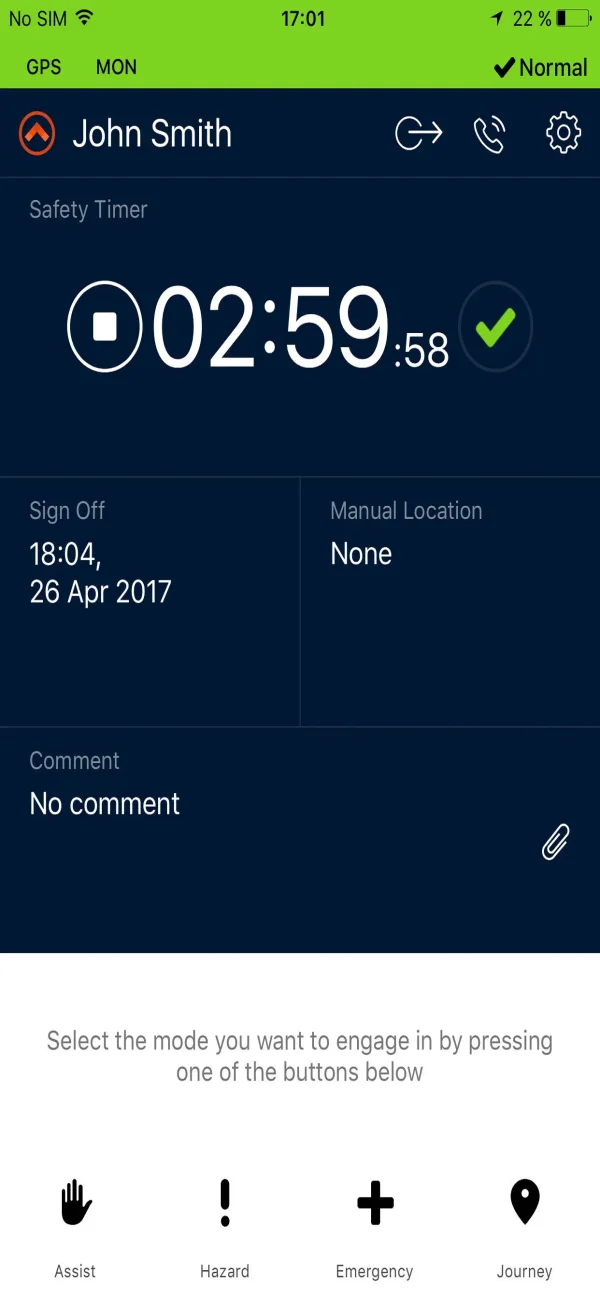
SafetyAware is a work-alone safety support tool that connects you with a monitoring center - 24 hours a day, 7 days a week. Using the GPS receiver in your device, SafetyAware logs your location and links it with your device ID and company profile at the monitoring center. Simply tap the screen to check-in, set your end-of-shift time, set a safety timer for hazardous situations, request assistance, or trigger an alert.
Note:
1. Continued use of GPS running in the background can dramatically decrease battery life.
2. SafetyAware requires a subscription to an authorized Gemini monitoring center.
Features:
MONITORED ALERTS:
When logged-in with SafetyAware, your device appears in the list of active devices at the monitoring center. A help request sent from your device or a missed safety check-in triggers an alert. The monitoring center will call you to determine the situation and follow up according to your company's procedures.
AUTO-DIAL:
If your GPS or server connections are compromised, tap a button to call the monitoring center directly and give them your details.
AUTOMATIC POSITIONING:
When SafetyAware is running, your GPS position is updated and logged at the monitoring center, so that if you do have trouble on the job, your last known location is always available.
MANUAL LOCATION ENTRY:
You have the added option of entering a location manually, in case your GPS signal is ever compromised, as it might be inside a building.
SAFETY TIMER:
The safety timer requires input from you at defined intervals to keep it from triggering an alert. Input can be any movement of the device beyond a set distance or a tap of the screen when stationary for a long period. The application notifies you when it's time to check-in, and triggers an alert if you are overdue. The check-in reminder (safety timer) interval is determined by your organization. If allowed, it can be turned on or off, depending on your needs.
SIGN OFF TIMER:
The Sign Off timer runs throughout your shift. It is completely configurable and can be changed depending on the circumstances. The application notifies you when your shift is about to end, and triggers an alert if you are overdue.
HAZARD TIMER:
Lets you set a countdown timer and add comments when you are about to enter a potentially unsafe situation. Simply cancel the timer when you are finished or edit it to extend the time. Expiry of your timer triggers an alert.
Limitation: iPhone 4 (3.5-inch display) is not supported in terms of UI.
新機能
バージョン 5.0.53 · 2026/10/27
Bug fixes and improvements
アプリのプライバシー
このアプリのデータの取り扱いについて、Aware360 LtdがApp Storeで申告している内容です。
-
ユーザーに関連付けられたデータ
収集され、ユーザーの識別情報に関連付けられる場合があります。
- 位置情報
- 連絡先情報
- ID
プライバシーの取り扱いは、ご利用の機能やお客様の年齢などに応じて異なる場合があります。
情報
- 販売元
- Aware360 Ltd
- カテゴリ
- ビジネス
- バージョン
- 5.0.53
- 更新日
- 2026/10/27
- リリース
- 2017/3/27
- サイズ
- 31.0 MB
- 必要条件
- iOS 15.0以降
- 対象年齢
- 9+
- 価格
- 無料
- 言語
- 英語, フランス語
- 著作権
- © Aware360 Ltd