
- 対象年齢4+
- カテゴリヘルスケア/フィットネス
- 開発元Rael Peixoto
- 言語英語
- サイズ47.1 MB
Setmark - Workout Trackerは現在App Storeで入手できない可能性があります
前回の確認時、ストアのページにアクセスできませんでした。リンク先は引き続きApp Storeの公式ページです。
スクリーンショット

概要
開発元はこのテキストをお使いの言語で提供していません。
Setmark is a fully offline workout tracker for people who just want to log their training: no account, no subscription, no ads.
PLAN YOUR TRAINING
• Build a library of exercises with muscles, equipment, form notes and an optional photo
• Create routines with their own sets, reps and rest for every exercise, so the same lift can be set up differently in each plan
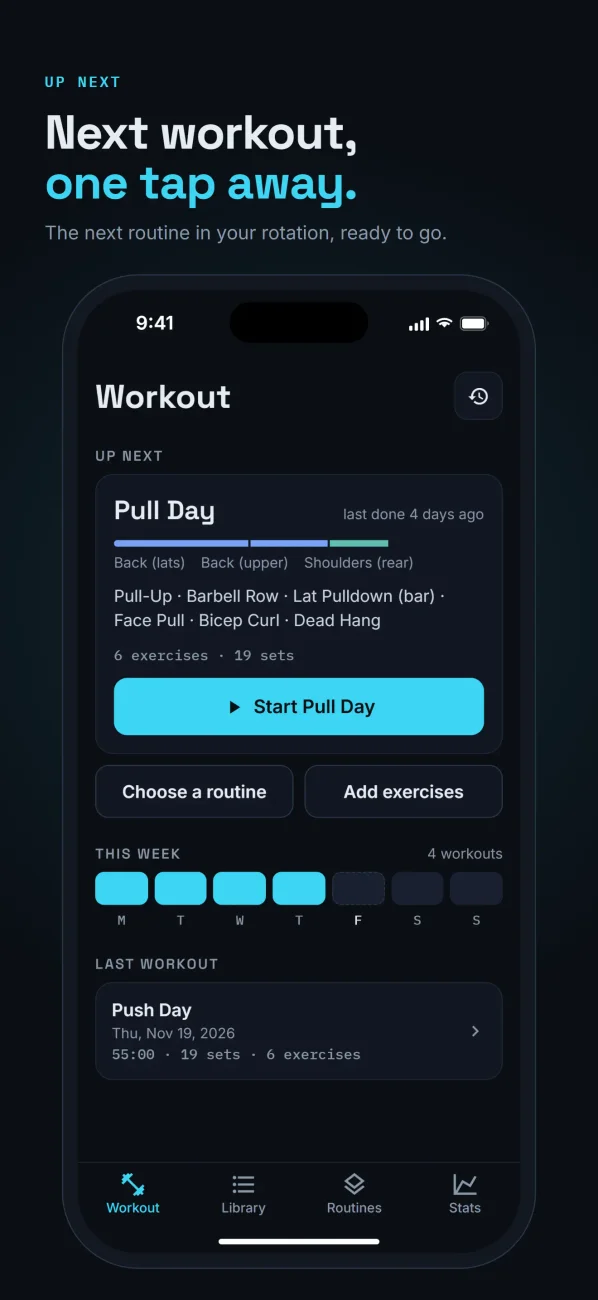
• Group routines into folders, and Setmark suggests the one that's up next in your rotation
LOG EVERY SET
• Weight and reps, drop sets, timed holds such as planks and dead hangs, and cardio by time, distance and speed
• Your last five sessions under every set, with the change since the time before
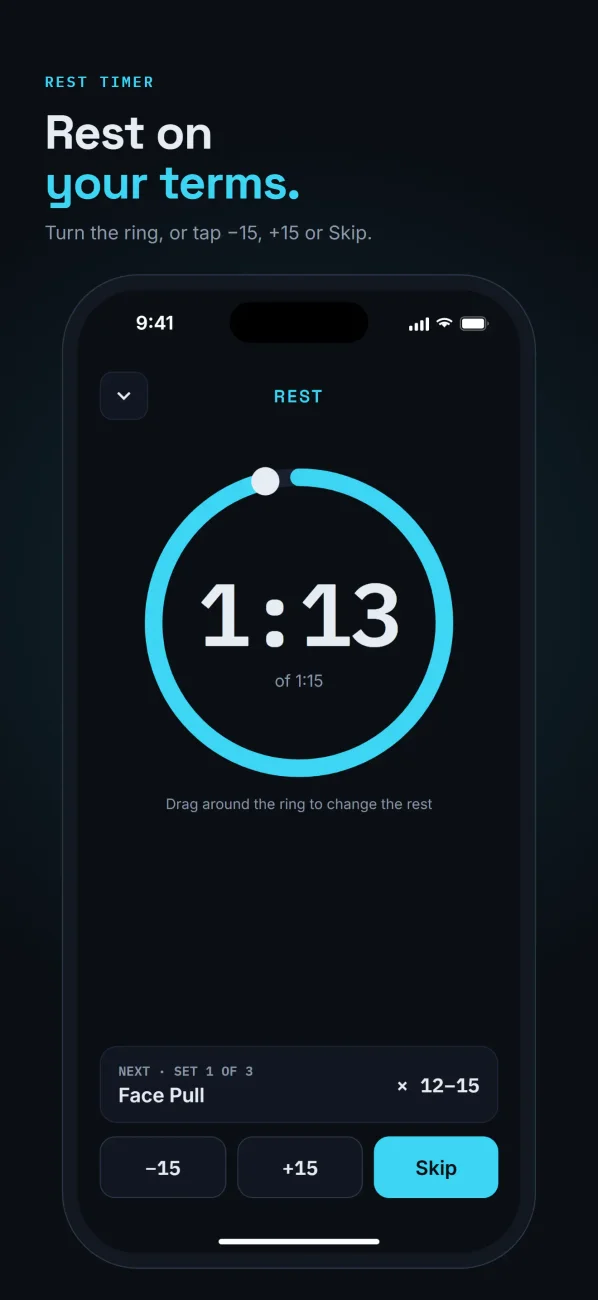
• A rest timer in a slim strip with −15, +15 and Skip, or a large ring you can turn like a dial, with a beep and a vibration when it's time to go again
• Swap an exercise or reorder the workout mid-session without losing your sets
SEE YOUR PROGRESS
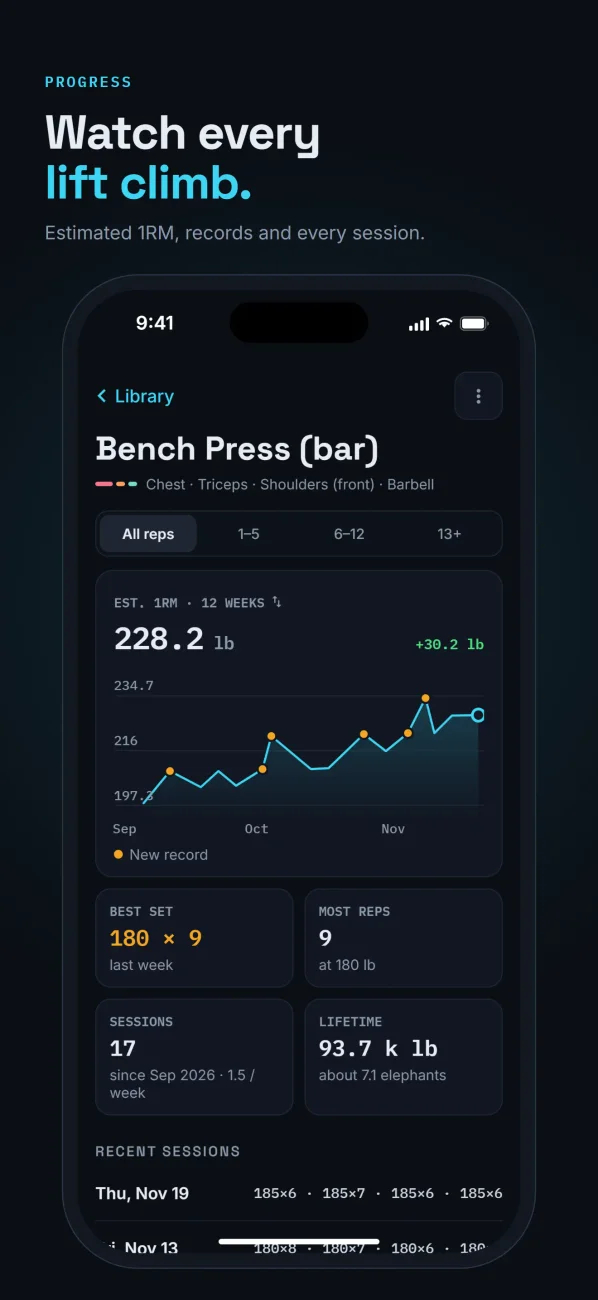
• A page for every exercise: estimated one-rep max or volume over 12 weeks, personal records, your best set and your lifetime total
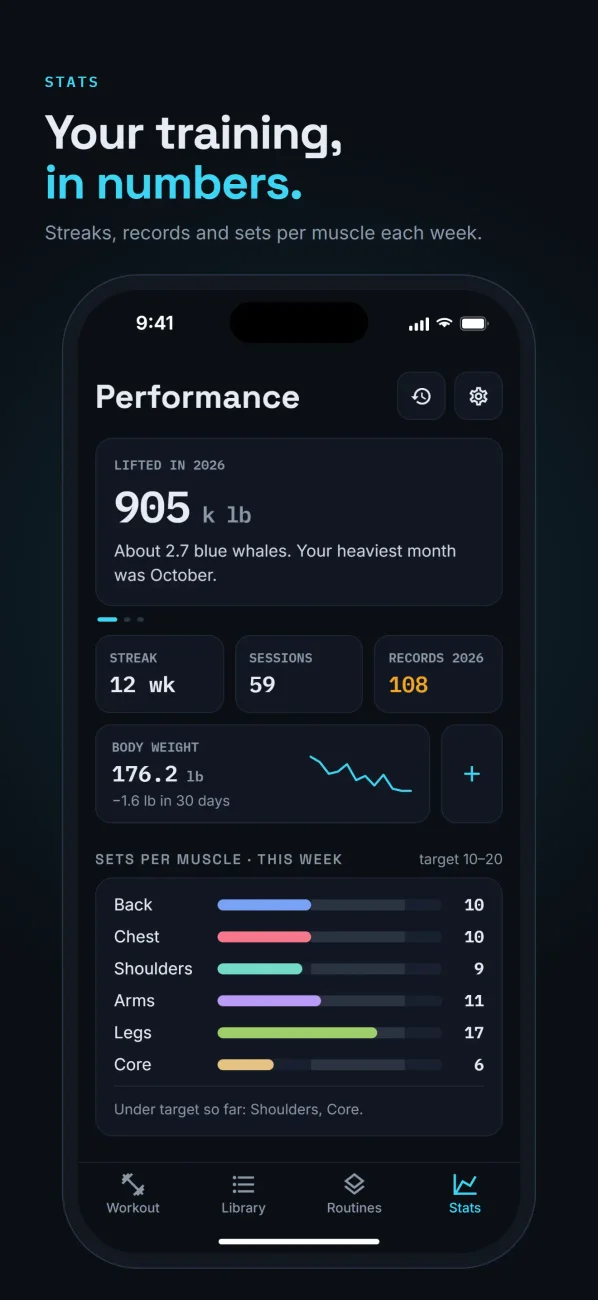
• Your year in numbers, weekly streak, personal records, an activity calendar and sets per muscle against a weekly target
• A body weight tracker with a 30-day trend
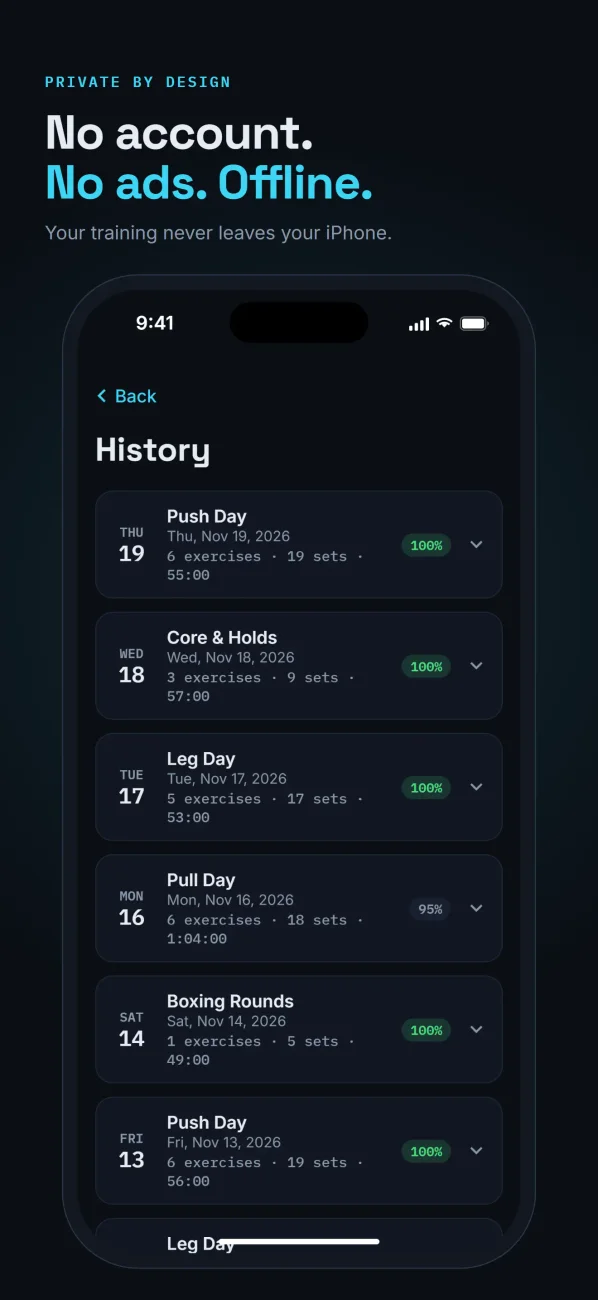
• Your full workout history, which you can edit
PRIVATE BY DESIGN
Everything stays on your iPhone. There are no accounts, no servers, no analytics and no tracking of any kind. Export a backup file whenever you like, and import it again on any device. See the privacy policy for details.
In English and Portuguese, with metric or imperial units.
Setmark is made by an independent developer who trains with it every session.
新機能
バージョン 4.0.0 · 2026/11/21
Setmark 4.0 is a complete redesign: a calmer navy look, larger text, clear monospace numbers and a new app icon.
New
• Up next. The Workout tab opens on the routine that comes next in your rotation, ready to start with one tap, with this week's training and your last workout below it.
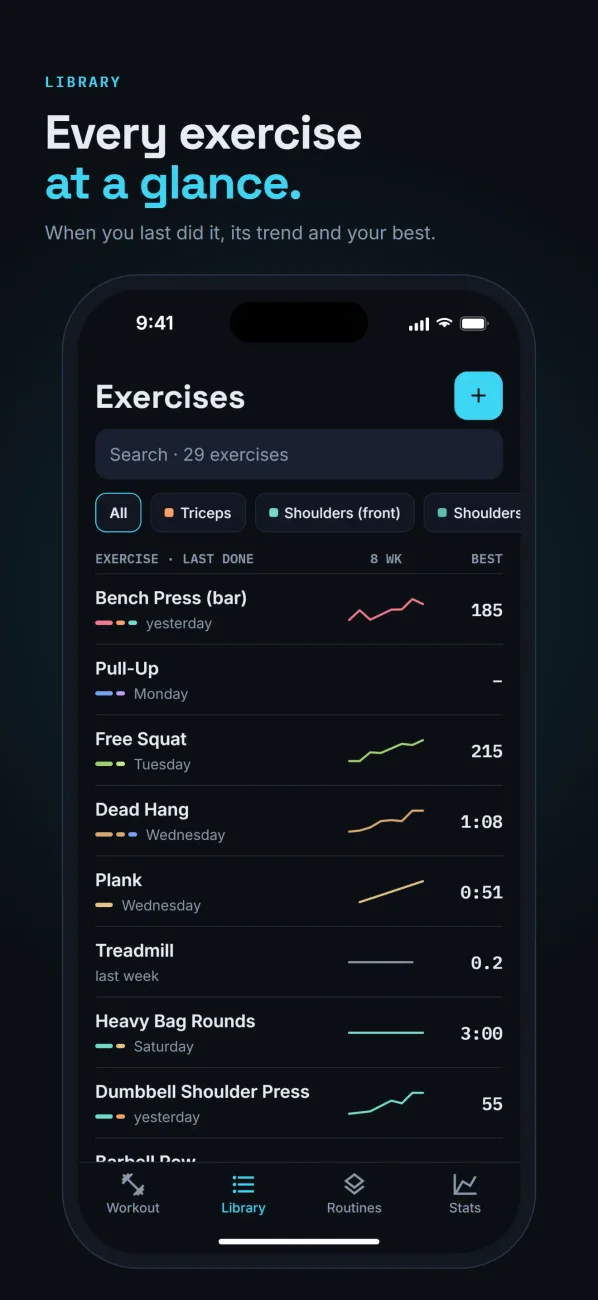
• A page for every exercise. Tap any exercise in the Library for a 12-week chart of your estimated one-rep max or your volume, with personal records marked, plus your best set, most reps, lifetime total and recent sessions.
• New Stats. Your year in numbers, your weekly streak, this year's personal records, body weight with its 30-day change, and this week's sets per muscle group against a 10–20 target.
• Turn the rest ring. In the large rest view, drag around the ring like a dial to shorten or lengthen the rest.
• Reorder a workout. The ⇅ button in the Workout header moves exercises up and down, and History keeps the order you really did them in.
• Large rest display. Settings > Timers > Rest display: Large opens the big ring whenever a rest starts, easy to read from across the room.
• Hold timer start buffer. Choose how long the "Get ready" countdown before a timed hold lasts, from 0 to 60 seconds, in Settings > Timers.
Improved
• The rest timer is a slim strip under the header with −15, +15 and Skip. It never changes size, so nothing on screen jumps when you check a set. Tap it for the large view.
• Set rows line up: weight, reps, the check button and a ⋮ menu, with your last five sessions directly under the fields they belong to. The next set to do is highlighted.
• One ⋮ menu per exercise and per set, for swapping, removing, drop sets and "Use this weight for all sets".
• The Library is one list showing when each exercise was last done, an 8-week trend line and your best.
• Routines show their exercises, sets and the muscles they train, with a Start button. Folders are simple section labels.
• Muscles are shown as small color marks instead of emoji.
• The muscle split on Stats counts each set toward the exercise's main muscle only, so helper muscles are no longer inflated.
• Timed holds have one time field: type 90 and it becomes 1:30.
• Both hold timer buffers take any whole number of seconds from 0 to 60.
• Four tabs, with Workout first. History and Settings open from the Stats header, and History from the Workout tab too.
Fixed
• Checking a set no longer makes the Workout screen freeze, or in bad cases crash.
• Fixes for the rest countdown sometimes standing still after a set was checked.
• Changing the beep or vibration setting during a rest applies straight away.
• History shows exercise names in the app's language.
Removed
• Quick Start, replaced by Up next.
• Favorites, routine colors and the Library view setting are no longer shown. Nothing is deleted: favorites and colors stay in your data and your backups.
アプリのプライバシー
このアプリのデータの取り扱いについて、Rael PeixotoがApp Storeで申告している内容です。
-
データの収集なし
開発元はこのアプリからデータを収集しません。
プライバシーの取り扱いは、ご利用の機能やお客様の年齢などに応じて異なる場合があります。
情報
- 販売元
- Rael Peixoto
- カテゴリ
- ヘルスケア/フィットネス
- バージョン
- 4.0.0
- 更新日
- 2026/11/21
- リリース
- 2026/7/14
- サイズ
- 47.1 MB
- 必要条件
- iOS 16.4以降
- 対象年齢
- 4+
- 言語
- 英語
- 著作権
- © 2026 Rael Peixoto
こちらもおすすめ
-
 SetMark: Progressive Overloadヘルスケア/フィットネス
-
 IronLog: Gym Workout Trackerヘルスケア/フィットネス
-
 The IBD Digestヘルスケア/フィットネス
-
 Blomo - 血液検査の結果記録・グラフ管理大切な検査データをすっきり記録
-
 IRL Health Barヘルスケア/フィットネス
-
 Watch to 5K-Couch to 5km coachヘルスケア/フィットネス
-
 The Outsiders: 健康とフィットネストラッカー全体的なパフォーマンスのためのトレーニングと睡眠管理
-
 Peaks: 睡眠&エネルギー体内時計に合わせて生活
-
 Zen: Guided Meditation & Sleepヘルスケア/フィットネス
-
 Pump Club: Fitness + Nutritionヘルスケア/フィットネス