- 対象年齢17+
- カテゴリ仕事効率化
- 言語英語
- サイズ54.7 MB
App Storeの公式ページにリンクしています
Download.orgはSheetPlannerのファイルを一切ホストしていません。ボタンを押すと、が公開しているApp Storeのアプリページが開きます。ページの最終確認:2026/11/13。
スクリーンショット


概要
開発元はこのテキストをお使いの言語で提供していません。
SheetPlanner helps you organize information, plan your life and schedule your tasks and activities with unparalleled power and flexibility.
FREE OUTLINER; advanced features available via 21 day in-app trial:
SheetPlanner's outliner supporting multiple columns, styles, notes, links, and more is available completely free forever. Try advanced features including timeline and calendar views, multiple sheets, smart filters, and more, free for 21 days. At the end of the trial, purchase to unlock those features, or continue with the free outliner.
Get organized:
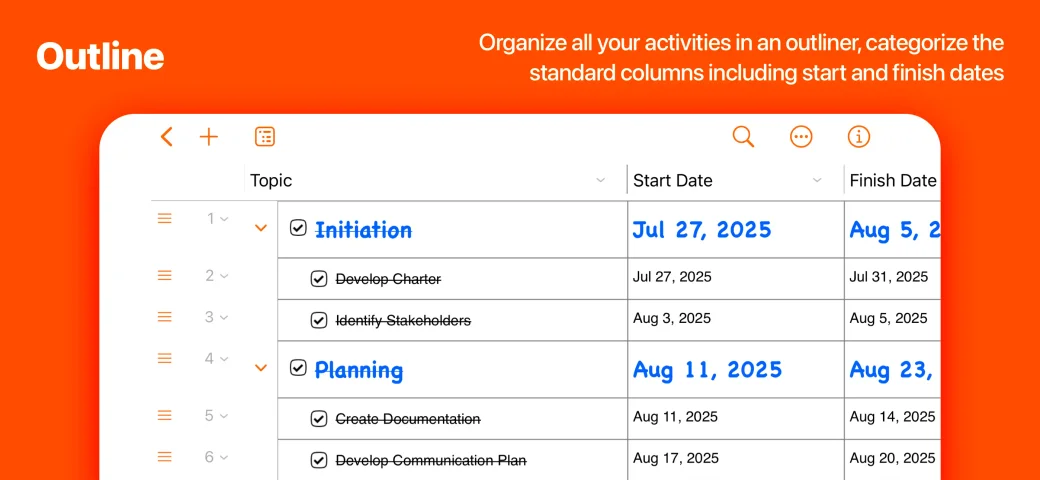
Organize all your activities in an outliner, categorize them using the standard columns including progress, start and finish dates. Create your own date, text, number, symbol or drop down list columns. Auto enter cell values. Link to documents and web sites.
Make a plan:
Plan and visualize your goals, project tasks and schedule in the timeline view. View task duration and sequence. View timeline by days, weeks, months, quarters or years. Create dependencies between rows. View predecessors and successors.
Get things done:
Use filters or focus to concentrate on whats important, due today, due tomorrow, or whatever criteria you decide. View tasks in a month or year calendar or both.
Features:
Outliner with columns:
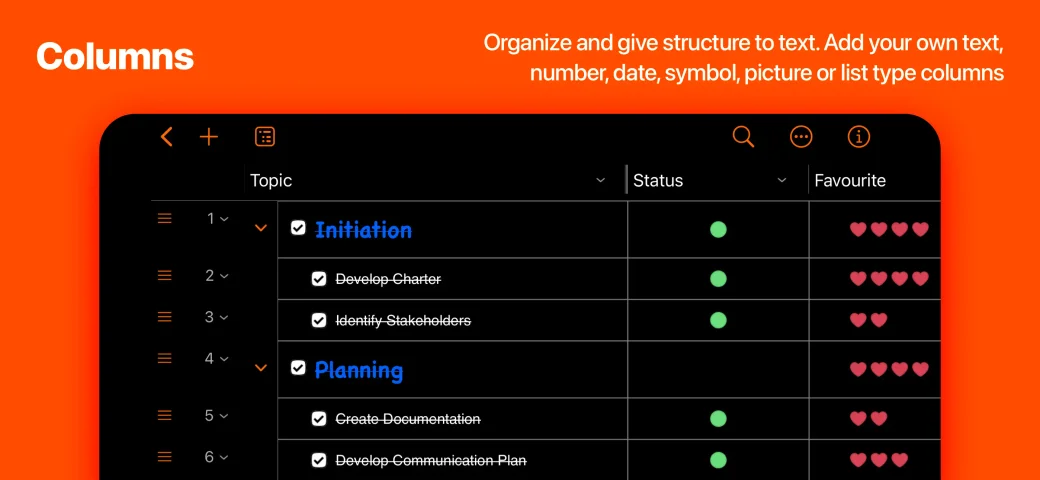
Organize and give structure to text. Add your own text, number, date, symbol or list type columns.
Sync
Syncing via iCloud Drive is now supported. Edit a document on multiple Macs, and the changes will periodically sync.
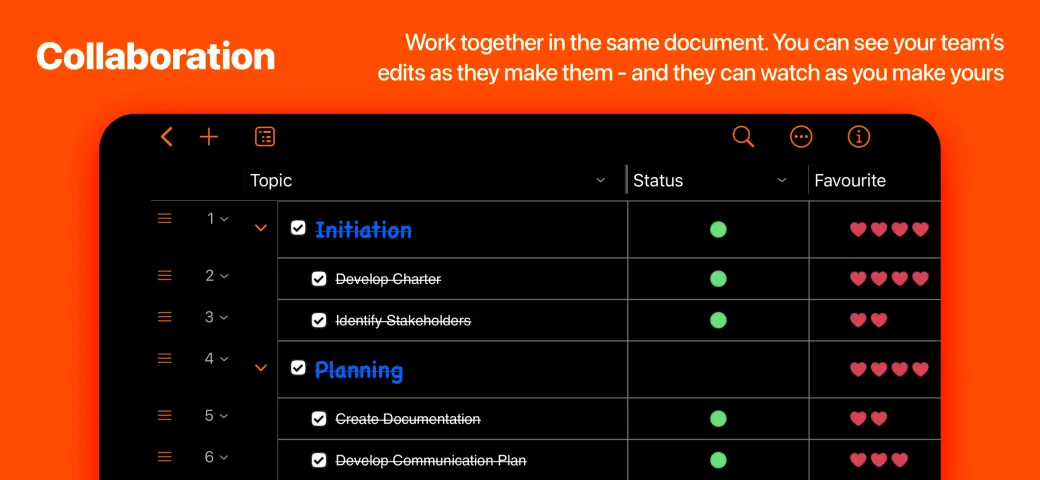
Collaboration
Collaborate with other people. Share a document, and see their changes highlighted, and even their selection.
Notes:
Notes inline below row topic and in own tab with full text editor.
Row Styles:
Custom fonts, size, color at each row level or specific to individual rows.
Focus:
Focus on a row or a row and its children. Transverse hierarchy via path bar.
Search:
Search the outline across columns from the toolbar with an option to save as a Smart Filter.
Sorting:
Sort the outline by any column, by ascending, descending order or by the order of values in a ‘List’ type column.
Smart filters (in-app purchase):
Create Smart Filters with simple or complex criteria and save them for future use via the Filter Bar.
Link files, folders & webpages.
Link to web pages, documents and folders on your Mac or in the cloud, or view them via Quick Look or tabs.
Multiple Tabs:
View sheets in multiple tabs at once in any combination of views: month view, outline, timeline or year view.
Monthly Calendar (in-app purchase):
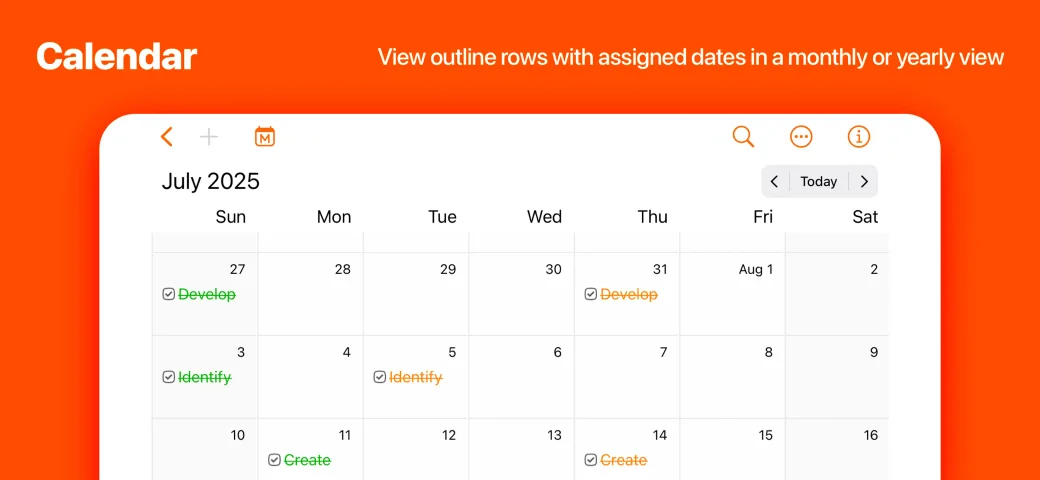
View outline rows with assigned dates in a monthly view.
Yearly Calendar (in-app purchase):
Heat-mapped year view indicating number of activities commencing and/or finishing on each day.
Timeline (in-app purchase):
View and adjust key dates for each task on a horizontal timeline. Create dependencies between rows. Dependencies can be of the following types: Finish to start, start to finish, start to start, finish to finish.
Board View (in-app purchase):
View Outline rows on a board. Organize cards by Topic, column list values, symbol list values, people. Organize by vertical and horizontal lanes. Drag to move cards between lanes.
Multiple Sheets:
A document can now include multiple sheets, each with their own columns, rows, styles, filters, etc. Organize and access multiple sheets using the sidebar and folders.
Printing:
See a preview of what will be printed, including printing the outline and timeline together.
Properties:
Customize cell, column, row, calendar and timeline settings.
Import & Export:
Import & export in CSV or OPML format.
Copy & Paste:
Copy and Paste from/to Excel & Numbers.
Themes:
Personalize Outline view with green-bar, yellow notepad or green notepad themes.
Templates:
Ready to go templates for business, education and personal use. Save templates for future use via the template chooser.
新機能
バージョン 5.3.1 · 2026/5/1
- Fixed Button cells not fitting larger title fonts.
- Made the pinned row indicator larger.
- Fixed an iPad crash that could occur when changing the sidebar display mode with split view gestures or buttons.
- Added the completed display mode options to the iPhone More Actions menu.
- Fixed the Image theme losing its selected background image when an iCloud Drive sync replaced the local document package.
- Fixed the Topic column width resetting when reloading the Outline, and increased the maximum column width (remember, column widths can be changed via pinching in the column header).
- Fixed the Resize to Fit Content column menu command not being available for the Topic column.
- Fixed indenting or outdenting multiple selected rows when the selection includes both parents and their children.
- Fixed rows completed on previous days remaining visible when they shouldn't be after a document is left open overnight.
アプリのプライバシー
このアプリのデータの取り扱いについて、がApp Storeで申告している内容です。
-
ユーザーに関連付けられたデータ
収集され、ユーザーの識別情報に関連付けられる場合があります。
- 連絡先情報
プライバシーの取り扱いは、ご利用の機能やお客様の年齢などに応じて異なる場合があります。
情報
- 販売元
- SheetPlanner Software LLC
- カテゴリ
- 仕事効率化
- バージョン
- 5.3.1
- 更新日
- 2026/5/1
- リリース
- 2018/11/26
- サイズ
- 54.7 MB
- 必要条件
- iOS 17.0以降
- 対象年齢
- 17+
- 価格
- 無料
- アプリ内課金
- あり
- 言語
- 英語
- 著作権
- © 2018-2026 SheetPlanner Software LLC
こちらもおすすめ
-
 ByDesign: ToDoリスト&カレンダー毎日のプランナー・タスク・習慣化
-
 Templates for Numbers - DesiGNスプレッドシート、請求書、グラフ
-
 OmniPlan 4パワフルなプロジェクト管理
-
 SunTable-スプレッドシートの作成と分析スプレッドシートメーカー
-
 Tasks - ToDoリスト・リマインダーカンバン・プロジェクト管理
-
 Project Plan 365仕事効率化
-
 Utility Spreadsheet仕事効率化
-
 Akiflow: AIプランナー&カレンダータイムブロッキングとToDoリスト
-
 MindNode: Mind Map & Outlineアイデア出し&整理計画
-
 エクセル スプレッドシート SpreadsheetExcelやPDFへの書き出し sheets