- 対象年齢17+
- カテゴリ仕事効率化
- 開発元Ali Abidi
- 言語英語
- サイズ23.5 MB
App Storeの公式ページにリンクしています
Download.orgはSift & Rememberのファイルを一切ホストしていません。ボタンを押すと、Ali Abidiが公開しているApp Storeのアプリページが開きます。ページの最終確認:2026/11/23。
スクリーンショット



概要
開発元はこのテキストをお使いの言語で提供していません。
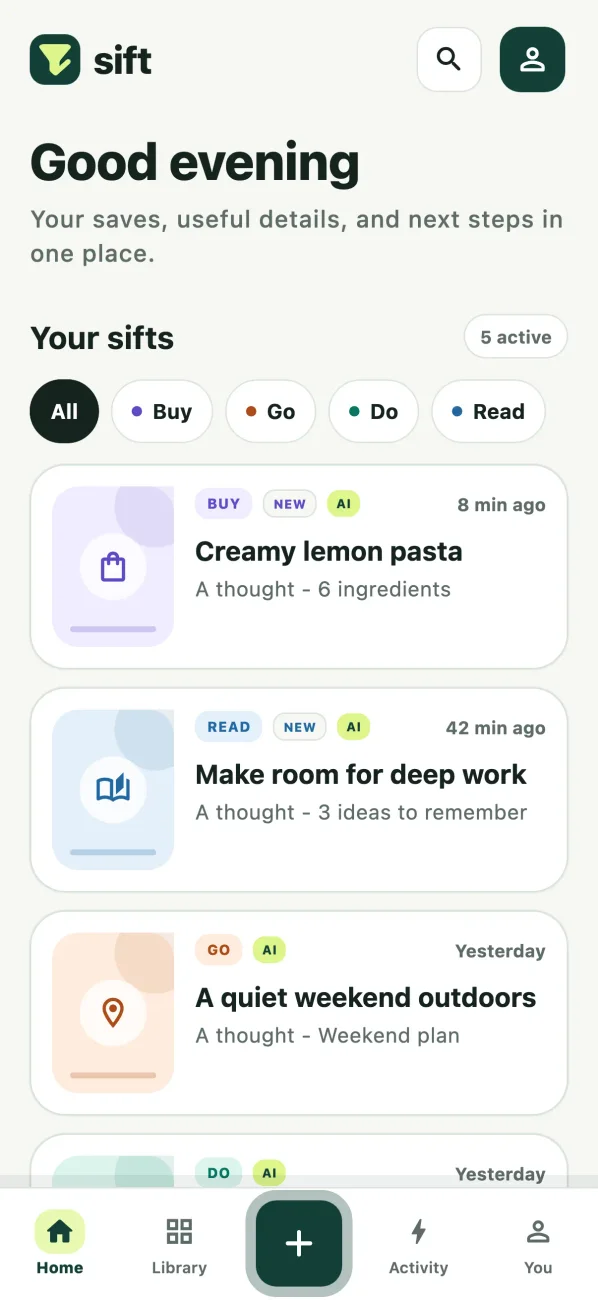
Save links to read later, keep screenshots with context, and organize notes and ideas in one place.
Sift & Remember is a bookmark manager and personal organizer for the things you want to come back to: recipes to try, places to visit, shopping ideas, useful articles and everyday thoughts. For adults aged 18 and older.
SAVE THE THING. REMEMBER WHY.
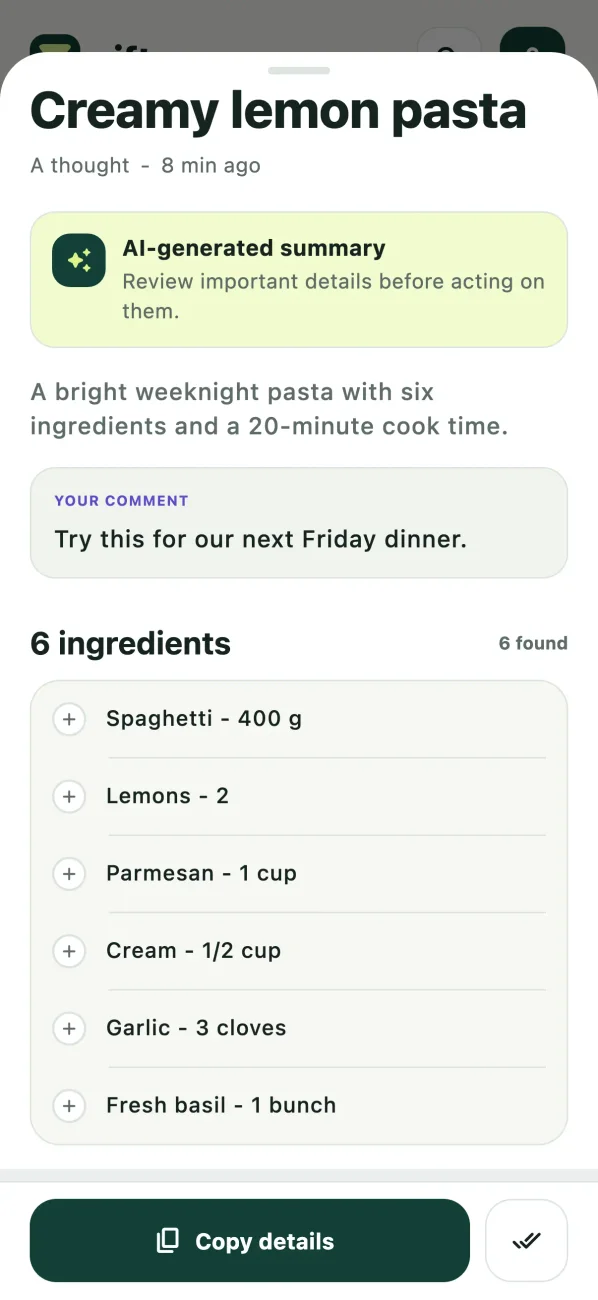
- Paste a link and add a comment about why it matters.
- Keep a screenshot in your local library, with optional typed or pasted text.
- Capture a short thought before you forget it.
- Search your saves and browse Buy, Go, Do and Read collections.
- Mark items done and use undo when you need it.
MAKE EVERY SAVE USEFUL
Planning dinner? Keep a recipe link and your own notes. Comparing a purchase? Save the options with a comment. Planning a day out? Collect places you want to visit. Building a reading list? Keep articles until you have time. Sift gives these small intentions a home, so useful finds do not get lost among tabs and screenshots. Revisit your library, decide what matters next, and mark it done.
OPTIONAL AI, WITH YOUR PERMISSION
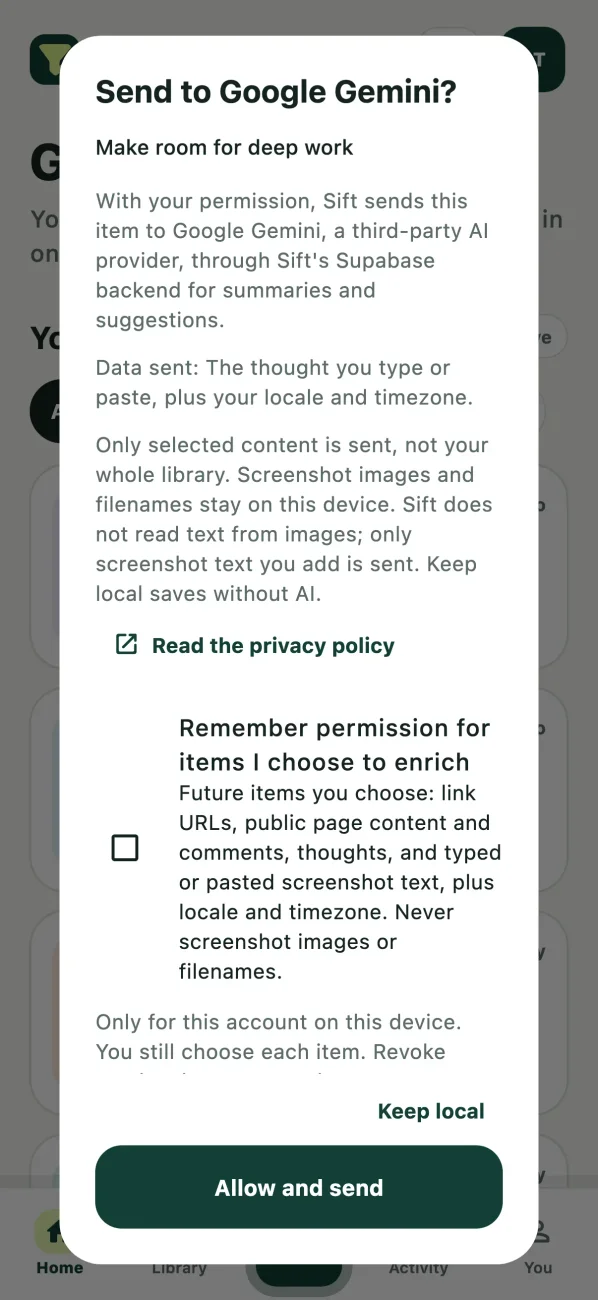
Choose AI for a useful title, summary, category and key details. Before sending, Sift names Google Gemini and its Supabase backend and explains the selected data shared: a link URL, public page content and your comment; a thought; or screenshot text you type or paste, plus your locale and timezone.
AI starts off for every new save. Choose Continue with AI to review permission, then Allow and send or Keep local. You can optionally remember permission for future items you choose on this account and device; that skips repeat prompts, not your choice of each item. Reset permission in You > AI privacy. Updated disclosures require a fresh choice.
Screenshot images and filenames stay on your device. Sift does not scan your photo library or read text from images. Only screenshot text you type or paste is eligible for AI. AI can make mistakes and cannot read every website. Review results before relying on them.
REDISCOVER YOUR SAVES
Opt in to a weekend snapshot notification, scheduled for Saturday at 9:00 AM in your device timezone. See a local count of active saves across your collections. Notification permission and device settings affect delivery.
14-DAY FREE ACCESS
Eligible verified-email accounts can choose one 14-day free-access period with unlimited saves and 20 successful AI enrichments total. No card or Apple purchase is required. Free access ends without a charge, does not renew, and never starts a paid subscription. Continuing afterward requires a separate purchase.
SEPARATE PAID APPLE SUBSCRIPTIONS
Monthly and yearly Sift Pro subscriptions include unlimited saves and 200 successful AI enrichments per UTC calendar month while active. Review your localized price, billing period and renewal terms beside the purchase button.
Payment is charged to your Apple Account when you confirm a purchase, including during free access; it does not wait until free access ends. No free period is included with this purchase. Paid subscriptions automatically renew at the displayed price for the selected period unless canceled at least 24 hours before the current period ends. Manage or cancel in your Apple subscription settings.
New saves require a signed-in account, active free access or a paid subscription, and an online access check, even with AI off. AI also requires internet access, available allowance and a supported service region. Usage and request-rate limits apply.
After access ends, you can still view, search and delete existing saves. Your library stays on this device; signing in does not provide cloud sync or backup. Keep separate copies of important content.
INPUT LIMITS
- Screenshots: up to 5 MB each.
- Thoughts and screenshot text: up to 300 characters.
- Screenshot text for AI: at least 3 characters.
Support: hello@solvvit.com
Privacy: https://mindgameapps.com/apps/sift/privacy/
Terms: https://mindgameapps.com/apps/sift/terms/
新機能
バージョン 1.0.2 · 2026/11/22
Turn saved ideas into things you do.
• Set “Bring this back” reminders for saved items, with options to change, remove or snooze them.
• Try a sample recipe reminder before creating an account.
• Keep ingredient checkmarks on this device and see how many are checked.
• Share a web link from Safari to Sift, then finish saving it in the app with an optional reminder.
• A simpler email-code sign-in and clearly separate 14-day free-access confirmation.
Your existing saves and subscription plans are unchanged.
アプリのプライバシー
このアプリのデータの取り扱いについて、Ali AbidiがApp Storeで申告している内容です。
-
ユーザーに関連付けられたデータ
収集され、ユーザーの識別情報に関連付けられる場合があります。
- 購入
- 位置情報
- 連絡先情報
- ユーザーコンテンツ
- 閲覧履歴
- ID
- 使用状況データ
- 診断
- その他のデータ
プライバシーの取り扱いは、ご利用の機能やお客様の年齢などに応じて異なる場合があります。
情報
- 販売元
- Ali Abidi
- カテゴリ
- 仕事効率化
- バージョン
- 1.0.2
- 更新日
- 2026/11/22
- リリース
- 2026/10/18
- サイズ
- 23.5 MB
- 必要条件
- iOS 15.0以降
- 対象年齢
- 17+
- 価格
- 無料
- アプリ内課金
- あり
- 言語
- 英語
- 著作権
- © 2026 Ali Abidi