
Smart Arrow Project Manager
Project, Resource & Time Mgmt.
iPhone, iPad向けに設計
無料 · アプリ内課金
- 対象年齢4+
- カテゴリ仕事効率化
- 開発元Nelson Rios
- 言語英語
- サイズ9.0 MB
App Storeの公式ページにリンクしています
Download.orgはSmart Arrow Project Managerのファイルを一切ホストしていません。ボタンを押すと、Nelson Riosが公開しているApp Storeのアプリページが開きます。ページの最終確認:2026/11/17。
スクリーンショット

概要
開発元はこのテキストをお使いの言語で提供していません。
The Project & Resource Management features implement the following project planning & tracking workflow:
a) Project Planning - Create project providing its planning data: start date, duration, finish date, effort and cost.
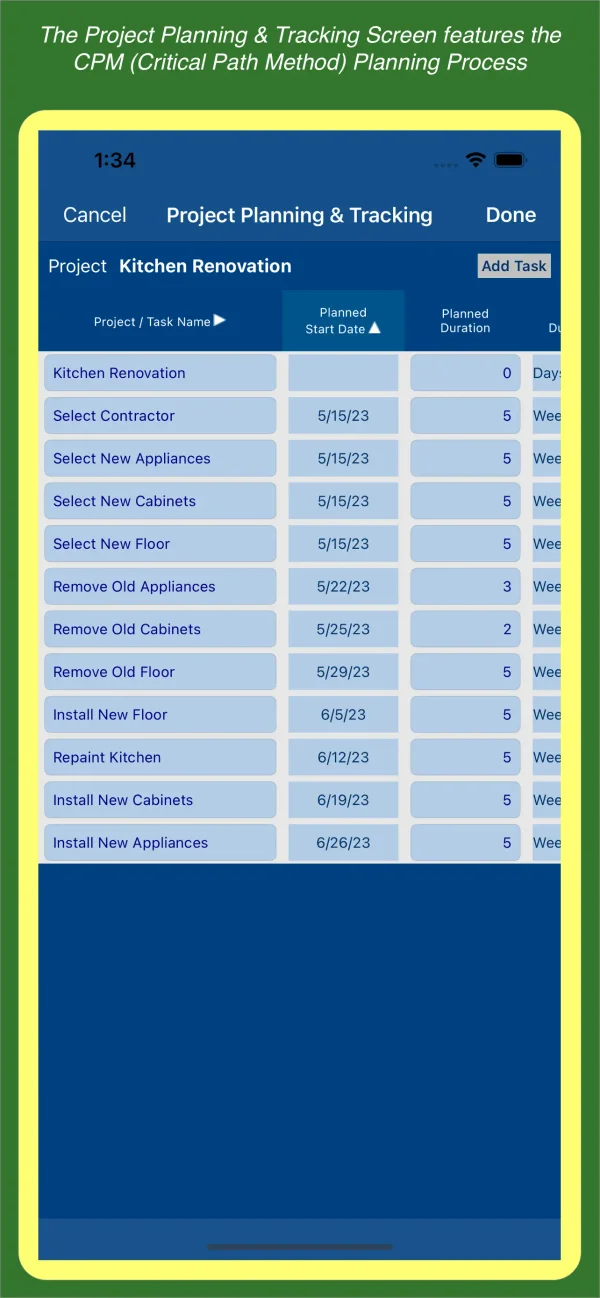
b) Task Planning - Using CPM (Critical Path Method)
b.1) Tasks Without Predecessors - Add tasks providing their planning data: start date, duration, finish date, effort and cost.
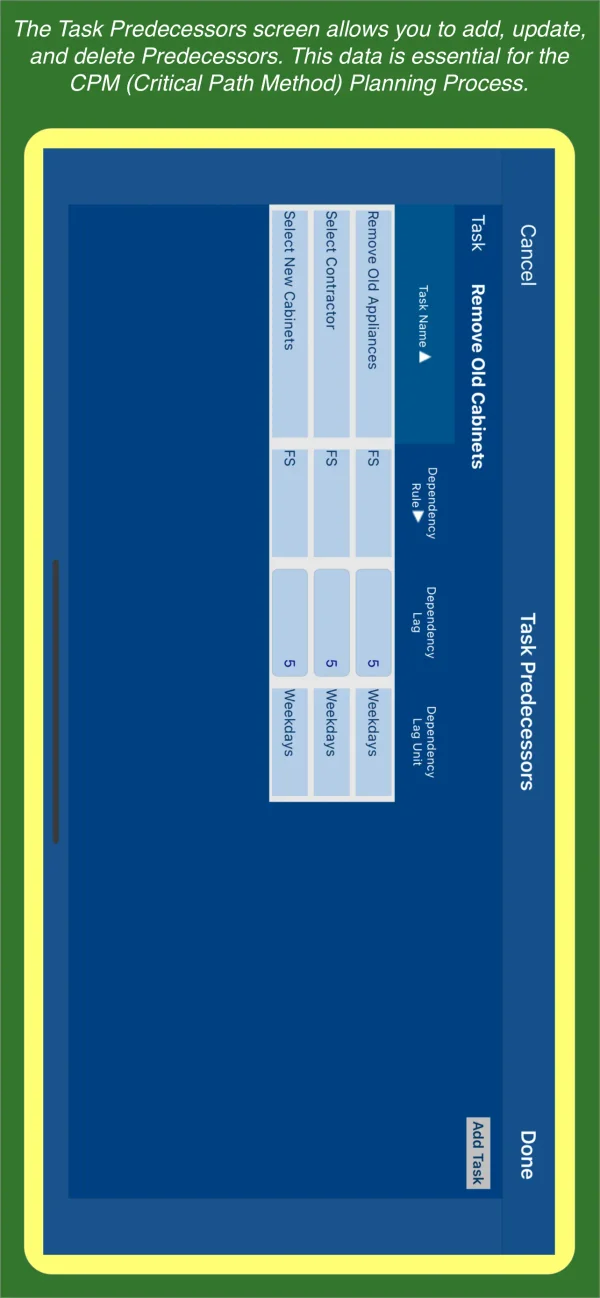
b.2) Tasks With Predecessors - Add tasks providing their planning data: duration, predecessors, effort and cost. CPM calculates task planned start & finish dates.
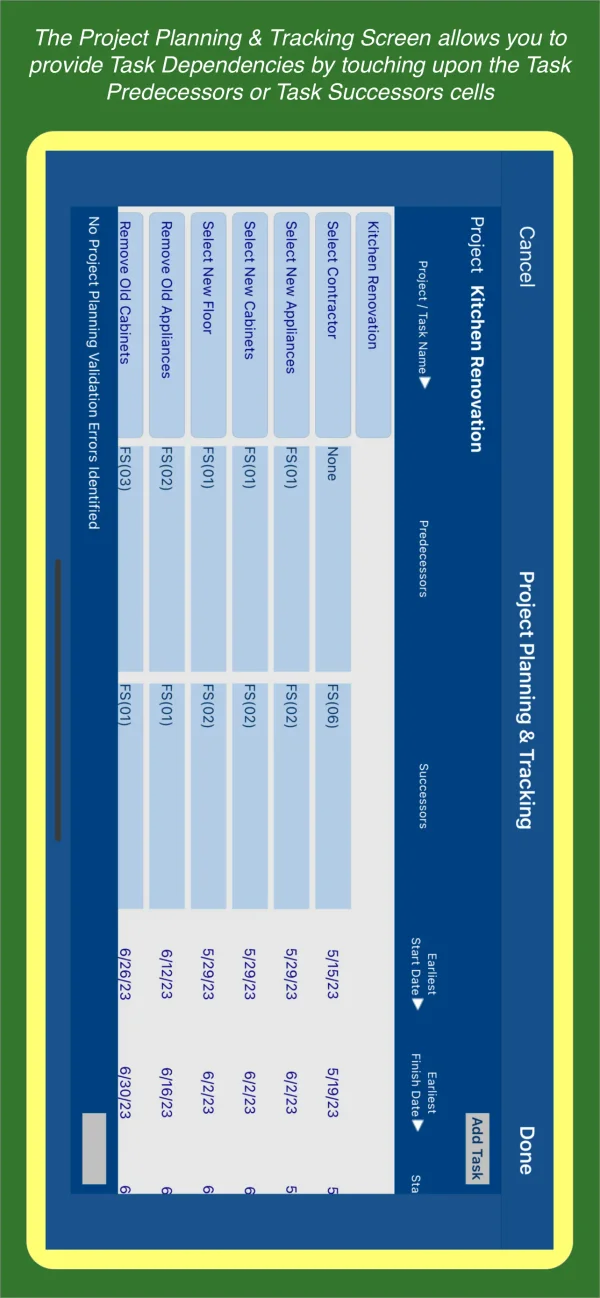
b.3) All Tasks - CPM calculates task planning data: earliest start & finish dates, latest start & finish dates, and total & free floats.
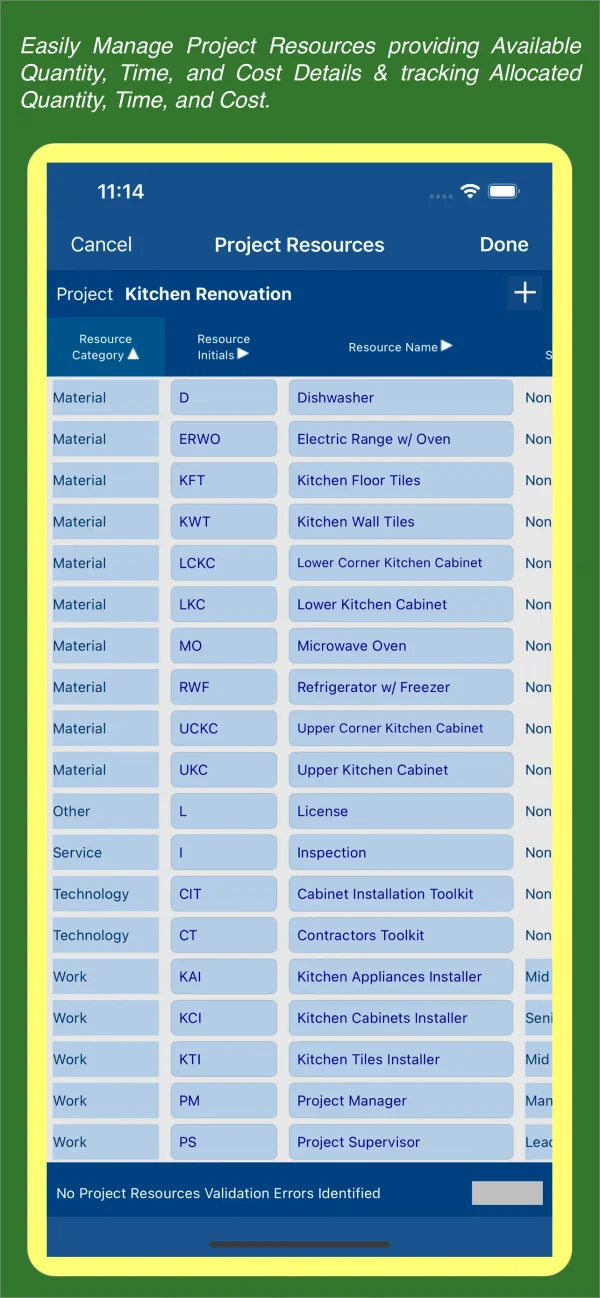
c) Resource Planning Screen & Chart - Add project resources providing resource identification, category, availability, and cost details.
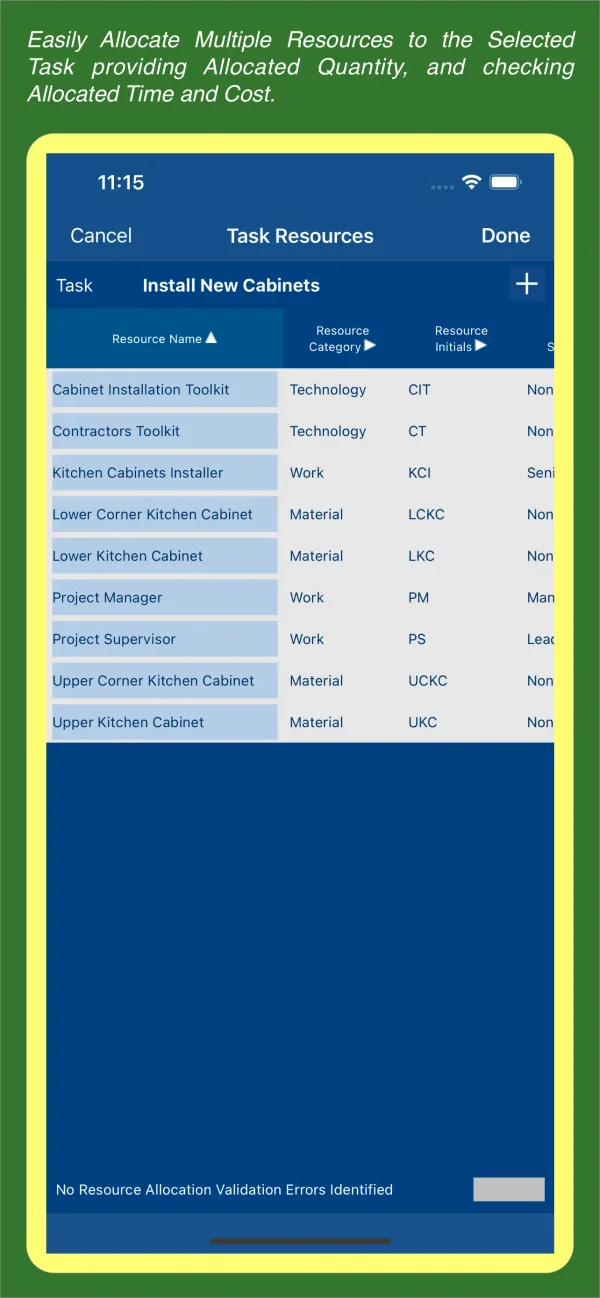
d) Resource Allocation - Allocate project resources to tasks providing allocated quantity, and allocated daily hours.
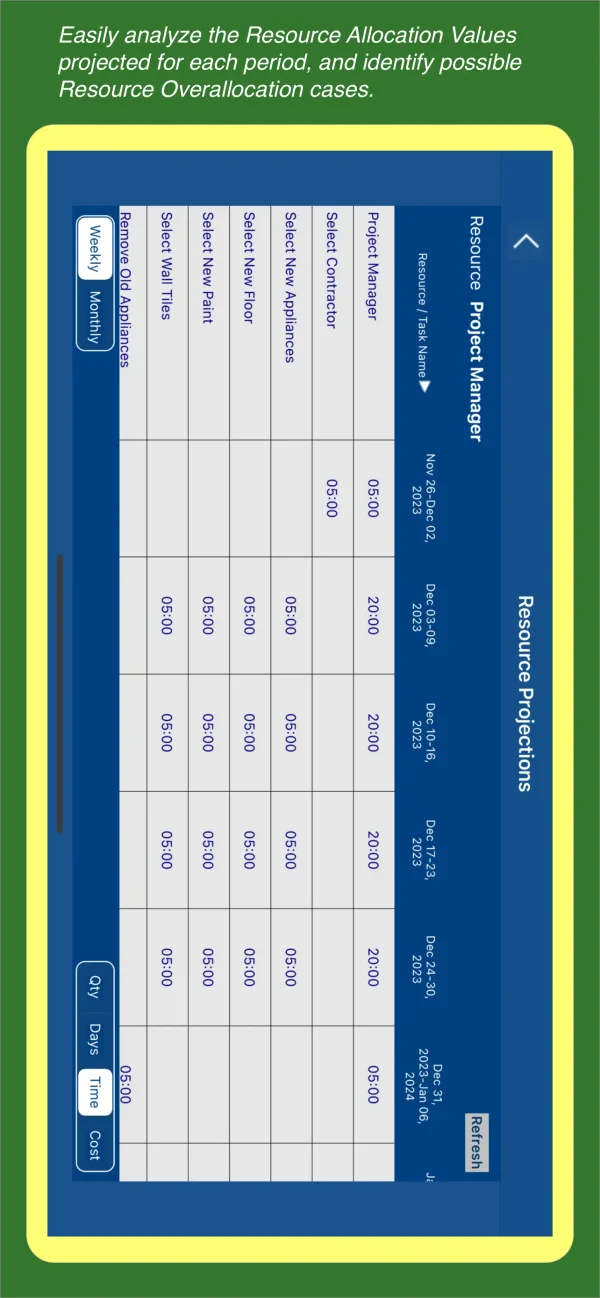
e) Resource Projections Screen & Chart - Evaluate resource and task level allocation values projected for weekly & monthly periods.
f) Project Cost Projections Screen & Chart - Evaluate project, resource category, and resource level costs projected for weekly & monthly periods.
g) Task Tracking - Track task execution providing actual start & end dates, actual effort & effort to complete, and actual cost & cost to complete.
h) Project Tracking - Analyze project execution data: actual start & end dates, actual effort & effort to complete, and actual cost & cost to complete.
h.1) The "Project Planning & Tracking" screen provides project & task effort & cost based progress indicators.
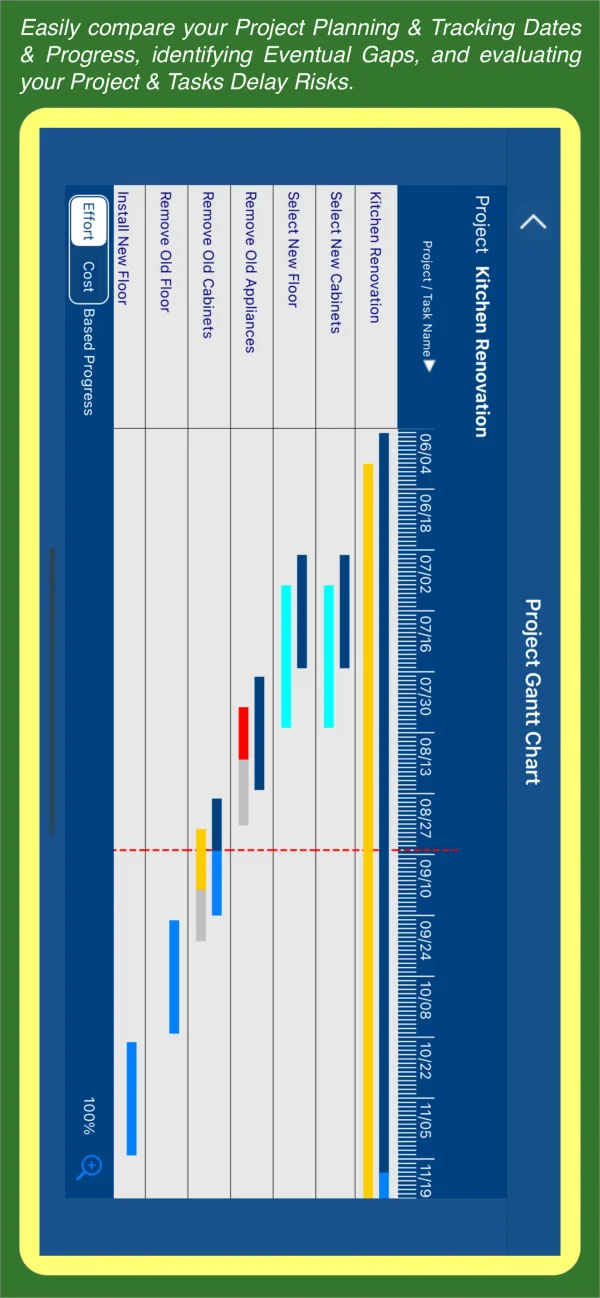
h.2) The "Project Gantt Chart" screen highlights project & task planning & tracking dates, progress, and delay risks.
The Time Tracking feature allows you to track the time spent on your project tasks
a) The Time Tracking Dashboard screen allows you to automatically track the time spent on your project tasks.
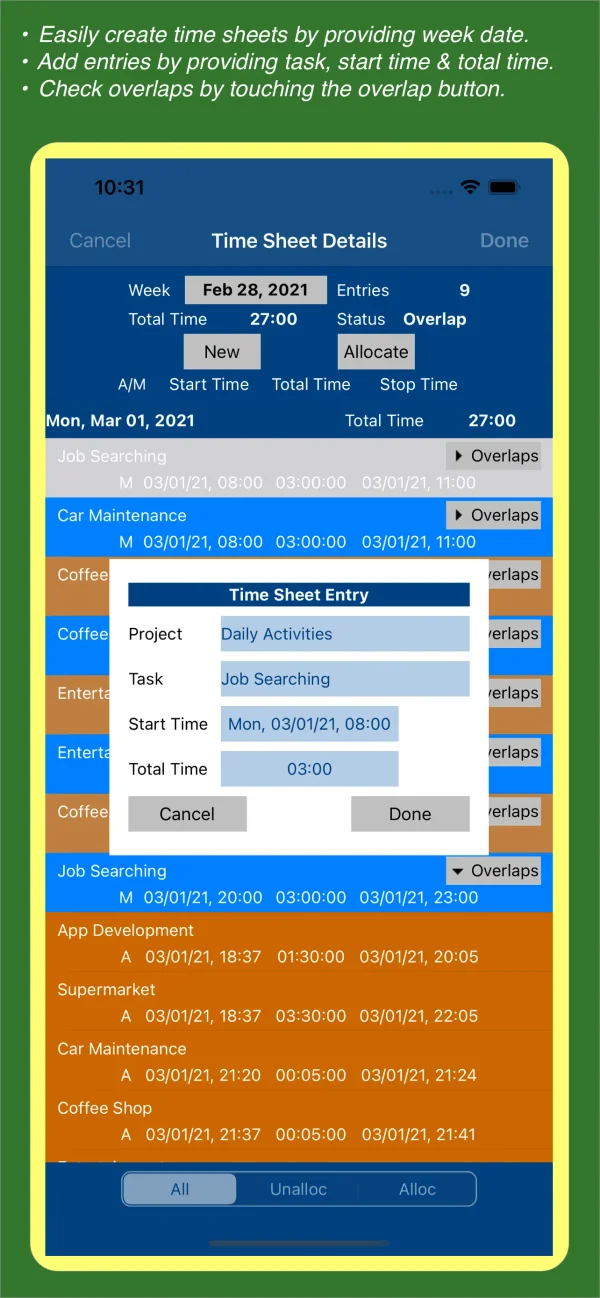
b) The Time Sheet Details screen allows you to manually track the time spent on your project tasks.
c) The Time Tracking Report & Chart provide the daily, weekly, and monthly total times spent on your projects & tasks.
d) The Task Timer screen allows you to automatically track the time spent on one particular project task.
e) The Task Time Split screen allows you to split one particular task time record into two records.
f) The Task Time Transfer screen allows you to transfer one particular task time record from one task to another.
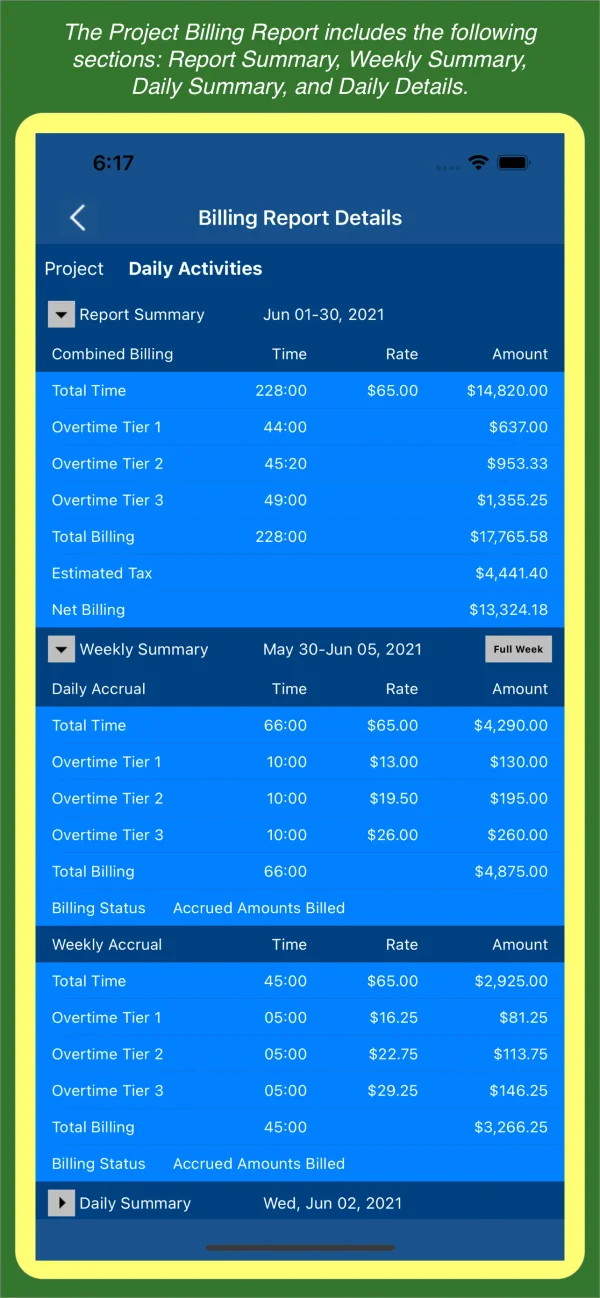
The Project Billing Feature allows you to configure project & task billing settings, and create & export project billing reports.
a) The Project Billing Settings screen allows you to configure several project billing parameters such as regular time rate and daily & weekly overtime rates & limits.
b) The Project Planning & Tracking screen includes the "Billable" switch, which allows you to identify which project tasks should be billed.
c) The Billing Report Details screen provides a multi-level billing report encompassing the Report Summary, Weekly Summary, Daily Summary, and Daily Details sections.
d) The Billing Report Export button allows you to export billing reports with different levels of granularity.
The To Do Lists feature allows you to create and track Project & Task Level To Dos.
Smart Arrow Project Manager® supports iCloud connectivity ensuring that local database changes are uploaded to the iCloud database, and synchronized with your iPhone & iPad devices.
The Standard App provides the following features: Project Management using Critical Path Method, Time Tracking, and To Do Lists.
The "Premium" Subscription Plans provide the following features: Resource Management, Manual Time Sheets, and Project Billing.
The "Premium Plus" Subscription Plans provide the following features: Resource Management, Manual Time Sheets, Project Billing, Amazing Charts, and Family Sharing.
Terms of Use (EULA): https://www.apple.com/legal/internet-services/itunes/dev/stdeula/
新機能
バージョン 9.5 · 2026/9/27
What's New in Version 9.5
===================
Project Planning & Tracking Screen
-----------------------------------
Fixed Function that calculates Free Float for the following Dependency Rules:
* SF - Start-to-Finish
* FF - Finish-to-Finish
Fixed Function that calculates Finish Date based upon Start Date, Duration, and Duration Unit when Duration Unit is "Weekday".
Fixed Function that calculates Start Date based upon Finish Date, Duration, and Duration Unit when Duration Unit is "Weekday".
Project Gantt Chart Screen
---------------------------
Fixed function that draws the "Task Planned Progress Time" and "Task Planned Remaining Time" Bars when the following condition occurs:
* Task Planned Start Date = Task Planned Progress Date
What's New in Version 9.4
===================
Project Planning & Tracking Screen (Enhancements)
----------------------------------------------------
* Improved the Project & Task Planning & Tracking Dates Validation Process to ensure full consistency across all Project & Task Records.
* All errors identified are listed in the Screen Footer Section and the associated Project & Task Date Cells are highlighted in the screen grid.
Task Predecessors & Task Successors Screens (Enhancements)
----------------------------------------------------------------
Implemented Non-Intrusive Task Dependency Validation Process as described below:
* The Task Dependency Errors identified are listed in the Screen Footer Section.
* The Task Dependency Cells with Critical Errors are highlighted with Red Color Border.
* The Task Dependency Cells with Non-Critical Errors are highlighted with Yellow Color Border.
Improved Task Dependency Validation Logic as follows:
* Task Dependency Records having Incomplete Information are flagged as Critical Errors.
* Task Dependency Records having Cyclical Dependency are flagged as Critical Errors.
* Task Dependency Records having Redundant Dependency are flagged as Non-Critical Errors.
Improved Task Dependency Errors User Review Logic as follows:
* Users must review and clear all Critical Task Dependency Errors identified.
* Users can either review and clear the Non-Critical Task Dependency Errors identified or just accept them by confirming the latest updates.
アプリのプライバシー
このアプリのデータの取り扱いについて、Nelson RiosがApp Storeで申告している内容です。
-
データの収集なし
開発元はこのアプリからデータを収集しません。
プライバシーの取り扱いは、ご利用の機能やお客様の年齢などに応じて異なる場合があります。
情報
- 販売元
- Nelson Rios
- カテゴリ
- 仕事効率化
- バージョン
- 9.5
- 更新日
- 2026/9/27
- リリース
- 2020/7/15
- サイズ
- 9.0 MB
- 必要条件
- iOS 18.6以降
- 対象年齢
- 4+
- 価格
- 無料
- アプリ内課金
- あり
- 言語
- 英語
- 著作権
- © Nelson Rios
こちらもおすすめ
-
 Paymo Project Management仕事効率化
-
 TeamGantt仕事効率化
-
 Project Plan 365仕事効率化
-
 OmniPlan 4パワフルなプロジェクト管理
-
 MeisterTask - Task Management仕事効率化
-
 ATracker - デイリータスクトラッキング時間管理・毎日の習慣・目標・ルーチン
-
 ToDoリスト - リマインダーとタスク管理チェックリストウィジェット&カレンダーで、やることや予定を忘れずリマインド
-
 Agenda:ノートとカレンダーの融合日付で管理するノート
-
 タイムスケジュール, デイリープランナー: Briteリスト、タスク管理、リマインダー
-
 PDF Reader: Edit & OCR Scan仕事効率化