
- 対象年齢4+
- カテゴリファイナンス
- 開発元JAMES ROSS HAILSTONES
- 言語英語
- サイズ28.9 MB
App Storeの公式ページにリンクしています
Download.orgはSpondooliesのファイルを一切ホストしていません。ボタンを押すと、JAMES ROSS HAILSTONESが公開しているApp Storeのアプリページが開きます。ページの最終確認:2026/11/20。
スクリーンショット




概要
開発元はこのテキストをお使いの言語で提供していません。
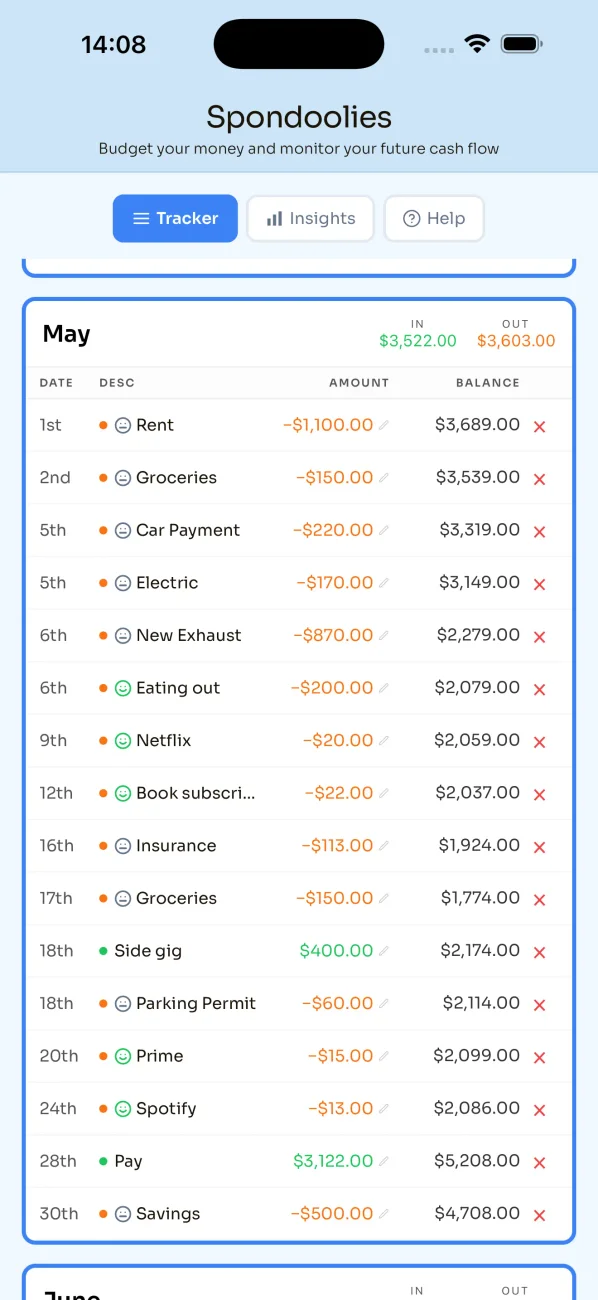
Spondoolies is a simple budgeting and cash flow tracker designed to give you a clear, month-by-month picture of your finances. No bank connections, no complicated setup.
You set an opening bank balance, add your expected income and outgoings across the months ahead, and the app builds a running balance that shows you exactly what your bank account should look like at any point in the year. Add regular commitments like rent, salary, subscriptions and bills, and you’ll quickly see at a glance whether you’re on track — or where you might need to make changes.
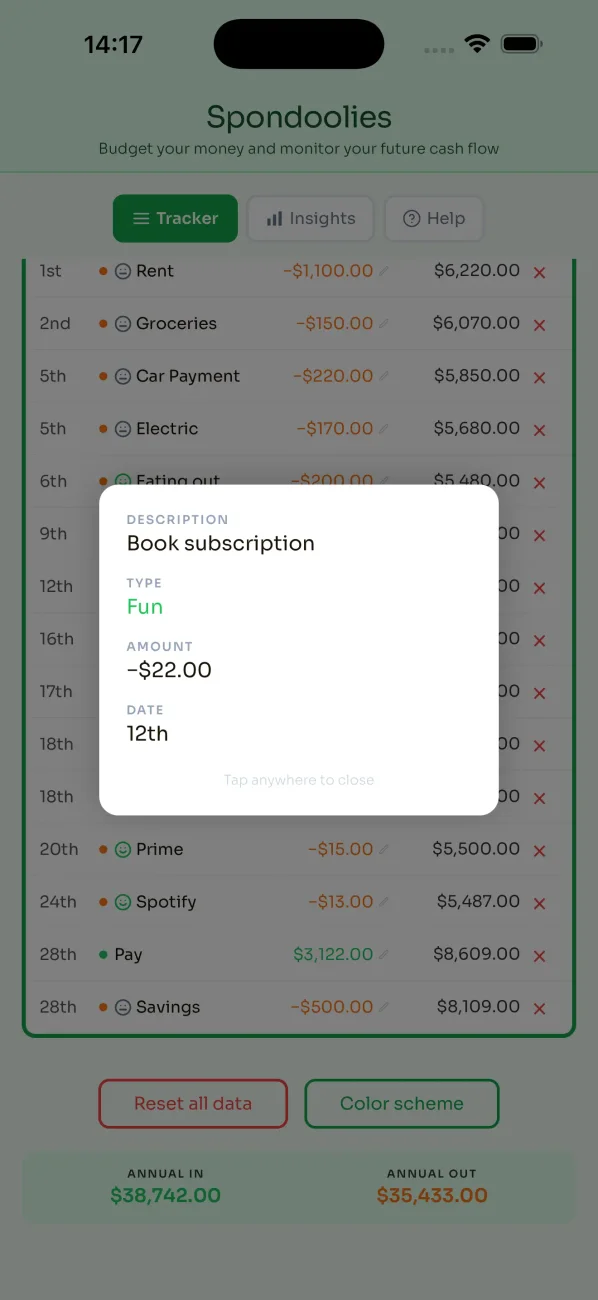
The Tracker page is the heart of the app. It displays a scrollable set of month cards — one for each month of your year — each showing every transaction you’ve added alongside a running balance column that updates with every entry.
Start by setting your opening bank balance. Everything else flows from this number.
Adding Transactions; use the Add Transaction form at the top of the page. Each transaction has four fields — Category, Month, Date and Amount. Choose from:
Funds In — money coming in, such as salary or transfers
Funds Out — money going out, such as rent or subscriptions
Balance Update — corrects the running balance to match your actual bank balance at a point in time
Select All Months to add a recurring transaction to every future month from today — ideal for regular salary or rent entries. For Funds Out transactions, tag the type as Essential (bills, groceries) or Fun (eating out, entertainment). These tags feed directly into the Essential vs Fun charts in Insights.
After adding a transaction, an undo button appears so you can immediately remove it if you made a mistake.
Balance Update; rather than entering every small unplanned purchase, periodically add a Balance Update set to your actual bank balance. The running balance adjusts from that point forward.
Every transaction updates the running balance column in real time. The balance carries forward from month to month, so you can see exactly what your balance should be on any date across the whole year. This makes it easy to spot months where money gets tight, and to plan ahead by adjusting spending or income accordingly.
Swipe left from the Tracker page or tap Insights to access a suite of charts and summaries built from your transaction data:
Annual Summary: Total Funds In and Funds Out for the year at a glance.
Income vs Spending:A line chart plotting monthly income (green) and spending (orange) side by side. Easily see which months you’re spending more than you’re earning, and where there’s healthy headroom.
Running Balance
A two-line chart showing the highest (blue) and lowest (pink) balance within each month, so you can see mid-month dips even if you end the month in credit. On months with a single transaction, the two lines sit exactly on top of each other.
All Spending Breakdown
Two donut charts breaking down your Funds Out by description — one for the full year, one for spending to date. Tap any slice for the exact amount. Items beyond the top five are grouped into ‘The Rest’ — tap to see the full breakdown.
Essential vs Fun
Two donut charts showing the split between your Essential and Fun tagged spending, with a breakdown by description inside each category.
Colour Schemes; personalise the look of the app with six built-in colour schemes. Tap the Color scheme button at the bottom of the Tracker page to choose
Free Version and Unlock; the free version shows your current and next month. Unlock the full 12-month view for a nominal amount per year. After subscribing, choose which month your financial year starts from. Your subscription status is preserved if you reset your data.
Resetting Data; tap the Reset all data button at the bottom of the Tracker page to start fresh. You’ll be asked to confirm before anything is deleted. Subscribers are given the choice of which month to start the new year from.
Terms of Use: https://www.apple.com/legal/internet-services/itunes/dev/stdeula/
アプリのプライバシー
このアプリのデータの取り扱いについて、JAMES ROSS HAILSTONESがApp Storeで申告している内容です。
-
データの収集なし
開発元はこのアプリからデータを収集しません。
プライバシーの取り扱いは、ご利用の機能やお客様の年齢などに応じて異なる場合があります。
情報
- 販売元
- JAMES ROSS HAILSTONES
- カテゴリ
- ファイナンス
- バージョン
- 1.0
- 更新日
- 2026/4/6
- リリース
- 2026/4/6
- サイズ
- 28.9 MB
- 必要条件
- iOS 15.1以降
- 対象年齢
- 4+
- 価格
- 無料
- アプリ内課金
- あり
- 言語
- 英語
- 著作権
- © 2026 James Hailstones
こちらもおすすめ
-
 PayTracker Proファイナンス
-
 Paycyl: サブスク管理・固定費・支出&シンプル家計簿クレジットカード支払いカレンダー・トライアル解約リマインダー
-
 Nesti · Budget Plannerファイナンス
-
 Mudal: Money Managerファイナンス
-
 Monthly Budget Planner - Easyファイナンス
-
 Bill Tracker: Simple & Localファイナンス
-
 WalletIN: 予算&支出AIお金の追跡、予算管理、貯金
-
 BIN Checker: Card Validatorファイナンス
-
 Elephant Insurance Mobileファイナンス
-
 Klink: Earn Cash & Rewardsファイナンス