- 対象年齢4+
- カテゴリミュージック
- 開発元Michal Macura
- 言語英語
- サイズ3.1 MB
App Storeの公式ページにリンクしています
Download.orgはsqsl Circleのファイルを一切ホストしていません。ボタンを押すと、Michal Macuraが公開しているApp Storeのアプリページが開きます。ページの最終確認:2026/11/18。
スクリーンショット


概要
開発元はこのテキストをお使いの言語で提供していません。
Geometry-based MIDI sequencer/controller.
Concept:
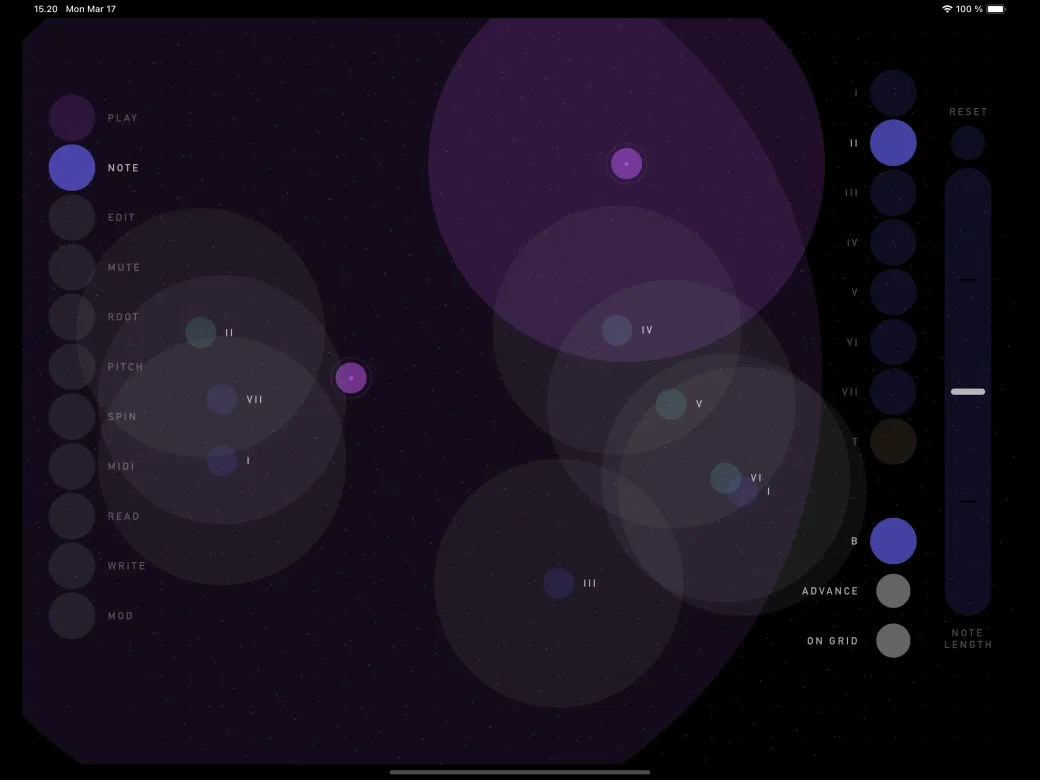
Place triggers on 2-dimensional ”timeplane” (as opposed to triggers placed on linear 1-dimensional timeline in normal sequencers). Place playhead - circular wave expanding through timeplane (as opposed to point-playhead advancing on timeline). When playhead encouters trigger, note is generated.
Rotate timeplane but keep playhead’s origin static - pattern evolves.
Interface: select mode on left side, right side and central part will show options/parameters available.
PLAY (playhead)
- Reach (how far playhead will propagate)
- Length (multiplier for note length)
- Octave transposition
- Divider (affecting speed/rate of playhead’s propagation)
- Channel (midi channel to which resulting notes are sent) or Mute state flip
- Rotate (will rotate Layer A or both layers by preset angle: 360/3, 360/4, 360/8 and 360/12 degrees)
When more that one option is enabled for above parameters, playhead randomly chooses one of them on start (reach, octave, divider) or when it encounters trigger (length, channel).
- Rate (playhead's propagation speed)
- Loop mode is activated by long touch when placing playhead
NOTE (triggers)
- Type I-VII (each type can have a specific pitch assigned)
- Type T (immediately restarts playhead that reached it)
- B layer (blue color)
- Note length
- Select type before placing trigger or use ADVANCE to automatically select next type after placement (type T excluded)
- Velocity is calculated based on trigger's distance from playhead
EDIT
- Clock parameter affecting timing of all elements
- Global MIDI channel offset
- Reposition existing playheads or triggers (touch and drag)
- Select playhead or trigger and edit playhead/trigger parameters
MUTE
- Mute/unmute individual triggers
- Unmute all triggers
- Ignore T triggers
ROOT
- Pitch origin from which type I and all the following types are calculated (transposes all types when changed)
PITCH
- Interval distance from root (for type I) or interval distance from previous type (in octaves and semitones)
- Separate set of 3 columns to set the octave (left) and semitone (right) distance
- First column represents +1 values, second +2 and third +4 (resulting interval is sum of activated columns)
- Scale Mode and Scale Pattern allows to set semitone interval distances to match scales (included patterns are: diatonic, melodic, harmonic major, harmonic minor and "heptonia tertia"). Octave distances are not affected.
SPIN
- Set angle directly for layer A or layer B (blue)
- Set rotation speed for layer A or layer B (blue)
MIDI
- Select current MIDI output
WRITE & READ
- Write current state for later recall
- Optionally read only pitch settings (root and pitch table) or only geometry (triggers and playheads) from presets
- Tap on WRITE when write is already active to enter ERASE mode
MOD
- Modwheel control (CC 1) per channel
Detailed description: https://www.seqsual.com/circle
Questions and feedback: https://www.seqsual.com/contact
Important notes:
- Circle does not make any sounds on its own, it generates MIDI messages (notes).
- Circle was designed for full-size iPads, not recommended to use on iPad Mini.
新機能
バージョン 1.4 · 2025/3/18
- Position of newly created triggers and playheads can be aligned to the grid.
- Looping playheads can step-rotate layers.
アプリのプライバシー
このアプリのデータの取り扱いについて、Michal MacuraがApp Storeで申告している内容です。
-
データの収集なし
開発元はこのアプリからデータを収集しません。
プライバシーの取り扱いは、ご利用の機能やお客様の年齢などに応じて異なる場合があります。
情報
- 販売元
- Michal Macura
- カテゴリ
- ミュージック
- バージョン
- 1.4
- 更新日
- 2025/3/18
- リリース
- 2023/10/4
- サイズ
- 3.1 MB
- 必要条件
- iOS 15.4以降
- 対象年齢
- 4+
- 価格
- ¥3,000
- 言語
- 英語
- 著作権
- © Michal Macura