Skip to content

beaTunes6.0.2 for macOS

Fixes iTunes tags, finds duplicates, and builds playlists by melody

tagtraum industries

Trial · Proprietary

Download 6.0.2 · 441.5 MB
  • Age rating
    0+
    All ages
  • Category
    Business
  • Developer
    tagtraum industries
  • Languages
    1
    English
  • Size
    441.5
    MB

Mac

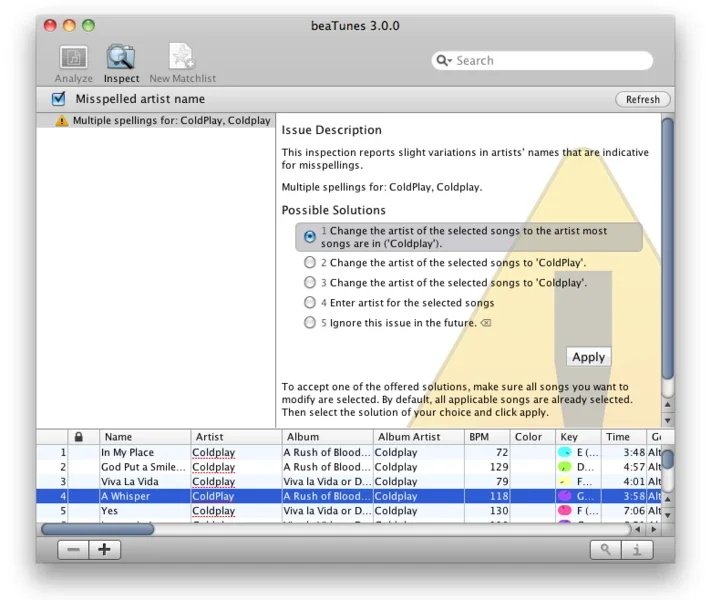
beaTunes can fix incorrect artist, album, or song title names in your iTunes library. It can also find and remove duplicate files.

To build smart playlists modeled on a chosen melody, it first analyzes the whole library. That analysis computes statistics like BPM, key, and tonality for each track and fills in missing metadata, which comes from the MusicIP.com web service. Playlist criteria can include BPM, key, year, or genre. The same analysis lets it detect gaps between tracks that share an album and release year, or share artist and genre.

beaTunes is for Mac and runs as a trial.

[Release notes coming soon]

Version 6.0.2

Verify the file

Compare the SHA-256 of the file you downloaded with the value below. Files exactly as the publisher released them.

  • beatunes-6-0-2.dmg

    6.0.2 · DMG · 441.5 MB

    SHA-256

    01083cf53fbb706b94971d8623764d886bdc9518ed130f9dddcdaf94f5e55640 Check on VirusTotal Get

Files exactly as the publisher released them.

Information

Size
441.5 MB
Category
Business
Compatibility
macOS
Languages
English
Age rating
All ages
License
Proprietary
Price
Trial

Version history

  • [Release notes coming soon]

    6.0.2
  • [Release notes coming soon]

    6.0.1
  • [Release notes coming soon]

    6.0.0
  • [Release notes coming soon]

    5.2.36
  • [Release notes coming soon]

    5.2.35
  • [Release notes coming soon]

    5.2.31
  • [Release notes coming soon]

    5.2.17
  • [Release notes coming soon]

    5.2.12
  • [Release notes coming soon]

    5.2.11
  • [Release notes coming soon]

    5.0.4
  • [Release notes coming soon]

    5.0.1
  • [Release notes coming soon]

    4.6.16
  • [Release notes coming soon]

    4.6.13
  • [Release notes coming soon]

    4.6.12
  • [Release notes coming soon]

    4.6.10
  • [Release notes coming soon]

    4.6.8
  • [Release notes coming soon]

    4.6.5
  • [Release notes coming soon]

    4.6.4
  • [Release notes coming soon]

    4.6.3
  • [Release notes coming soon]

    4.6.2
  • [Release notes coming soon]

    4.6.0
  • [Release notes coming soon]

    4.5.7
  • [Release notes coming soon]

    4.5.6
  • [Release notes coming soon]

    4.5.3
  • [Release notes coming soon]

    4.5.1
  • [Release notes coming soon]

    4.0.23
  • [Release notes coming soon]

    4.0.21
  • [Release notes coming soon]

    4.0.19
  • [Release notes coming soon]

    4.0.11
  • [Release notes coming soon]

    4.0.9
  • [Release notes coming soon]

    4.0.7
  • [Release notes coming soon]

    4.0.6
  • [Release notes coming soon]

    4.0.4
  • [Release notes coming soon]

    3.5.17
  • [Release notes coming soon]

    3.5.9
  • [Release notes coming soon]

    3.5.8
  • [Release notes coming soon]

    3.5.6
  • [Release notes coming soon]

    3.5.4
  • [Release notes coming soon]

    3.5.0
  • [Release notes coming soon]

    3.0.12
  • [Release notes coming soon]

    3.0.10
  • [Release notes coming soon]

    3.0.7
  • [Release notes coming soon]

    2.1.19
  • [Release notes coming soon]

    2.1.1
  • [Release notes coming soon]

    3.0.3
  • [Release notes coming soon]

    3.0.6
  • [Release notes coming soon]

    3.5.16
  • [Release notes coming soon]

    3.0.4
  • [Release notes coming soon]

    5.2.34

All versions ›