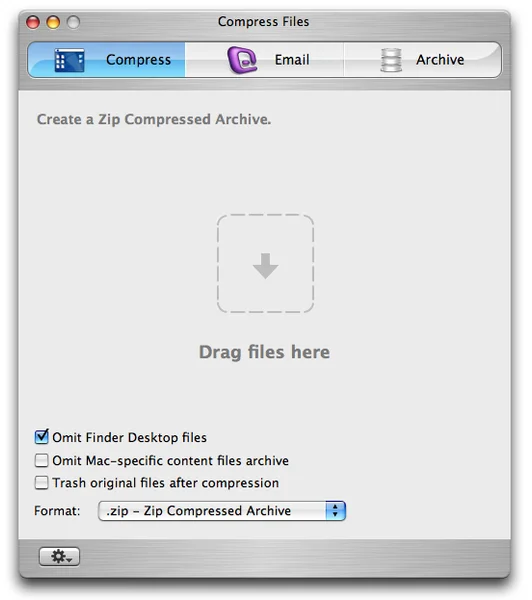
Drag a file into Compress Files and pick one of the three tabs at the top: compress, email or archive. Zip, Tar and 7Zip are the formats it builds, and it can also make Mac DMG images. How long it takes comes down mostly to file size, though it is usually quick.
Sending archives to other systems
For files headed to a PC or a Linux machine, the article advises turning on two checkboxes before you build the archive. One tells it to leave out the Mac-specific content files, the other to skip the Finder desktop files. The resulting archive is smaller, and no .DS_Store files travel with it. Three items sit at the bottom of the interface to check. The progress bar does not clearly show how far compression has got, and the preferences menu holds no extra information. Note that the app does not decompress files.
[Release notes coming soon]
Verify the file
Compare the SHA-256 of the file you downloaded with the value below. Files exactly as the publisher released them.
-
compress-files-3.0.dmg
3.0 · DMG · 3.2 MB
SHA-256
6b864077073ef0fa43513b344613cc4c9bb6ff0c730fb61474c5732f094b53baCheck on VirusTotal Get
Files exactly as the publisher released them.